
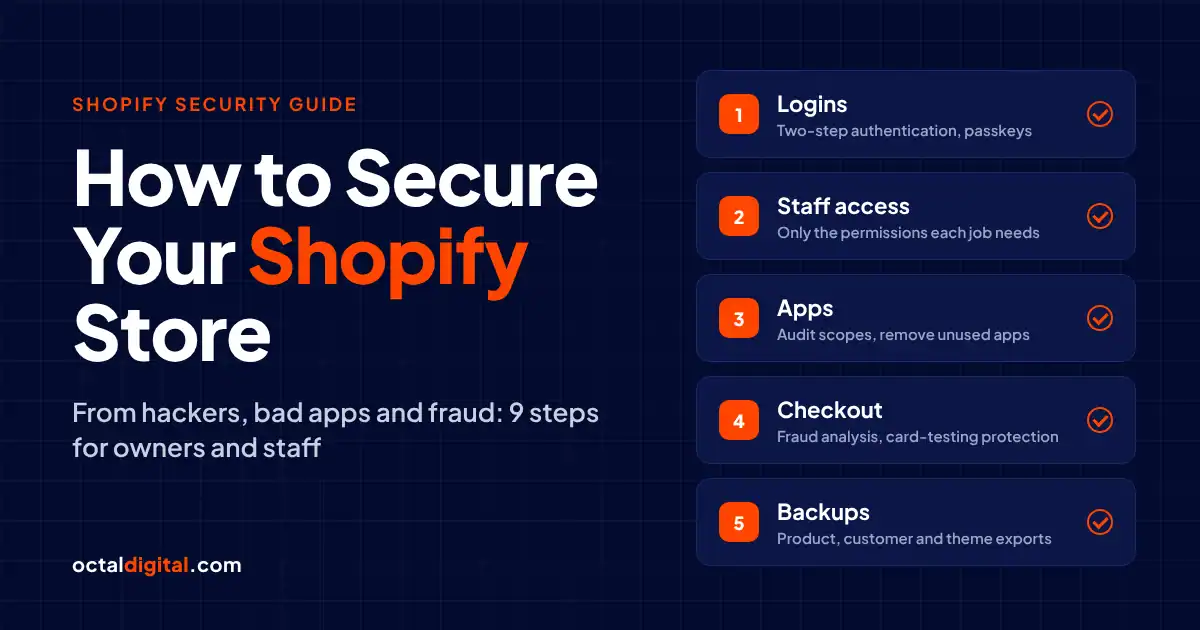
Shopify security represents an ongoing concern for owners, staff, and shoppers around the world. Reports showed that there was a malicious script in several Shopify stores on Oct 13, 2026, after an app’s internal tool was breached. As well as the lost sales caused by a hacked store, there are less visible costs for owners, such as chargebacks and less trust from customers. It’s easy to think that because Shopify is safe, only big brands get hacked, but in fact, the risk is real for stores of every size. There are simply far too many logins and apps to ignore the risks.
Key Takeaways
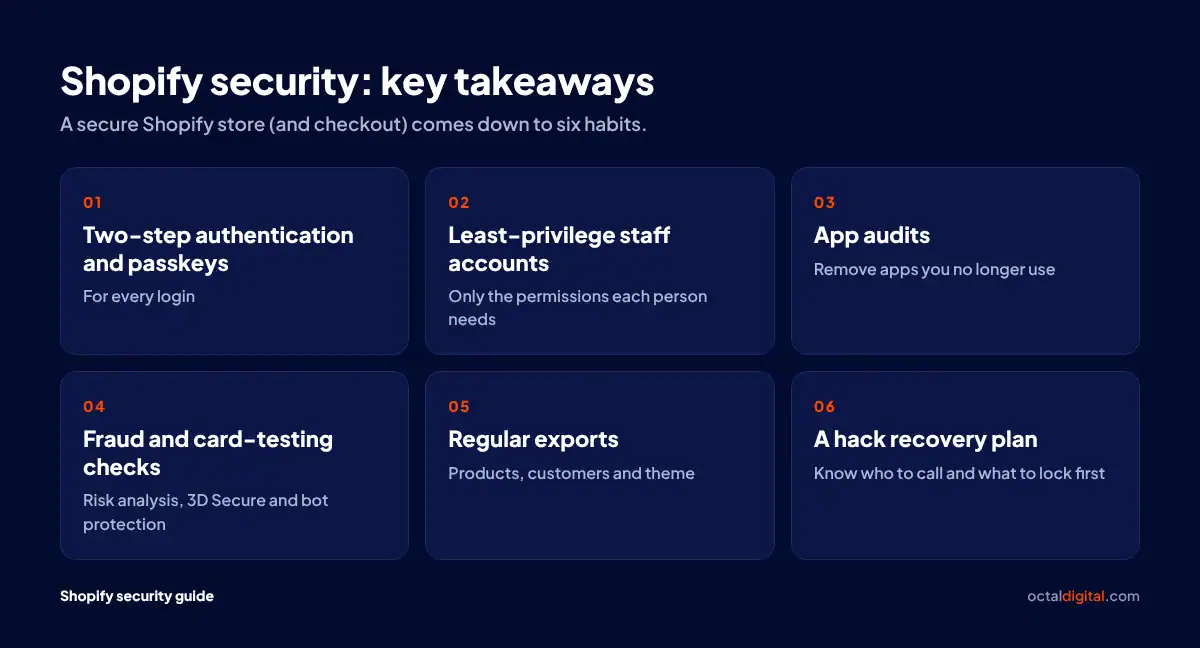
A secure Shopify store (and checkout) comes down to:
- Two-step authentication and passkeys for every login
- Staff accounts with only the permissions each person needs to do their job
- App audits and removing unused apps
- Fraud and card-testing checks at checkout: risk analysis, 3D Secure and bot protection
- Product, customer and theme exports
- A hack recovery plan
Is Shopify Safe? What Shopify Secures and What You Secure
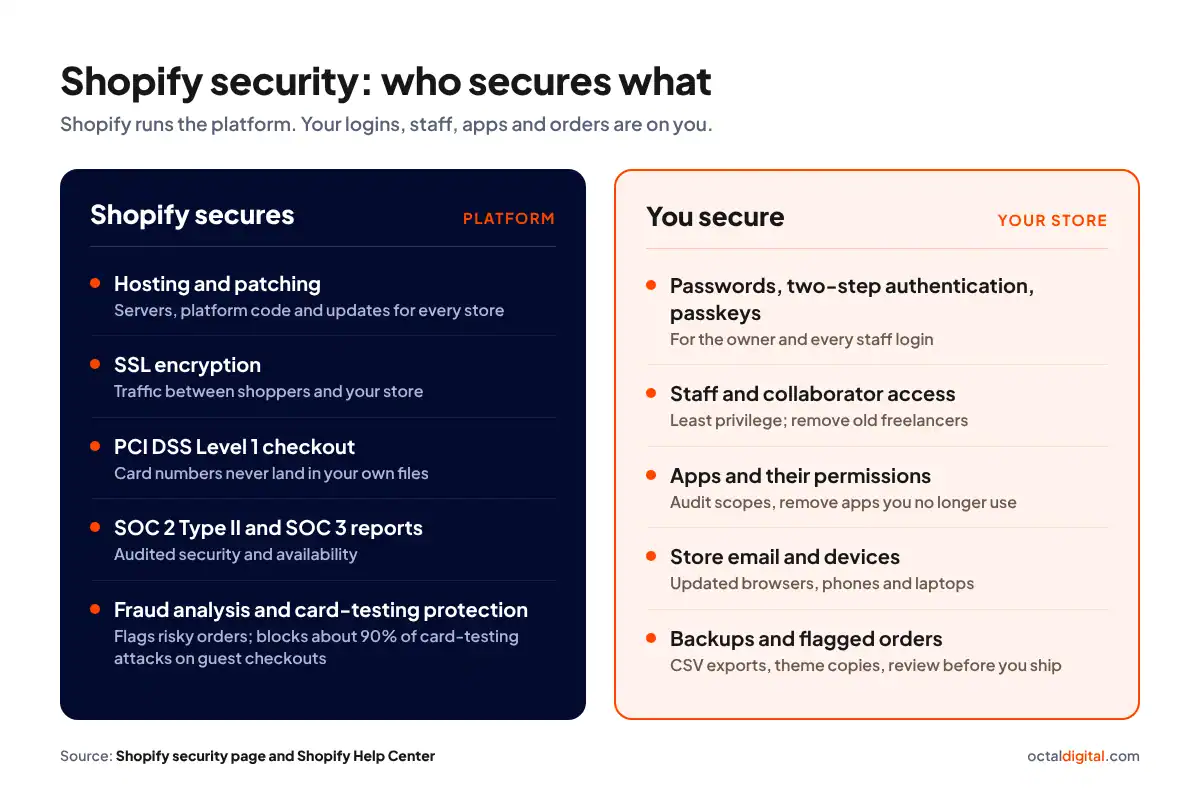
Shopify security is a shared job by Shopify and store owners to protect checkouts, guard data, or stop a hacked store account from being used to launch more attacks. Store attacks have grown more common over recent years and, because of that, Shopify store security is essential for every owner and staff member.
What Shopify protects for you
Platform security is based upon the careful hosting and patching of every store. Shopify’s security teams are at a disadvantage since they have to cover all possible entry points, from card payments to SSL, while attackers just need to find and use one weak login or app. This imbalance helps attackers, which means even a platform with SOC 2 Type II and SOC 3 reports can’t stop thieves with your password from getting into your store.
What you are responsible for
Attackers may use any logged-in device as a tool, a target or even both, so owners and staff of every store size face risk. Arguably, since they tend to use fewer security settings, small and new Shopify stores can face greater risk than bigger ones, despite looking like less likely targets on the surface. Apps are often outside suppliers to many Shopify stores, which means if a single attacker enters one app’s systems, the whole chain of stores can be exposed.
The Biggest Shopify Security Threats in 2026
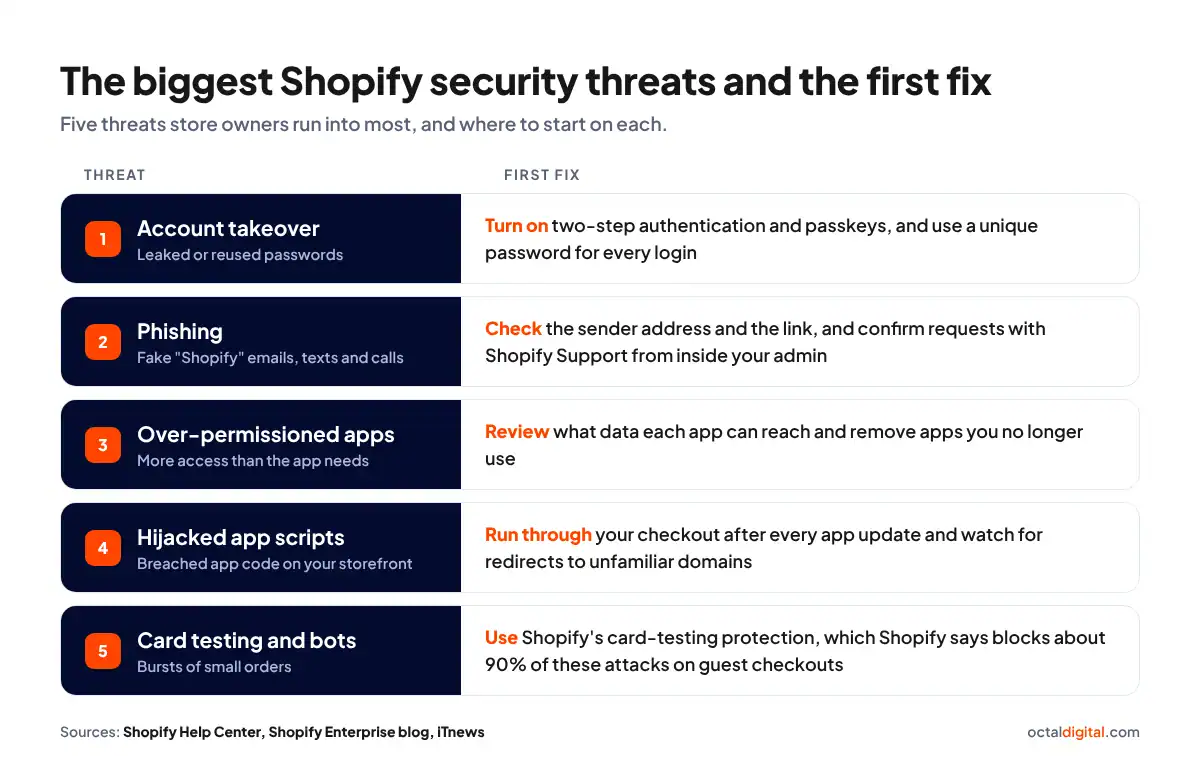
Once you’re aware of what Shopify covers, you can start looking at the threats that actually reach your store. Here are 5 threats store owners run into most, so you’ll know where to look first.
Account takeover
Imagine finding a stranger logged in to your Shopify admin. Would you know how they got your password? Well, they most probably bought it from a data dump or tricked it out of you with a fake login page. Surprisingly, it can work exactly the same way with staff accounts that nobody checks anymore.
Sometimes simple attacks are the best ones: just use a leaked password and start trying logins. There’s no faster way to break into a store than to reuse a password the owner already used somewhere else. Bots will quietly try every leaked email and password pair on your login page. Because of that, they can get in without tripping a single alarm. For instance, a texted login code you never asked for usually means someone already has your password.
Phishing aimed at owners and staff
Years of running a store should result in a sharp eye for fake emails. Make sure that any message claiming to be from Shopify has really come from Shopify and is asking for something Shopify would actually need. Warnings about your account in several channels (like email, text, or phone calls) and pressure to act fast might be more than suspicious. Checking the sender address and the link will be a big step towards spotting the phishing and vishing attempts aimed at you.
Over-permissioned apps
Although reviews should never be the only criteria for choosing a Shopify app, let’s be frank: the app’s permissions are important, especially for a small store. However, we know that striking the right balance between features and access is never easy. First, go back to the start and look at what the app really needs to do. It will quickly clarify whether it needs your customer data, your orders, or just your product catalog, and it will help you judge the risk.
Hijacked app scripts
As a store owner, you don’t need to have advanced coding skills, but the apps running on your storefront definitely use code. That is why you don’t need an app with lots of installs, but an app whose developer will protect every technical part of its scripts. To make sure no script will send your shoppers to the wrong place, run through your checkout after every app update and watch for redirects to unfamiliar domains. In October 2026, hijacked Selleasy and Hulk Product Options scripts did exactly that on real stores. If an app’s developer gets breached and its script changes overnight, this is one of those things that can catch even careful owners.
A good and careful app developer should tell you when its code changes and what it now has access to.
Card testing and bot traffic
At the end of a slow day it’s great to see a burst of new orders come in, right? However, a sudden rush of small orders is not always good news. First of all, it can mean card testing, where bots run stolen card numbers through your checkout to find the ones that work. No one wants to sit and watch every checkout attempt by hand. Make sure Shopify’s card-testing protection and machine learning are working for you, since Shopify says they block about 90% of these attacks on guest checkouts.
How to Secure Your Shopify Store: 9 Steps
So, how to secure your Shopify store against hackers? Some of the simplest ways to approach Shopify store security include:
1. Train yourself and your staff to spot phishing
For all store owners, making sure that you and your staff can spot phishing is essential. Run regular, updated phishing training so that everyone on your team knows to:
- Check the sender address on any email from “Shopify”
- Think twice before sharing login codes or changing payouts. If a message seems off, it probably is. Check it with Shopify Support from inside your admin before acting on any request you are unsure about
Staff training, practice and awareness will cut the likelihood of phishing scams being successful.
2. Back up your products, theme and store data
Shopify stores often collect and hold customer names, addresses and order histories, which can be grabbed by hackers and used to commit fraud and therefore further compromise store data. In the case of a hacked account, it’s important that you have CSV exports of products, customers and orders to cut downtime, lost listings and lost sales. If a bad app or hijacked account wreaks havoc, your products could themselves be changed or deleted which could ruin your listings, even if you have strong passwords set up. Make sure you keep all exported data private, including customer and order files.
3. Audit your apps and settings regularly
Although you can’t remove the risk of a hacked store altogether, you can put habits in place to check your store security on a regular basis. Look over your installed apps and regularly check settings, staff accounts, and login alerts to ensure your store is better secured. Duplicate your theme and download a copy to see how the restore process would work for your store. Identify unfamiliar changes in the activity log, devise ways to undo them and confirm whether your product files have been altered in any way. Remove apps you no longer use to cut the risk of hackers exploiting them to steal or change your data.
Not sure which apps can touch your store?
Shoppers are safer when stores audit their apps and make sure their storefront code is clean and safe to use.
4. Watch collaborator and freelancer access
As collaborator accounts let agencies and freelancers into your store, create a simple access policy that’s plain for all to follow. Put a collaborator request code in place. For example, consider the risk that comes with having old freelancers still holding access to your store without a clear exit procedure and take action to remove it.
5. Give staff only the permissions they need
Minimize the risk of a takeover by limiting admin rights to a small number of people and setting up staff accounts that keep logins separate from employee to employee. Staff permissions mean limiting each user’s access in the admin and applying the rule of least privilege needed for their actual jobs. One of the dangers for store owners is having staff install apps on the store that could compromise your customer data. Preventing staff from installing apps without approval or even seeing certain data in your admin is beneficial to your store’s safety.
6. Use fraud and bot protection
Using Shopify’s fraud analysis, bot protection and card-testing protection is among the most useful ways to guard yourself from fraud. A Shopify Flow workflow, on plans that include it, will help to hold high-risk orders placed in your store before they can cause any damage.
7. Keep apps, themes and devices up to date
Often, store hacks take place because browsers and devices are out of date, leaving gaps. Hackers exploit these gaps to get into your store admin. To overcome this, some store owners keep a simple update checklist that will cover all app, theme, browser and device updates, keeping your store solid and up to date.
8. Use strong passwords, two-step authentication and passkeys
Ensure that a unique password rule is set up and actually followed. A sensible and strict password rule should stop staff from sharing the owner login and should push each person to keep passwords in a password manager. Everyone should create unique passwords for Shopify, email, and payment apps. They should also enable two-step authentication, which Shopify requires to use Shopify Payments. Store owners may opt to use passkeys instead of passwords for a more secure sign-in. It’s important not to share recovery codes with anyone on the team and remember to keep them somewhere safe and private.
9. Lock down the email and devices tied to your store
Account security is the work of keeping things like your store email, laptop, phone, and browser updated and safe from takeovers. Two-step authentication protects the email tied to your store, and a Have I Been Pwned check shows if it leaked in a breach. You can learn more about passkeys and recovery codes in Shopify’s account security guide here.
What to Do If Your Shopify Store Is Hacked
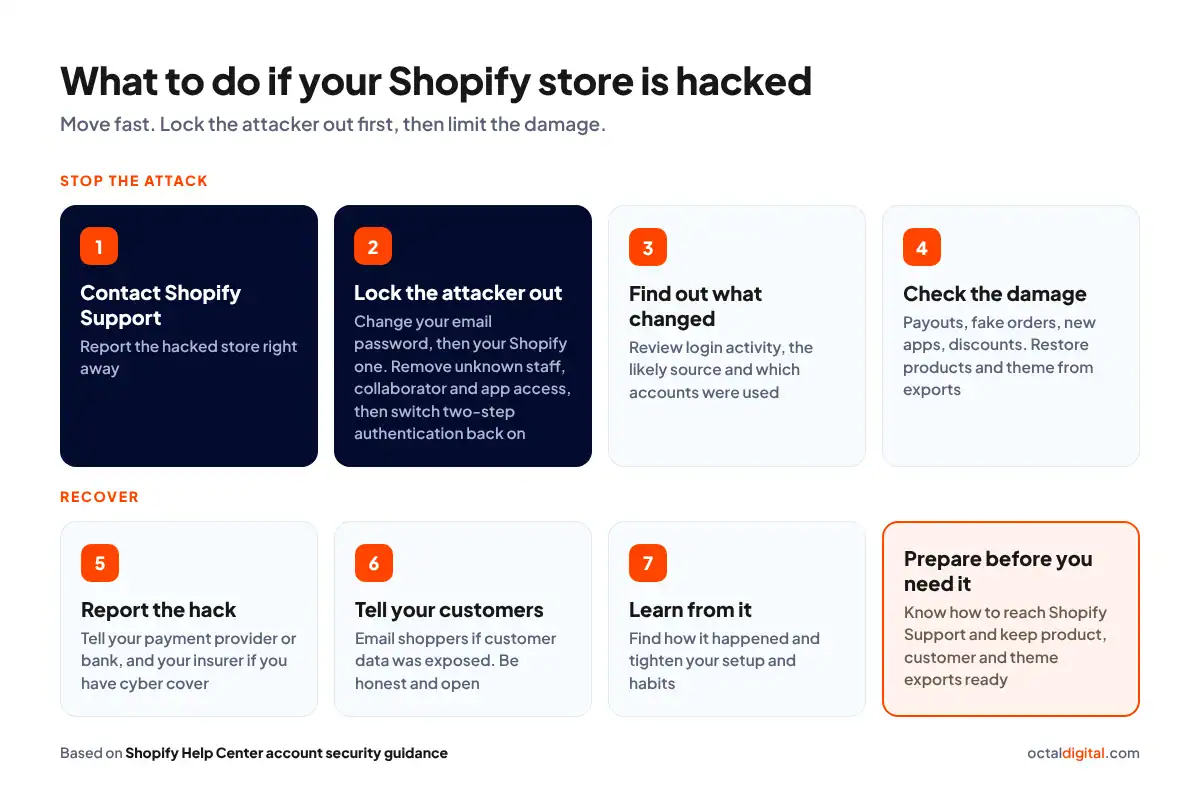
For store owners dealing with a hacked Shopify store, it’s important to move fast. Your goals should be to lock the attacker out and limit the damage:
- Contact Shopify Support. The first thing you do is contact Shopify Support and report the hacked store. Ideally, you will have found out ahead of time how to reach them in case of a breach.
- Lock the attacker out. It’s essential to find and shut off every way that attackers might get into your store. With any kind of store hack, you should act promptly to:
- Change your email password first, then your Shopify one
- Remove all unknown staff, collaborator and app access
The aim should be to keep attackers from getting back into your store. You can then switch two-step authentication back on, using a new device if it was bypassed.
- Find out what changed. Knowing what kind of access the attacker had will make sure you know where to look and how best to close it off and recover from the hack. As well as reviewing the login activity, it’s important to understand the hack’s likely source, which accounts were used and what was touched.
- Check the damage. Once the hacker is out, you need to check whether Shopify Payments, Balance, Credit or Capital have been touched, what orders or draft orders may be fake, which apps have been installed, and whether any odd custom apps or discounts remain. Products may need to be re-imported from exports, the theme may need to be swapped for a saved copy, and any altered code replaced or repaired.
- Report the hack. You might need to report the hack to your payment provider or bank, which will vary by store. If your store carries cyber insurance, contact your insurer for advice on what comes next.
- Tell your customers. It’s likely you will need to email shoppers, especially if the hack has exposed any customer data. Depending on the size of the hack and the kind of store you run, you may need to post a public notice. You have to be honest and open about the hack to keep shoppers’ trust.
- Learn from it. After you recover, it’s important to look into how the hack happened and decide how to change your setup and habits to lower the risk of another one. Use the incident to get stricter about your store’s security.
Keep your Shopify store patched and monitored
Be sure to look at our Shopify support and maintenance plans, set up to help keep your apps, access and backups up to date and secure.
Shopify Security Checklist
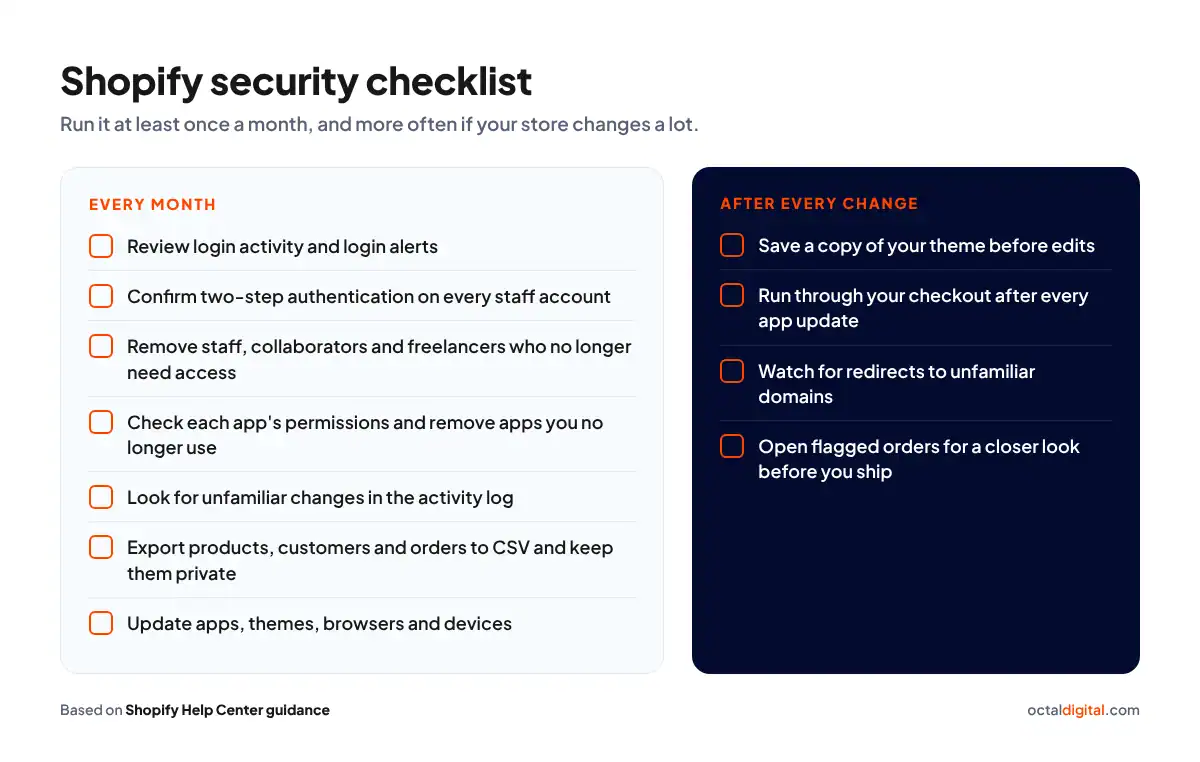
One of the worst mistakes your store could make when growing a Shopify business, is not setting aside enough time towards regular security checks and reviews. This time includes a monthly slot for login and app reviews, a plan for future fixes and a Shopify developer or team to make it happen.
How often you should run security checks depends on your store’s size and setup and how often it gets changed. In general, it’s a good idea to check your store’s security at least once each month, and more often if possible. This will help to keep your apps, logins and staff access current and locked down. While it’s possible to run these checks yourself, it’s often best to have a Shopify support team handle it for you. This is because security work can be slow and technical, and it’s easy to miss small settings that could end up losing you sales in the long run.
Keep Your Shopify Store Secure
Shopify store security is NOT a one-off job. The safest stores treat security as a regular part of running the business each month. When planning your budget be sure to save time for the ongoing app and access reviews. If your store needs a Shopify team to set up, audit or maintain its security, please reach out to our team today.
Talk to our Shopify team
If you’re looking for Shopify developers to secure your store, contact the Octal Digital team today.
Shopify Security FAQs
Is Shopify secure from hackers?
Shopify’s hosting and checkout can block many attacks at the platform level and can also encrypt traffic between shoppers and your store. You can add further protection by turning on two-step authentication and auditing your apps.
Is Shopify safe for sellers?
Yes, at the platform level, but a hijacked login can mean lost data and stolen order, staff, and customer information. Attackers can use tools, such as phishing emails, hijacked apps, and fake payment pages, to disrupt payouts and orders, and it can be hard to get a hacked store running normally again.
It takes real time, effort, and money to recover from a store takeover, and you might need to work with Shopify Support and your payment provider to undo the damage and set up fresh logins to stop future attempts. Stores take a reputation hit if they leak customer data or don’t warn shoppers early about a breach. Suppliers and partners that rely on your store for their sales will also feel it if you are hacked.
Is two-step authentication required on Shopify?
That all depends on whether you use Shopify Payments, which requires it. Without it on your account, Shopify can put your payouts on hold. Depending on your setup it applies to the owner and any staff login with access to financial products. Larger teams should turn it on for every staff account too. Most all store owners will also benefit from passkeys, which let you sign in with a fingerprint, face or device PIN instead of a password.
Are Shopify apps safe to install?
Yes and No. Depending upon the app developer, big or small, you can have a well-kept app with tight access or a sloppy app that will allow attackers to “hijack” your storefront scripts for their own ends. Because big apps are not immune to breaches and small apps aren’t either, they need different levels of access, review and care, and some have permissions which reach further into your store than the app needs to work properly. We can help you work out what the right set of apps for your store would be.
Why does my Shopify store say “Not secure”?
Generally speaking, for up to 48 hours after you connect a custom domain you should expect the SSL certificate to still be pending. If you have a custom domain, your A record and CNAME should be checked as soon as possible. Not only does a working SSL certificate keep your shoppers’ traffic encrypted, but it’s also what removes the warning from the browser.
Does Shopify have fraud protection?
Yes, Shopify runs fraud analysis and flags risky orders for stores, with checks that range from AVS and CVV to IP address. Open each flagged order for a closer look before you ship. As a payments platform, Shopify says it can block about 90% of card-testing attacks on guest checkouts. Stores that are on Basic or a higher plan and want more rules can use Shopify Flow to hold risky orders.
Is Shopify PCI compliant?
Your PCI compliance really comes with the Shopify platform, which is certified Level 1 PCI DSS for card payments. We can help you set up a checkout that fits your needs today and later on, without card numbers ever landing in your own files. Many security questions merchants ask about hosting are answered by Shopify, which holds SOC 2 Type II and SOC 3 reports for security and availability.
How do I back up my Shopify store?
Backing up a Shopify store is the habit of keeping your own copy of store data up-to-date and complete as well as stored safely. Backing up includes tasks like exporting all the products in your store to CSV, regularly exporting customers and orders, and downloading your theme. It also covers some basic housekeeping jobs like saving a copy of your theme before edits and checking what your apps can access.