Key Takeaways
1 min summary- If you need custom URLs or checkout code, you might get them on WooCommerce, so weigh that control against the upkeep it takes each month.
- You can move from WooCommerce to Shopify, plus with redirects in place for every old URL, you'll keep most links working, though customer passwords will not transfer.
- Overall, in our view, Shopify is the better platform for most new stores that want hosting, security and checkout in one plan.
- We think you could run a great store with WooCommerce if you already have WordPress and someone to handle updates.
- The yearly cost of a $10,000-a-month store with $50 orders (plan, card fees and hosting) is about $4,550 on Shopify Basic and $4,500 on lean WooCommerce.
- Some owners might enjoy coding, don't mind running updates, don't mind picking their own host and gateway, and that's all good.
- But Shopify adds a 2%, 1% or 0.6% fee if you use another payment provider, which a gateway-tied store can skip on WooCommerce.
Shopify vs WooCommerce: they are two of the biggest online store builders and platforms out there, and if you’re planning to sell online, we highly recommend you look closely at both platforms!
However, if you’re wondering which platform is better in the fight between WooCommerce vs Shopify, we at Octal Digital, who build stores on both, will lay out what you need to know about the two platforms, how they differ, and what costs are usually like.
Just remember that you can and should test both platforms first to get the best fit for your store!
Shopify vs WooCommerce: The Short Answer
Let’s start with the basics. Shopify is a hosted platform and WooCommerce is a free plugin.
When you sell as a store owner on either, you are treated as the merchant as you complete each sale, typically paying Shopify a monthly fee from $29 billed yearly or paying a host to run your WordPress site.
Both platforms became more popular than most other ecommerce platforms, according to W3Techs site counts.
About Shopify
Shopify is a hosted service from end to end. By late 2025, its App Store had more than 21,000 apps from partners and developers worldwide. It’s also behind Shopify Payments, POS, and Tax. The platform runs stores on 5.4% of all websites.
The company handles some very big sales days. In 2025, its merchants made $14.6 billion over Black Friday Cyber Monday. You can pick plans like Basic, Grow, Advanced, and Plus in the admin as your business grows.
About WooCommerce
In 2015, Automattic entered the online store game when it bought WooCommerce. Over the last several years, it has grown to be the largest store software on the web in terms of site share. That growth was partly fueled by its link to WordPress, the CMS behind 38.5% of sites.
Today, WooCommerce supports stores on 7.6% of all websites and almost half of all online store systems. It’s free to download for any WordPress site, offering store features to owners worldwide, making it more widely used than Shopify by site count.
WooCommerce specializes in WordPress stores, but it does sell paid extensions for extra features.
Here’s a closer look at the main differences between both platforms.
| Factor | Shopify | WooCommerce |
|---|---|---|
| Type | Hosted platform | Free WordPress plugin |
| Starting price | From $29 a month billed yearly | Free core plus hosting |
| Hosting and security | Included | You or your host |
| Third-party payment fee | 0.2% to 2% | None from WooCommerce |
| Checkout edits | Deep edits on Plus only | Free if you code |
| URL structure | Fixed paths | Your choice |
| Best for | Most new stores | WordPress and custom builds |
As you can see, they each have their strengths and weak spots. So, it mostly depends on what you need.
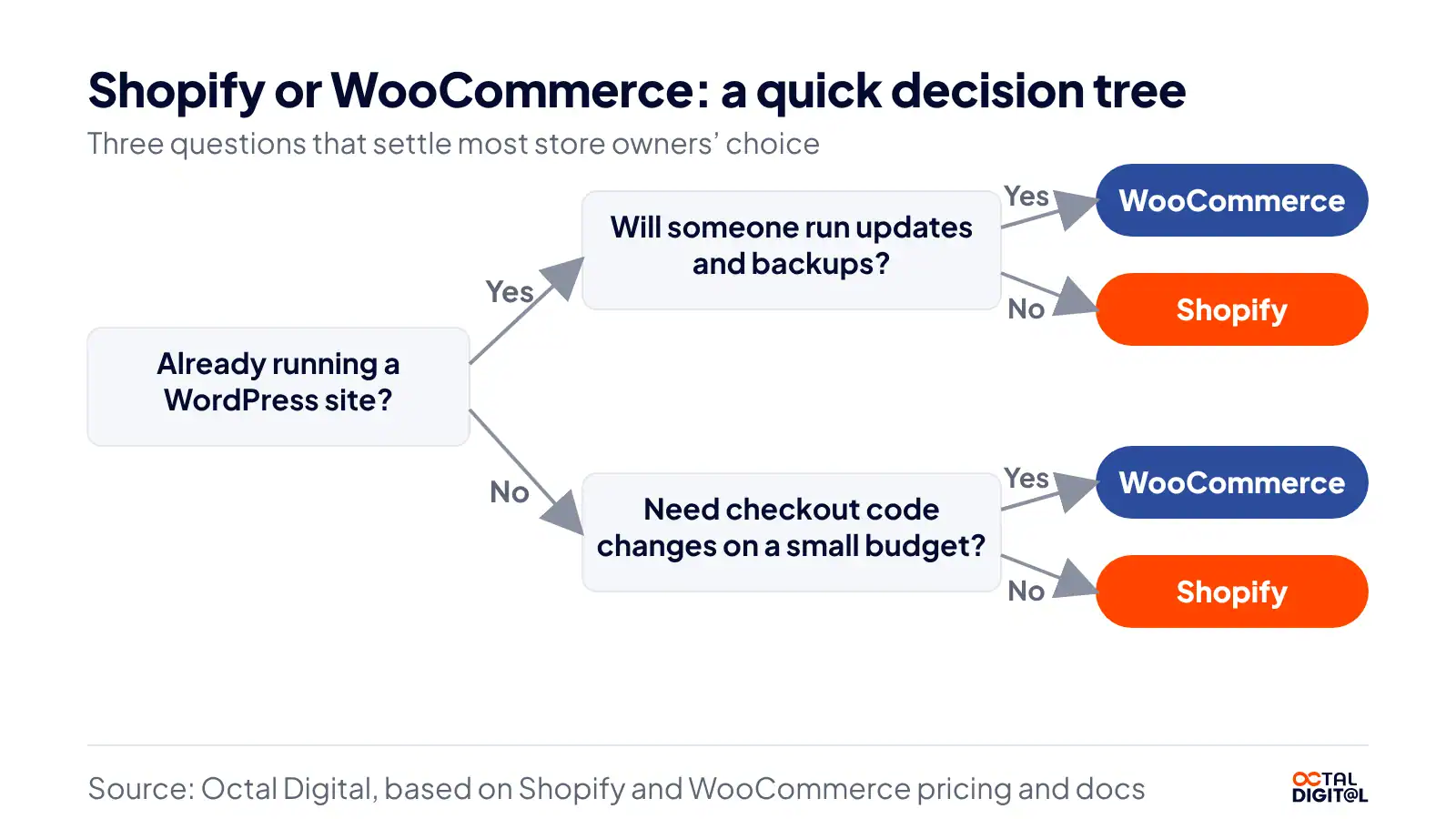
- Do you want hosting and security handled for you?
- Do you want it to be easy to change every part of the store?
- Do you want to keep selling from your WordPress site?
It’s also very store-dependent. Some products will favor one platform over the other. So, you’ll have to do your own planning and testing to work out which platform is best for your store.
WooCommerce vs Shopify: Which Is Cheaper?
The most important thing to know is that neither platform is much cheaper on fees. When we recently worked out the yearly fees for a store selling $10,000 a month in $50 orders, we came down on the side that Shopify Basic costs about $4,550 and lean WooCommerce about $4,500.
What Shopify Costs Each Month
Shopify charges you per month. You’ll also pay a small fee on every card sale. When you first sign up Shopify gives you the cheapest start, 3 days free and then $1 a month for 3 months. After that though, you are likely on most plans to pay a lot more.
Shopify lists every plan on its pricing page, but the Basic plan and Grow cost $29 to $79 a month. Stores that pay month to month pay about a third more, since they skip the discount for paying yearly.
| Plan | Price per month (billed yearly / billed monthly) |
|---|---|
| Basic | $29 / $39 |
| Grow | $79 / $105 |
| Advanced | $299 / $399 |
| Plus | From $2,300 |
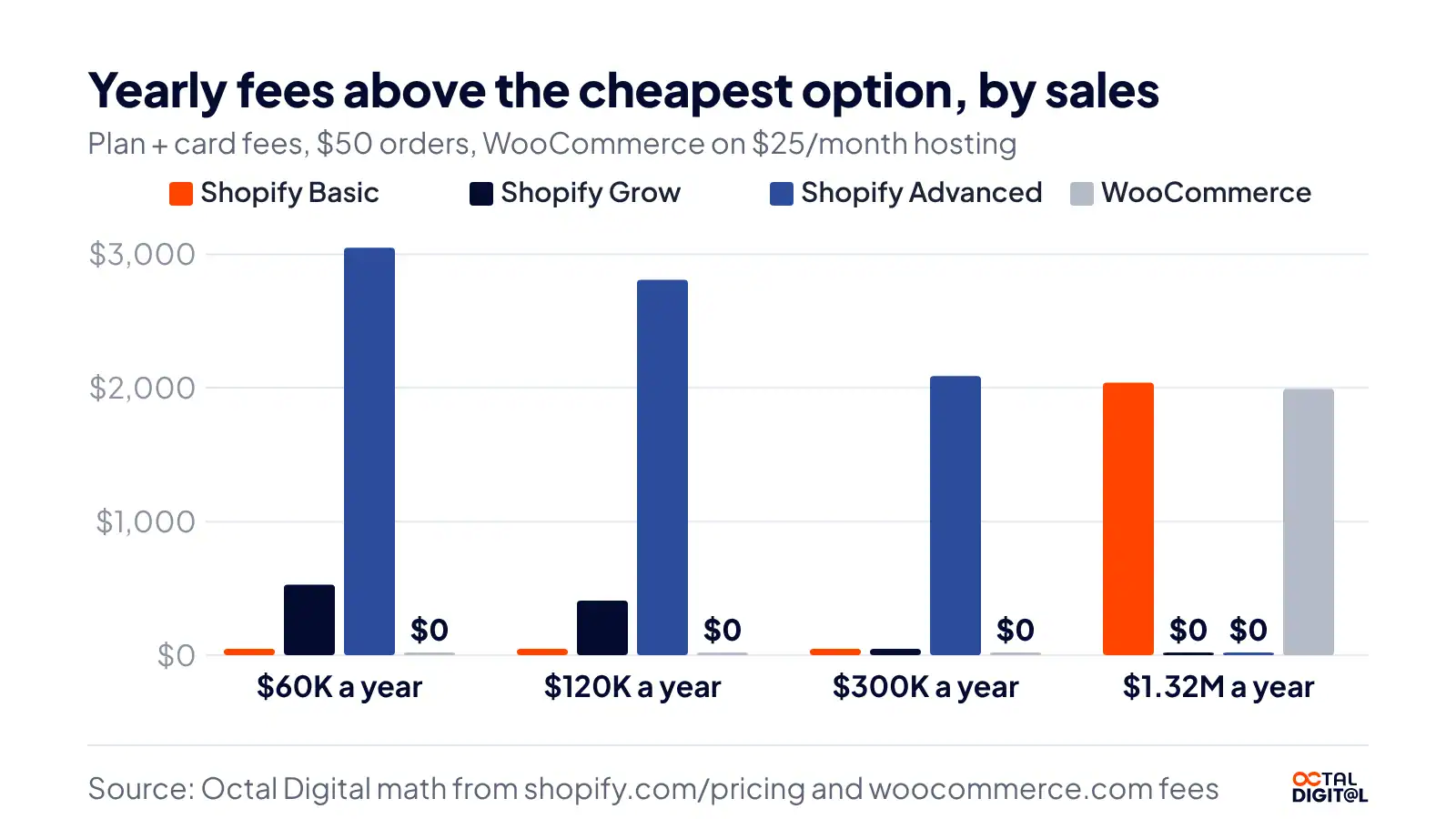
We’ve found in our math that Basic stays cheaper than Grow in total cost up to about $300,000 a year. When sales go up, so do the card fees, and the same is true when sales go down.
For us, Shopify is the easy pick here, simply because the plan price doesn’t change with your traffic or hosting. We don’t like the idea that a store can be paying more or less each month simply because its traffic grew at a different time than planned. We strongly believe that a fixed plan price helps small teams, so if they know the cost they can plan ahead.
What WooCommerce Really Costs
Both WooCommerce and Shopify allow owners the option to add paid extras within the store. However, there is one big difference between both platforms when it comes to extras.
With Shopify, you get hosting and security inside the plan you pay for each month. With WooCommerce, you only get the plugin itself for free and pay for the rest. On its website, WooCommerce mentions that if you want to run a store then you would need hosting at about $25 to $350 a month, plus $29 to $299 a year for each extension.
| Cost | Published price |
|---|---|
| WooCommerce plugin | Free |
| Hosting | $25 to $350 a month |
| Extensions | $29 to $299 a year each |
We think it’s clear that WooCommerce is the winner on software price alone since it starts at $0 for the software compared to Shopify which only starts at $29 a month for the plan.
Payment and Transaction Fees
If you don’t take a card payment in your store, you are not paying card processing fees. So if you have the lowest plan price offered, and the most features being added per month, it all means little if your card fees run high.
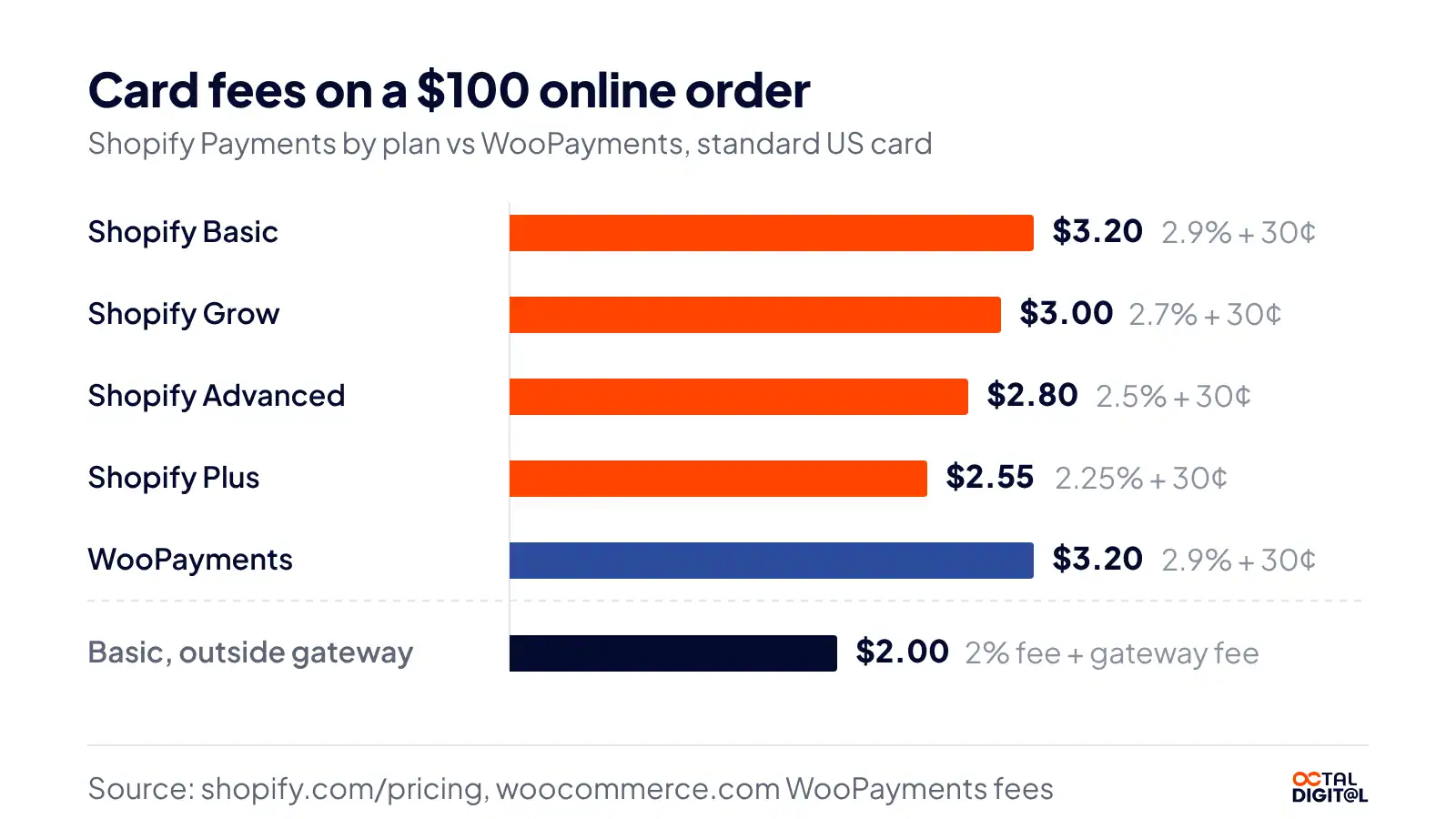
Shopify tends to, on its own pricing page, charge 2.9% plus 30 cents on Basic, or 2.7% and 2.5% plus 30 cents on the bigger “Grow” and “Advanced” plans. Depending on the size of your sales, there may be enough savings that you move up a plan, but you could be waiting a long time.
The best pick for most is Shopify Payments or WooPayments. We’ve priced just Shopify and just WooCommerce, and on Shopify Basic we land on the same card cost, simply because both charge 2.9% plus 30 cents on a US card. We like WooCommerce more on this point, the third-party gateways are typically open, free of extra platform fees, and it’s more flexible.
But at the end of the day, Shopify charges 2% on Basic, 1% on Grow, and 0.6% on Advanced when you use another provider, so you have to weigh that fee against the payment gateway you want.
WooCommerce is a clear winner in the “which platform lets you pick any gateway” debate, especially when it comes to extra fees. This is true whether it’s a small shop or a big one.
Total Cost for a Store Selling $10,000 a Month
Both Shopify and WooCommerce have extra costs, but they’re called different things depending on the platform.
Shopify has apps and themes. Each month you’ll receive bills from Shopify, through email, your card statement, or the admin itself, telling you of the charges for that month.
We ran our numbers, at a $50 average order, on a store as small as $5,000 a month in sales, and as big as $110,000 a month in sales. Obviously, the bigger the store the more likely you are to move up a plan, which is why Shopify’s Grow plan, and at the very top Advanced, start to pay off when card fees run high in your store.
WooCommerce too has paid extensions at times, or hosting plans that cost a certain amount of money per month. Unfortunately, in our model (lean store, $25 hosting), we haven’t added any paid extensions or theme costs at all.
In addition to monthly plans, you can get a fee on each sale or dispute through both WooCommerce and Shopify. Sometimes it’s an extra 30 cents per order, sometimes it’s $15 for a WooPayments dispute. Or it may be a percentage. Again, this depends on the plan and the gateway for each store in that specific case.
So which is cheaper, WooCommerce or Shopify? At this size, we’ve found the two to be a near tie. With plan, card and hosting fees we got about $4,550 a year on Shopify Basic and about $4,500 on WooCommerce, about $50 apart.
Octal Digital builds Shopify and WooCommerce stores. Get a free consultation and a quote before you pick a platform.
- A written scope and cost range
- Fixed price or hourly, your choice
- 5.0 rating from 250+ client reviews
Which Is Easier to Set Up and Run?
For us, Shopify is a very easy platform to set up. As you use anything enough, it becomes very, very easy.
Now, Shopify does charge for apps, they do add some limits. But in the end, if you know your products, your theme, if you stick to a plan and you add apps when needed, it’s a very easy platform to run.
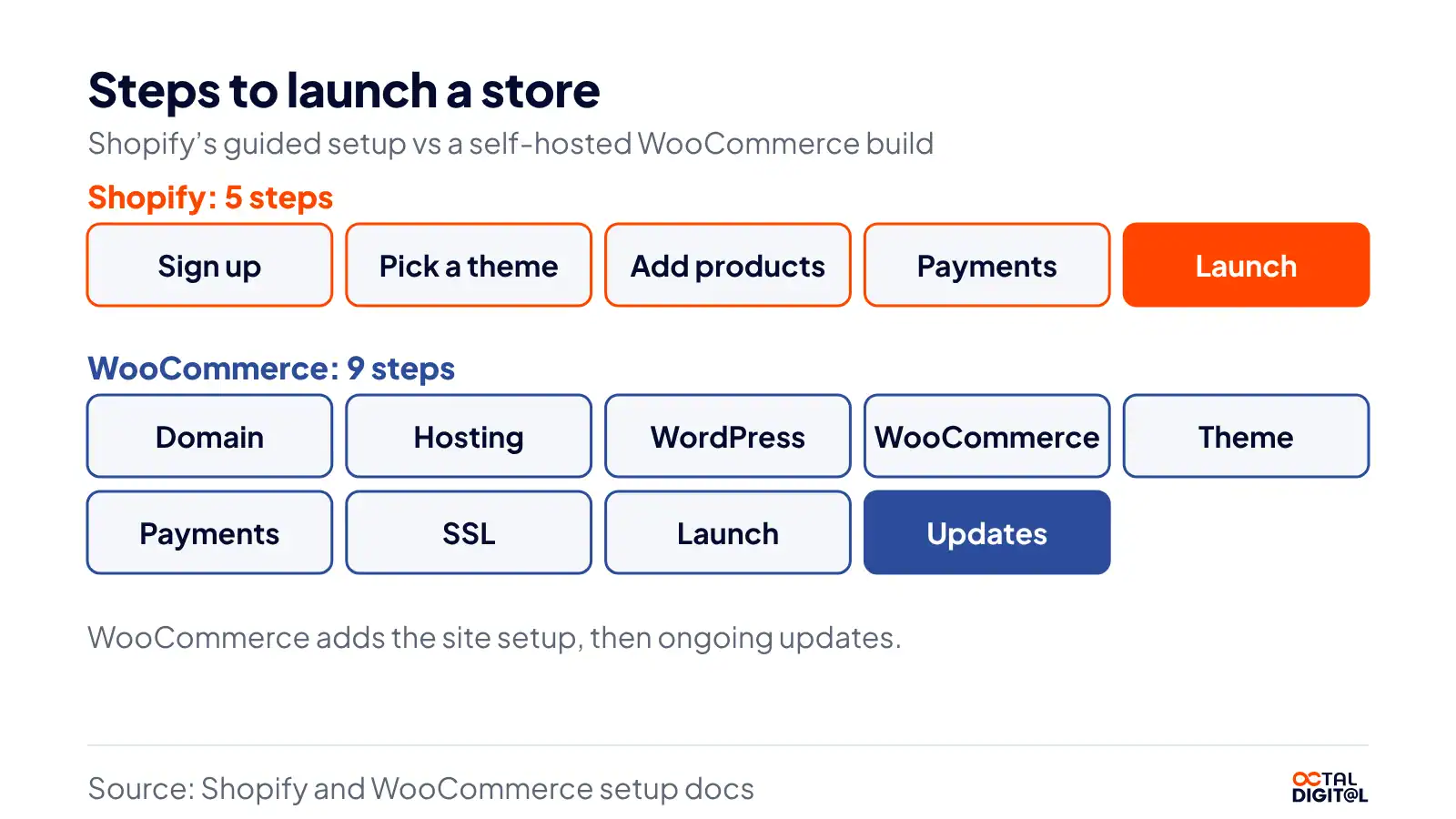
In the Shopify vs WooCommerce setup race, we think Shopify has the shortest setup. When things are at their best with Shopify, it’s the best platform, in our opinion, all things considered. Sign up, add products, very easy.
There are some payment, tax and abandoned cart steps through Shopify and those tend to be quick settings.
One thing with Shopify, you’re going to pay the bill. The bill is the bill. They are really clear with that. There’s really no hosting bill on top of that.
With WooCommerce, you can have some quick installs, but sometimes, WooCommerce will have you handle a long list of setup tasks. For a new store, what we see is a long list of steps. Plus, WordPress will stack them. You’ll need a domain, and then hosting, and then WordPress itself. Three different pieces for one particular store. And it’s typically not a quick start.
With WooCommerce, you are also going to handle the updates to WordPress, the theme and each plugin (see below).
So, if your host says it’s managed, it might only cover a couple tasks, but you have to take that into account and really look at what plan it is. It may not be the one that runs updates. It might be one that only keeps the server running.
Another thing with WooCommerce is the updates will come in real often. So, you might see a really useful plugin update, and it might break a page in a snap before you can even test it. Your backups have got to be real fresh in order to roll that back.
Which Is Better for SEO?
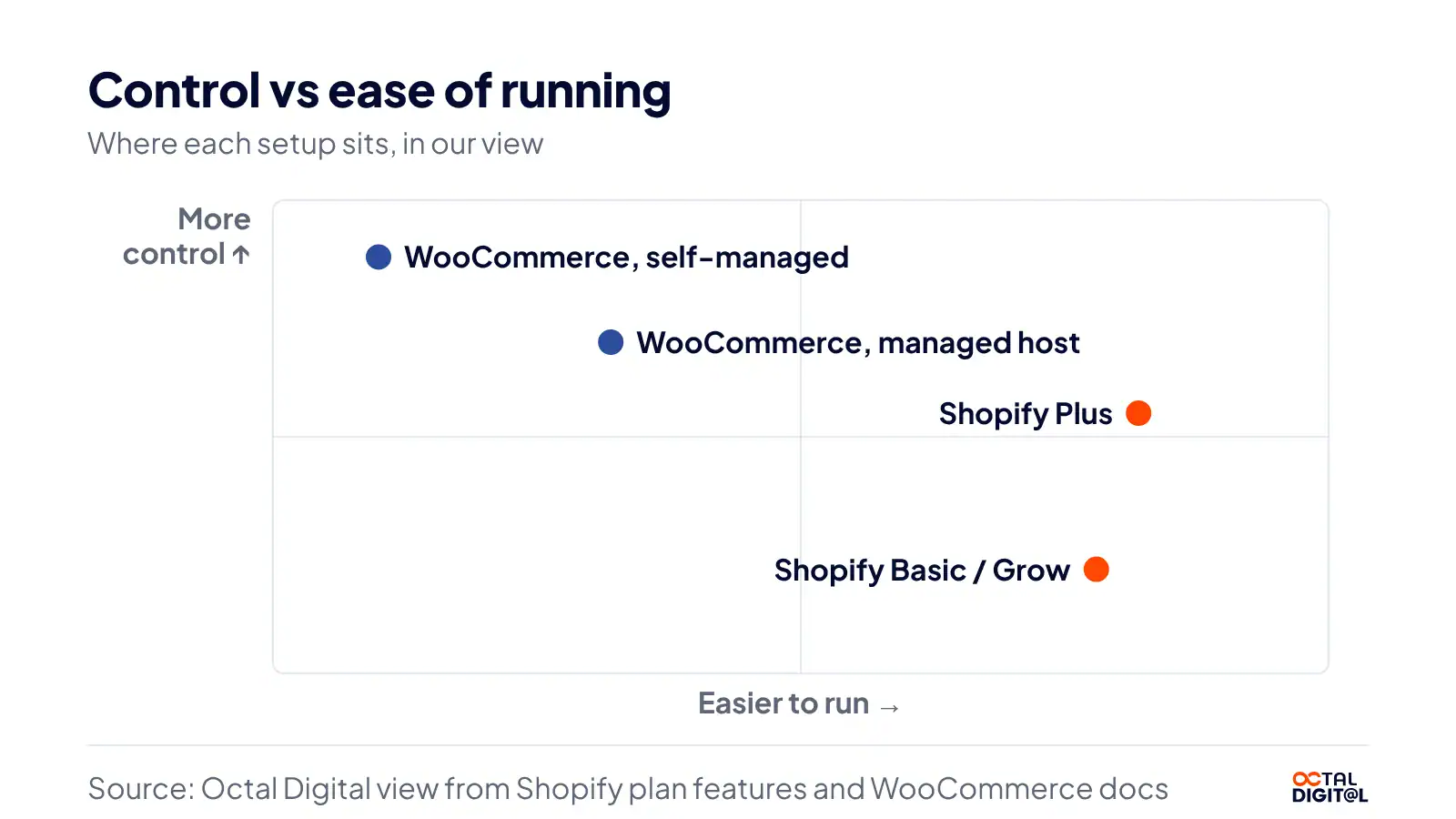
When it comes to SEO in Shopify vs WooCommerce, one caveat is it will always be content dependent, but the biggest thing is, how much control do you get? Most of the WooCommerce settings are going to give more control, from URLs to schema, to get that particular result.
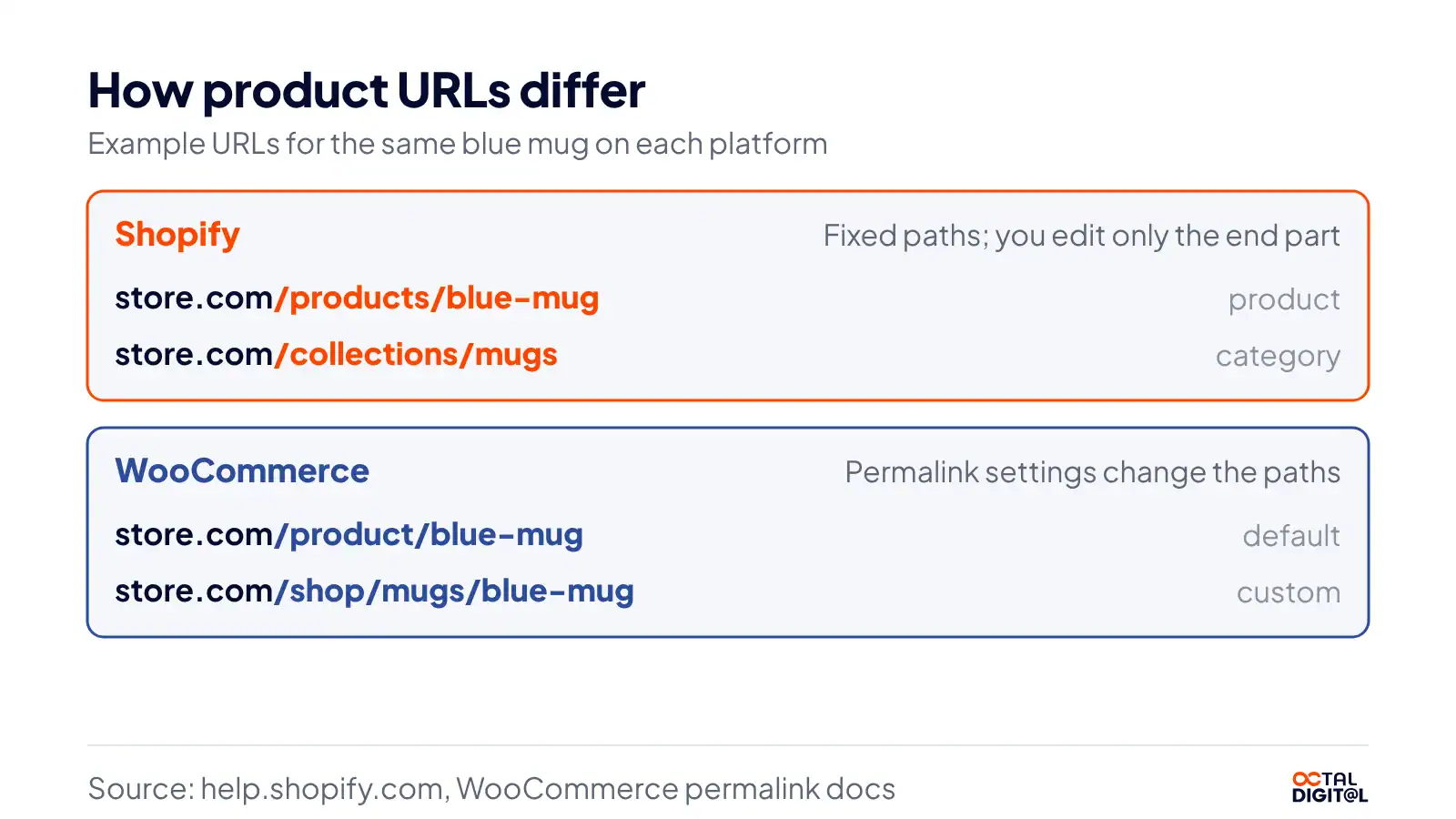
While the basics might be good. You might see a clean sitemap, or something like that (Shopify builds it for you) but the fixed /products/ and /collections/ paths you’re going to get and keep for every product page will be locked, way, way, way past launch.
So, you might have a lot of short, clean, fixed URLs, you’ll even have extra collection paths on Shopify, but if you can write three good product pages on Shopify in, let’s say a day, that’s fine.
You might get full URL control on WooCommerce, but it could take you more hours to set it up and test more plugins and fix more errors that are possible.
To rank a full WooCommerce store (where you run the site as well as the shop), you’ll need to cover the following basic SEO tasks:
- An SEO plugin like Rank Math or Yoast
- Hosting fast enough for your traffic
- Clean permalinks for every product
- Regular updates to and tests of everything (core, theme and plugins)
- A plan to add schema with or without a plugin
You’ll also need to write useful content to rank for more than your product names.
We run our own site on WordPress with Rank Math. Simply fill in the title, meta description, focus keyword and schema type to get started. Be prepared to also check speed and links to complete the SEO setup.
Which Is More Secure?
First of all, if you’re hoping to get a fully secure store with no work, you should know that neither platform is one. Shopify is mainly a hosted company that allows small businesses to run their stores on a managed platform.
As a store owner, you’re working with customer credit card data. This means you will need to take thorough care to keep track of your security and updates. Shopify’s fully hosted plans are built for small business owners who want to hand off their everyday security work.
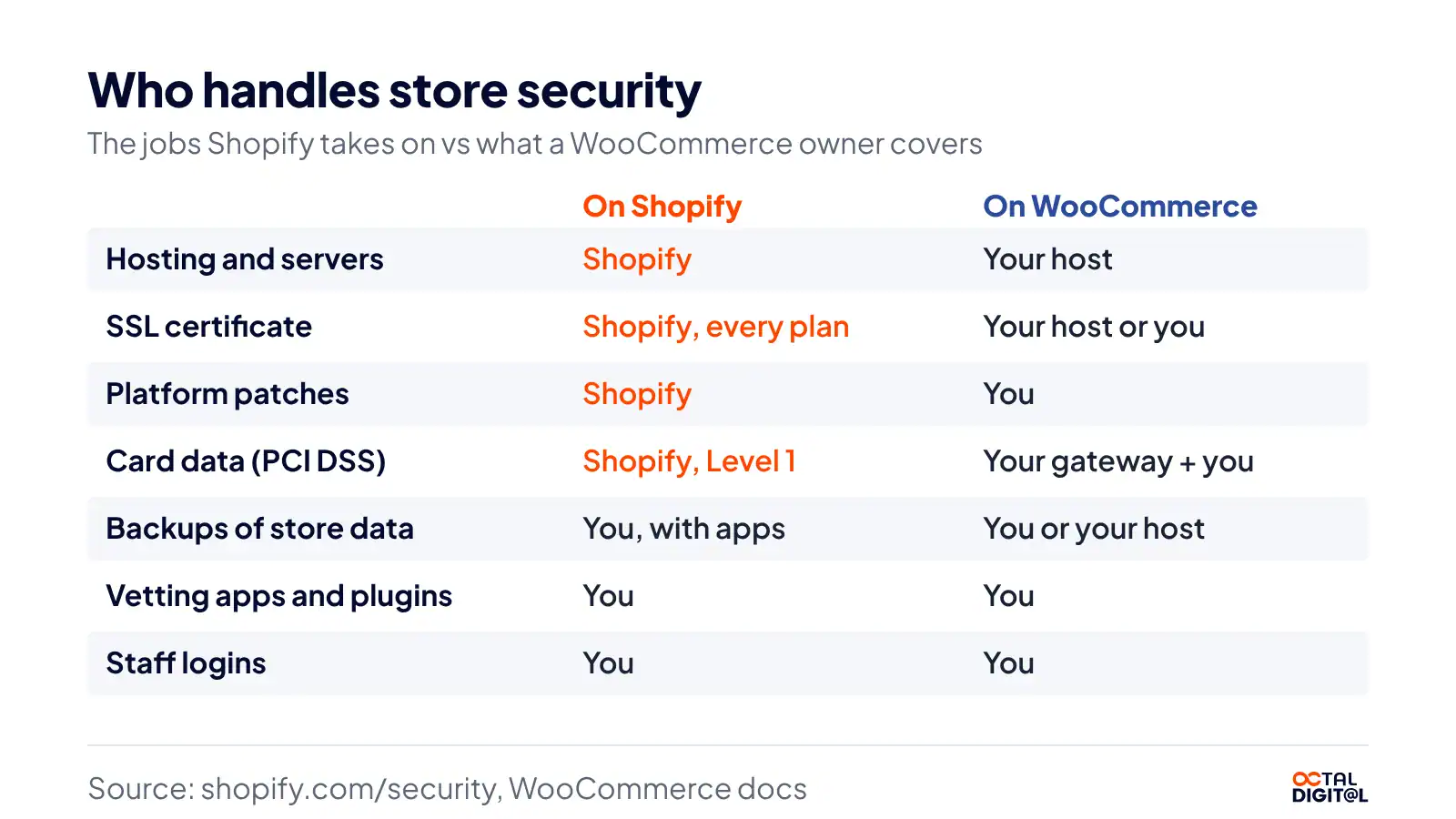
Besides that, card payments are covered by Shopify’s Level 1 PCI DSS status, Shopify holds SOC 2 Type II and SOC 3 reports, and you will receive an SSL certificate to use on your domain.
Most importantly, you do not have any server update chores, and platform patches come with the plan. Unlike other platforms, you don’t have to install any security plugins before opening a store.
We know, it sounds too easy to be true, right? If you’re skeptical about whether Shopify is the safer option for you as a small store or a new brand, read the detailed points below to see for yourself.
As mentioned above, WooCommerce is a plugin, not a host, and does not run your server. So, how does it keep a store safe as an ecommerce platform?
Put simply, WooCommerce works using a basic concept of shared duties with your host. The plugin lets you manage your store online while passing its card security duties through a gateway like WooPayments or Stripe.
WooCommerce relies on your host to keep the server patched. However, WooCommerce does not apply plugin updates for its users.
Instead, WooCommerce offers a single free plugin that holds its core store features for business owners and teams who are happy to deal with upkeep.
You can lock down your store through security plugins and two-factor logins. Also, you can connect your WooCommerce store with your host’s backups to restore pages directly.
You will miss out on some protections offered by hosted platforms. These include platform patches, SSL in every plan, and PCI coverage for the whole store. So, is using WooCommerce safe for small stores? It is, when someone keeps every update current.
Our support team handles WordPress and WooCommerce updates, backups and security checks, so your store stays patched.
Which Is Faster and Scales Better?
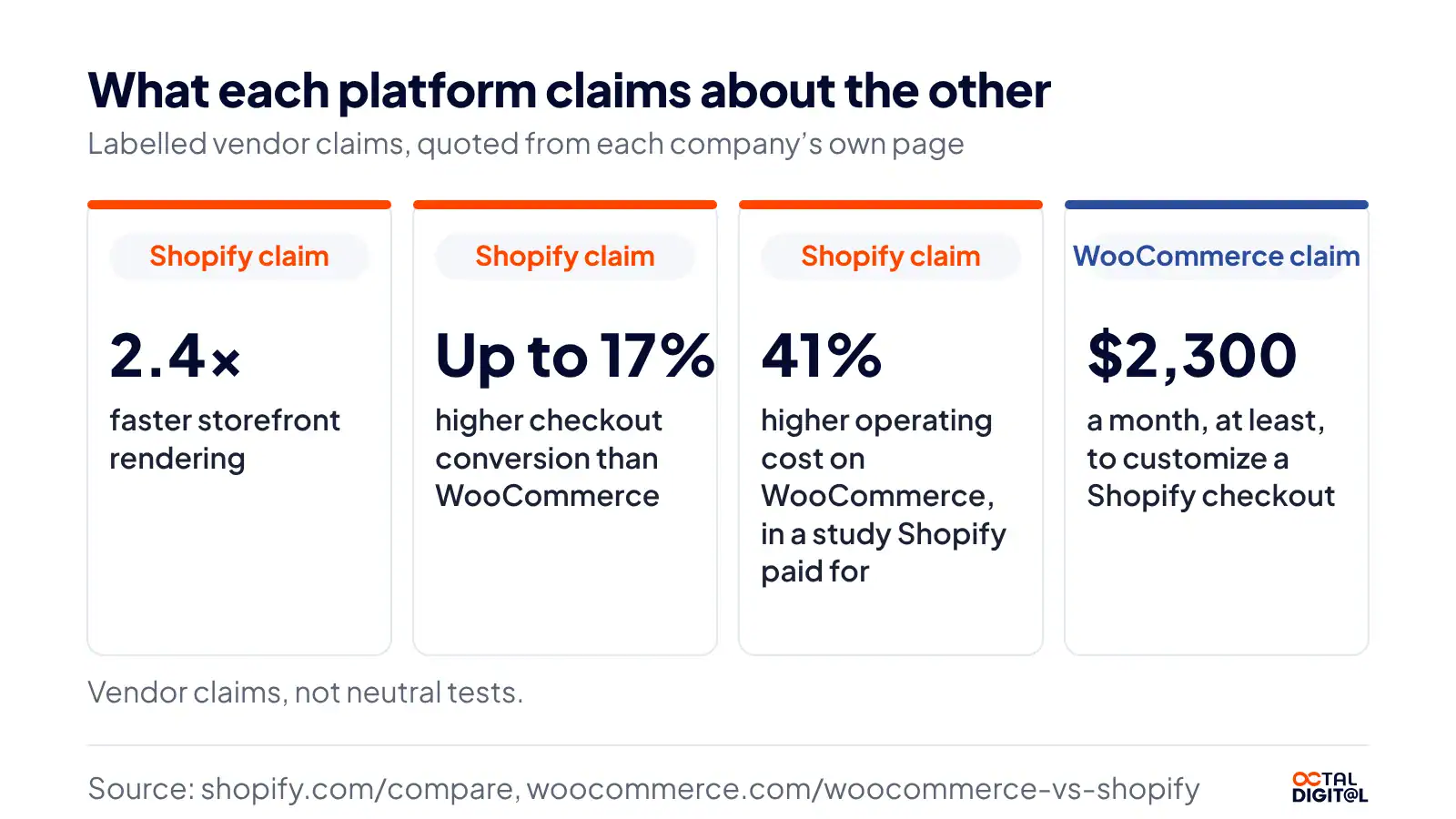
Since we found no neutral test, you have to use other sources to judge speed on each platform. Here are some claims on this:
- Shopify speed claim: It is a headline claim on Shopify’s compare page to get owners onto its platform. You can read that its storefronts render 2.4 times faster or test a store yourself. Also, Shopify says its checkout beats WooCommerce’s checkout conversion by up to 17%.
- Shopify cost claim: You can spend 41% more running WooCommerce, according to a study Shopify paid for.
- WooCommerce checkout claim: If you do not have a Plus plan, deep checkout changes are off the table, and WooCommerce says customizing it costs at least $2,300 a month.
- Shopify uptime claim: With the Shopify platform, you can expect 99.9% uptime on your store, by Shopify’s own count.
- WooCommerce scale: Typically, self-hosted stores do not scale on their own. However, WooCommerce lets you grow your store by moving to a bigger host or a managed plan at a WordPress host.
The two notable facts on Shopify’s side are its hosting and its sales record. Apart from that, Shopify also has the $14.6 billion BFCM weekend and its uptime claim.
Apps, Plugins and Customization
Shopify’s App Store is available to every plan and every store. Moreover, the store has those 21,000+ apps, many rated by merchants.
As for the code, Shopify themes use Liquid, making it comfortable for front-end developers to get the hang of it. The main parts of a theme include layouts and sections. Apart from that, Shopify has app blocks to help you stay in control of your pages and edit them without code.
Owners can also change their main checkout steps through apps, and that too on Plus only, which is the real WooCommerce vs Shopify Plus question. If you need deeper checkout changes or custom logic, you can get them through Shopify Plus.
As discussed earlier, the WooCommerce plugin does not have any monthly fees or plan limits. Plus, you do not have to pay Woo any fees for code changes or checkout edits.
After you install WooCommerce, you get the full source code for free. It runs on PHP, the same language as WordPress itself. Many paid extensions are sold on the WooCommerce Marketplace.
Even better, you can hook into WooCommerce’s actions and filters in your theme for free. If you use a custom plugin, the change stays safe through updates.
Since the code is open to you in case of a change or fix, you can see what is happening in your store. Plus, you can change most of it through a child theme or plugin.
Since it is open source, you also get full control of the code, which means you are not held to any platform’s rules on your checkout. Most importantly, if you do not want to write code yourself at all times, that option is also open.
Just hire Shopify development services or a WordPress developer, and you can make custom changes on either platform.
Should You Switch From WooCommerce to Shopify?
Switching offers a number of gains that we touched on earlier in this guide. For now, let us look at the two main parts of a move.
The move to Shopify suits owners who are tired of WordPress upkeep. They need a plan, mainly for data and URLs, ahead of the switch to open the new store.
The plan is responsible for mapping the products of the old store and adding them into the new one. It can also manage the old store’s traffic by redirecting or keeping it.
If you have a simple catalog, you can easily move it with a CSV file. However, Shopify’s free Store Migration app can also bring customers over from WooCommerce’s CSV export.
Owners or developers can transfer data to the Shopify store from CSV files, the Store Migration app, LitExtension, Matrixify, or Ablestar.
Shopify does not allow you to bring customer passwords into your store, and orders can’t come in by CSV, although third-party apps can move them.
Shopify owners can also set up URL redirects. Simply put, they can send old links to new pages instantly. However, the option to keep WooCommerce’s /product/ paths is not offered. Likewise, do not expect a ranking boost from the move even if you have a lot of products in your store.
As for products imported by the app, owners do not have to worry since Shopify saves them as drafts for review.
Staying on WooCommerce is a valid choice, which is neither a failure nor a delay. Rather, it is a choice that helps stores with custom code or deep WordPress content keep their setup. Custom stores are similar to Shopify stores in their sales tools.
But they also let you edit checkout code for free, which is something Shopify’s lower plans do not offer.
The reverse move needs similar steps in the other direction. For instance, if a store has 200 products on Shopify, it will export them by CSV and map and import those 200 into WooCommerce.
In this way, owners do not have to make any rushed choice since all their data is still in the old store. Thus, stores can test the move to build their new setup without taking the old store down.
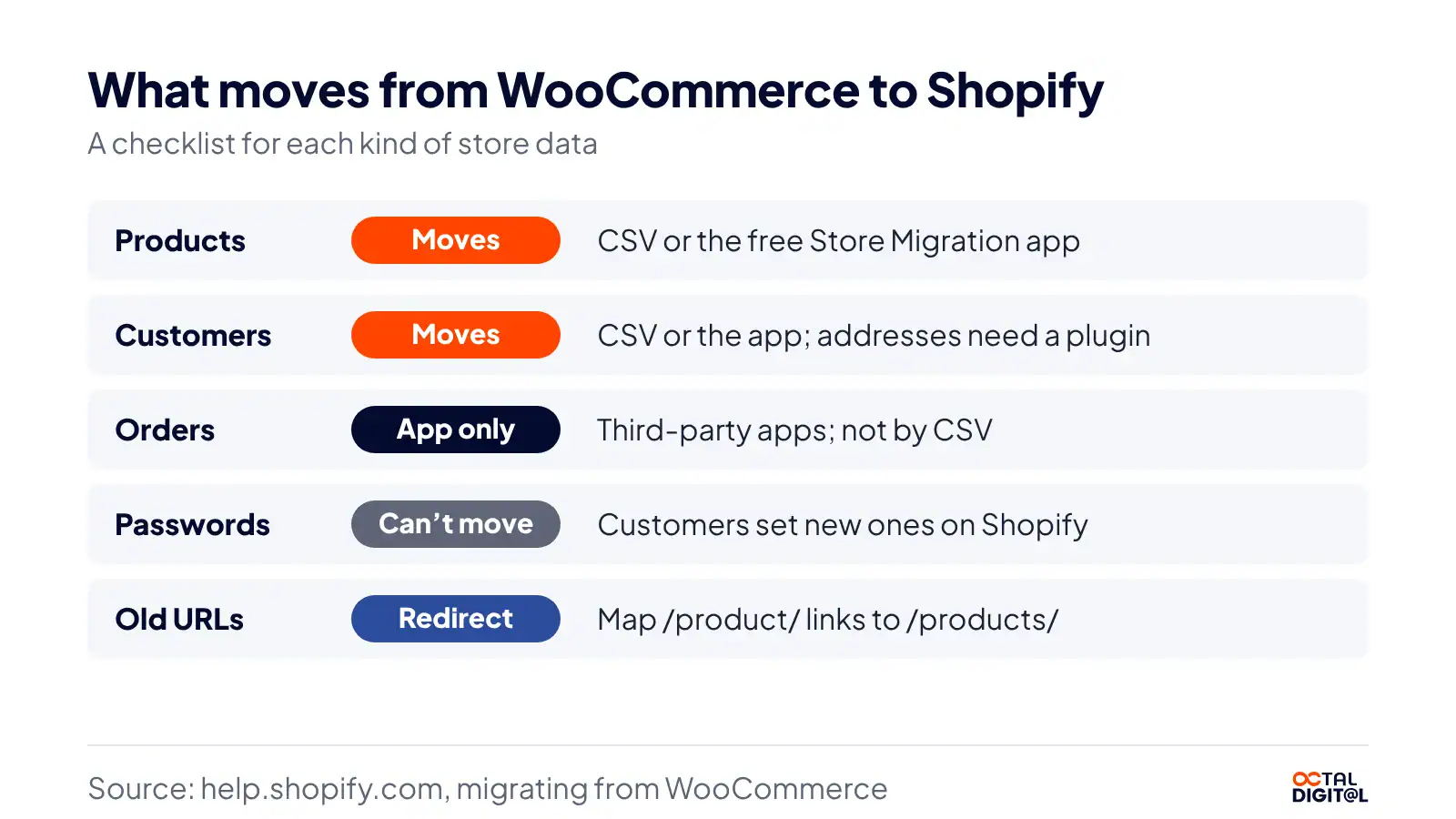
We move products, customers and orders, and plan redirects so your old links point to the new store.
- A written scope and cost range
- Fixed price or hourly, your choice
- 5.0 rating from 250+ client reviews
Shopify vs WooCommerce vs BigCommerce
Shopify’s features can be compared to a few other platforms made for online stores. Here is the main one:
BigCommerce
BigCommerce is another hosted store platform that offers built-in B2B features and a checkout for brands that want to sell to businesses as they grow.
Features: The platform has B2B features designed for wholesale teams and their buyers. Like Shopify, BigCommerce also has themes and apps that help your team build out pages and meet their sales goals.
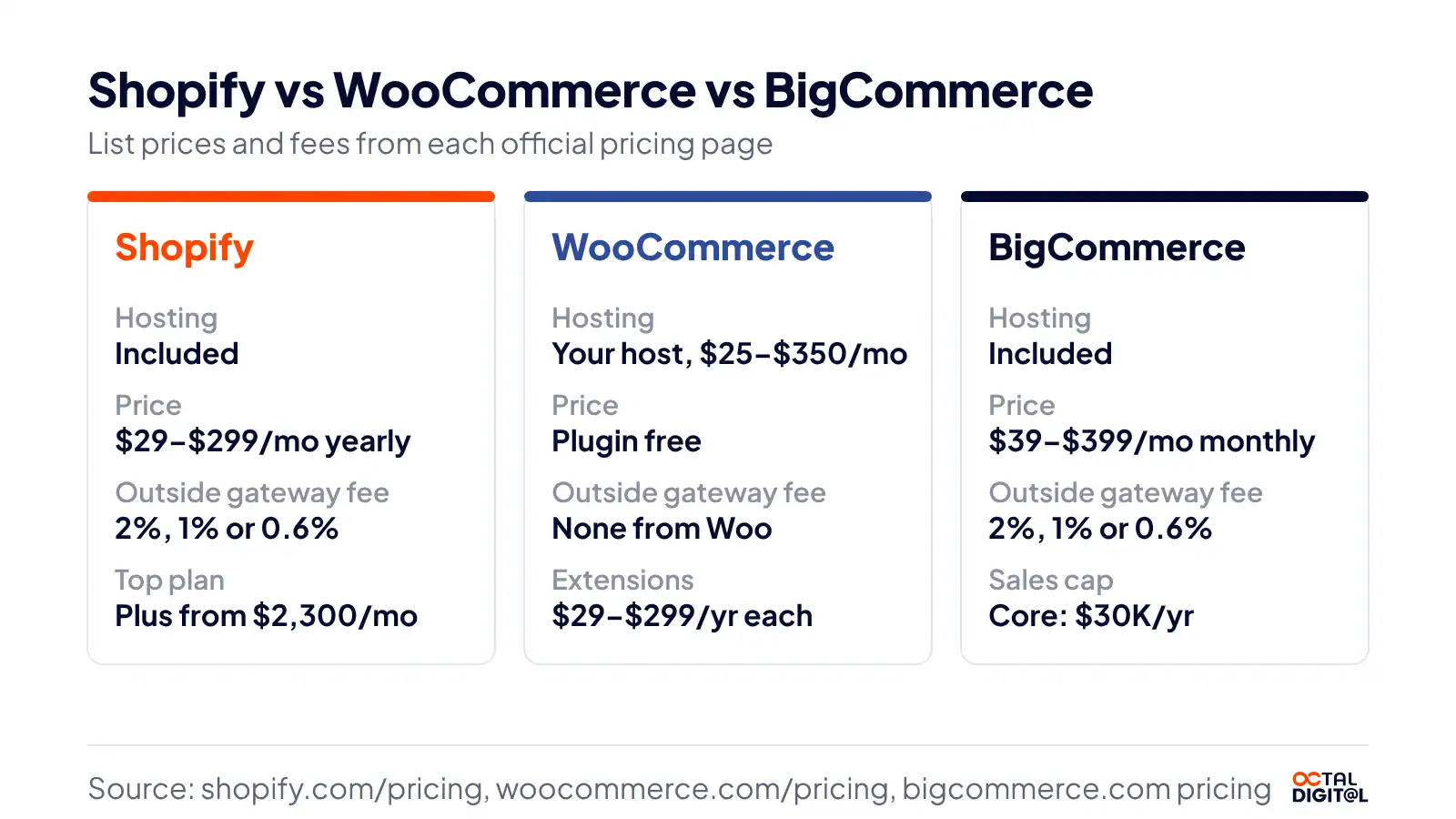
Limits: Although BigCommerce offers set plans, the Core plan is capped at $30,000 in yearly sales, which translates to a move up a plan once you pass it.
Fees: BigCommerce charges $39, $105 or $399 a month billed monthly on its main plans. Plus, a 2% fee applies to outside payment providers on Core.
Adobe Commerce
Adobe Commerce (Magento) is another platform for large stores, giving big teams a way to manage complex catalogs and custom builds from day one.
Should You Choose Shopify or WooCommerce?
Shopify is ideal for owners who want to start selling fast or hand off hosting and security from day one. If you are a new brand with a simple catalog or have a small team at this stage, you should consider using Shopify to kickstart your online sales.
Since it comes with hosting built in, Shopify also allows owners to focus on products and marketing, which will help them in the long run.
As the platform allows POS selling, it is also good for stores that have pop-up or full-time shops. Start a Shopify trial today!
Shopify is a weaker fit for stores that already run on WordPress or need full code control. Also, if you have the technical expertise and want checkout code changes on a small budget, you should opt for a WooCommerce store rather than Shopify.
Summing up, Shopify or WooCommerce is a choice for owners who want to weigh the trade between ease of use and full control over their store from the start. At the same time, it also helps to know your budget and how much upkeep your team can take on.
Sure enough, each has a few gaps, such as Shopify’s fixed URLs or WooCommerce’s upkeep. However, you can close these when you bring in a developer who builds on both platforms, such as our Shopify team in Houston or our WordPress and WooCommerce developers in Houston, for a fair rate.
Frequently Asked Questions
Which is better for beginners, Shopify or WooCommerce?
After building on both platforms, we’ve found that Shopify suits beginners more based on setup and upkeep. First stores often need fewer setup steps on Shopify. Owners who already know WordPress may find the learning curve on WooCommerce a little easier, so the gap is smaller for them. The store tools are much alike between the two, with the main difference being that Shopify is usually easier to run than WooCommerce.
Is WooCommerce really free?
WooCommerce does not charge for the plugin itself. However, it does have a paid extensions store, and owners pay $29 to $299 a year every time they add a paid extension, plus $25 to $350 a month for hosting and card fees such as WooPayments’ 2.9% + 30 cents.
Do customer passwords transfer from WooCommerce to Shopify?
WooCommerce customers do not keep their passwords in a move to Shopify. Since you’re moving to a new platform, customers will need a new password on the new store, as Shopify’s help center says passwords can’t be migrated. Products and customer records can still move by CSV (full addresses need an export plugin) or the free Store Migration app.
Is Shopify only $1 a month?
According to Shopify, the company offers a trial of 3 days free for new stores, then $1 a month for the next 3 months. After that, the plan you pick bills at its full price, from $29 a month on Basic billed yearly, plus card fees.
Which is better for dropshipping, Shopify or WooCommerce?
Both Shopify and WooCommerce support dropshipping and have a few app types in common. There are dropshipping apps on Shopify, which are comparable to WooCommerce extensions, and both platforms connect a supplier’s catalog to your store rather than holding stock if you want a little less risk. There are also print-on-demand apps on both which offer custom products like shirts and mugs for a cost per order. Quicker setup is one edge that Shopify has over WooCommerce.
Who owns WooCommerce?
Who is behind WooCommerce? Before 2015, WooCommerce was not part of Automattic, but in 2015 Automattic bought it, and today it runs under Woo (WooCommerce, Inc.), an Automattic company, while the plugin itself stays free and open source!
Do I need a developer for Shopify or WooCommerce?
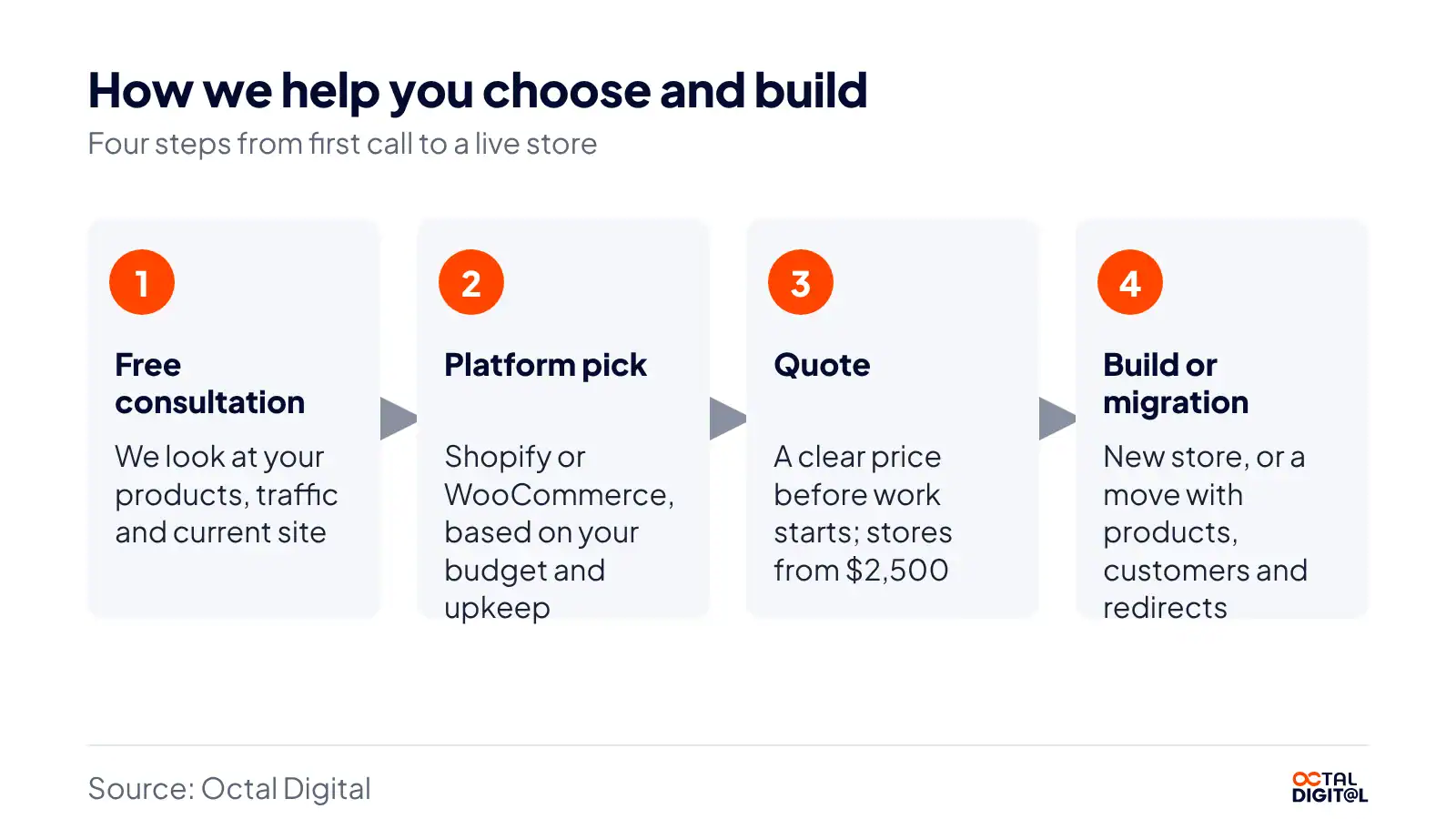
Shopify has minimal skill requirements for new store owners. If you’re a small store with a theme and a few products, you can easily launch without a developer. A developer is the ideal choice for owners who want a custom theme, a migration or hassle-free WooCommerce upkeep. Owners and small teams can hire Octal Digital for Shopify or WooCommerce work and pay from $2,500 for a new store (about 10 products on Shopify) or $25 to $50 an hour.
Can you use Shopify and WooCommerce together?
Yes, you can run both and even keep them side by side on one site. That brings us to how they connect with WordPress. As a store owner, you probably use WordPress for your blog or main site already. For example, Shopify’s compare page has a section on selling with Shopify on WordPress, so a WordPress site can show Shopify products.
Have a project in mind? Get a free consultation.
Tell us what you want to build. We reply with next steps, a rough timeline and a cost range.
(800) 995-3369
Michael Husky is the Director of Sales & Marketing at Octal Digital, leading growth strategy, client acquisition, and brand positioning across mobile, web, and AI services with a results-driven, consultative approach.