Key Takeaways
1 min summary- Coding a store from scratch isn't a sensible or realistic option for every seller, so Shopify hosts the store, checkout and payments for you.
- There are six simple steps to follow when you're setting up a Shopify store, from picking a plan to selling on more channels.
- You've got to have some kind of budget in mind beyond the plan, since card fees, apps and themes add to the real cost.
- Price will also be affected depending on the plan you pick, from $29 a month on Basic to $2,300 a month on Plus.
- Shopify is a legitimate public company with Level 1 PCI DSS checkout, though owners still secure their apps and staff logins.
- You can build a Shopify store on your own, but custom themes, migrations and integrations come with risks a developer can help you avoid.
Shopify is a cloud-based ecommerce platform that hosts online stores for brands of every size. Shopify allows for the quick setup of tools needed for selling products online, including product pages, checkout pages, payments, inventory management, and shipping.
The popularity of Shopify stores continues to grow, and in 2023 more than 675 million shoppers bought through Shopify stores, including shoppers at major brands like Glossier, Mattel, and Converse.
A properly configured Shopify store may also help small brands sell in some common offline places, such as pop-up shops and retail counters with Shopify POS.
What is Shopify?
While Shopify does not make your products and can’t replace the need for a proper business plan, it does give you the store, checkout and payments, which turns a product idea into a working shop. Many sellers struggle to have their selling needs met by marketplaces like Etsy or Amazon, which is one reason some opt for Shopify.
By handling hosting to reduce setup work, helping to prevent outages during busy sales, and managing checkout security, Shopify is a popular choice to relieve some of the major pain points that come with running a self-hosted store.
What do you get with Shopify?
Although the features of using Shopify vary depending on the plan and needs of an online business, the main features for most sellers can be broken down into four different parts:
- Building the online store: By picking a ready-made theme and using the drag-and-drop editor (among other tools), owners get a store live without writing code. As shoppers are more inclined to click away from a clumsy store, a clean theme can reduce cart drop-offs and increase the amount of time that people spend on the store. In other words, a cleaner store can mean more shoppers browse and stick around longer.
- Taking payments: Card processing fees for online selling are a primary expense for stores. Through Shopify Payments and other gateways, Shopify is able to reduce the amount of setup a new seller must handle, thus reducing checkout work for store owners.
- Selling in more places: Large numbers of shoppers or new sales channels can stretch normal store operations. Thanks to its connected setup, a Shopify store can sell on social media, on marketplaces and in person from one admin.
- Keeping the store secure: Shopify may improve security by providing PCI compliance, free SSL certificates, and other protections.
How does Shopify work?
At its core, Shopify is a set of selling tools linked together with the goal of running a store as simply, cheaply, reliably, and securely as possible. In order to keep setup and upkeep low, Shopify will host stores on its own servers for a monthly plan fee after a 3-day free trial.
These monthly plans (Basic, Grow, Advanced and Plus) are the main tiers where different store owners sign up in order to give their shoppers access to products listed on their different storefronts. By having a store on these hosted servers, a Shopify seller is able to reduce costs and setup times in day-to-day store management.
Beyond hosting of stores on its servers, Shopify makes a number of upgrades on standard cart and checkout setups. Shopify handles card payments at checkout in many countries, manages security, and is designed to survive various types of outages and Black Friday traffic spikes.
If you are a total beginner in the field, it can be rather confusing to know where to begin when opening a Shopify store. But take a deep breath, because once you follow clear directions, the process is very doable. Below is a step-by-step guide that can take you through how Shopify works.
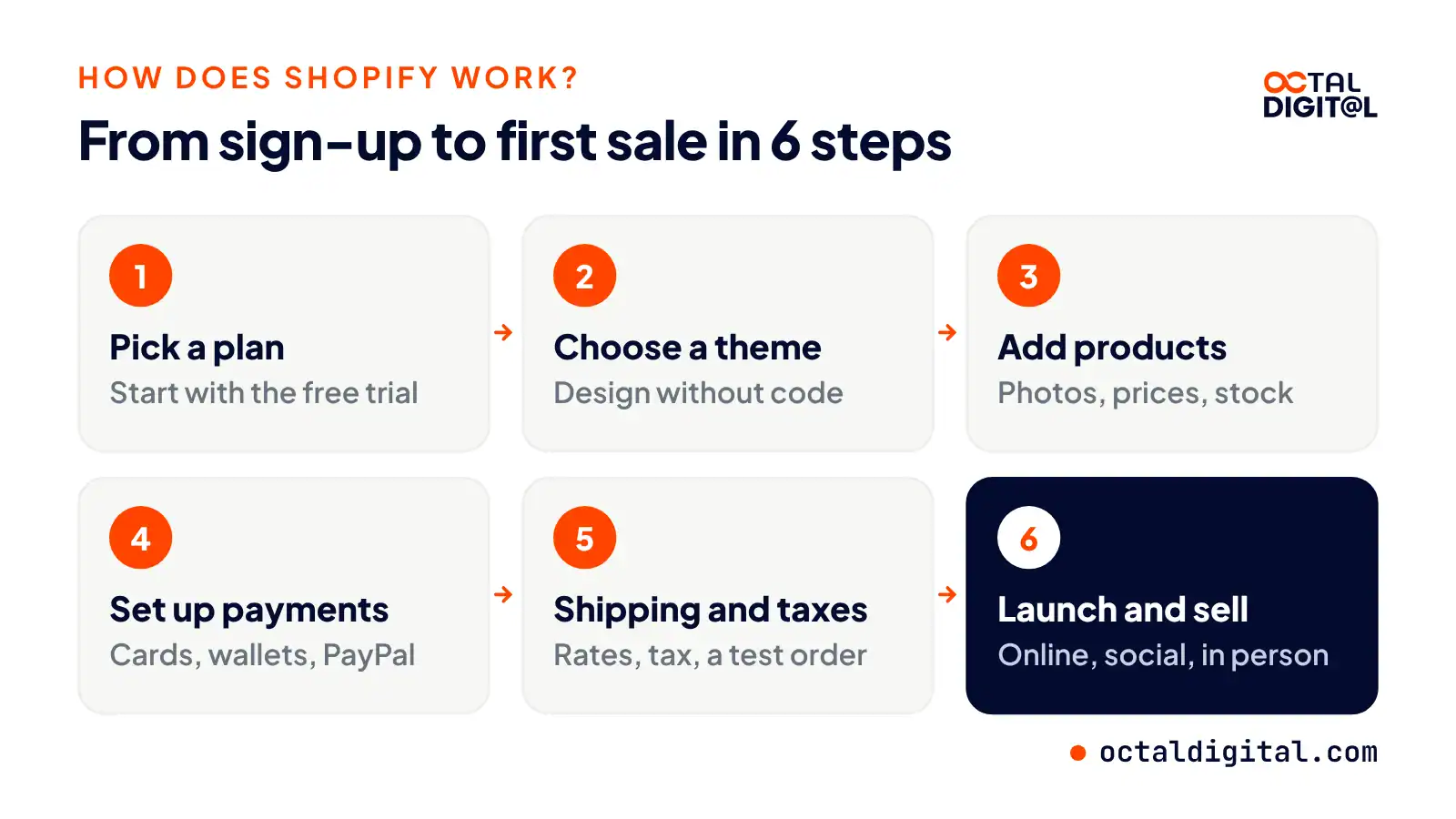
Step 1: Sign up and pick a plan
The first step to opening a store is choosing a plan. This will help you decide which features your store gets. A good plan should match your current sales and offer room to grow. You can start with the free trial ($1 a month for the first 3 months after it) and test which features matter to your business before committing to a plan that has a fair monthly price.
Step 2: Choose a theme and design your store
It’s important to make note of the look you want your store to have. One part of the store setup process you should pay careful attention to is the shopping experience. How shoppers move through your store will affect its sales. When picking a store’s theme, consider things like brand colors, font style, product photos, and phone screens.
Step 3: Add your products
You should add your products with clear product descriptions. This will help to make sure you will list a product that isn’t confusing to someone browsing. This will also let you set prices, variants and inventory counts, as well as show you any gaps you should fill before opening your store to shoppers.
Step 4: Set up payments and checkout
You can choose Shopify Payments or a third-party payment provider, depending on the actual country you want your store to sell in. Shopify Payments refers to Shopify’s own built-in payment processing for a supported country.
Third-party payment gateways, on the other hand, allow you to accept payments through other providers. For example, you could add both PayPal and Amazon Pay, which would be offered at checkout next to Shop Pay and Apple Pay.
Step 5: Set shipping and taxes
Once you have carefully planned all aspects of your future store, you can proceed to the shipping setup. You should collect all the necessary rates and settings before you begin to sell your products. Shopify plans come with a shipping settings section that allows owners to customize the shipping rates.
Before the launch process, ensure you set up sales tax collection. It will help you charge the right tax for your shoppers, based on their location. You should also consider placing a test order once you finish your store’s settings. That test will help you improve the flow of the checkout and remove any errors you missed.
Step 6: Launch and sell everywhere
Finally, you can launch your store by opening it to shoppers on several channels. For instance, you can sell on your own website or on Instagram and TikTok and allow actual shoppers to buy from the same catalog. Once orders have arrived from the different channels, they’ll be easy to manage in the Shopify admin to print labels and track stock.
Another way you can grow your store is by selling in person at specific events. Some sellers use Shopify POS at a market, which gives local shoppers time to see products and give feedback. If your store is good, existing shoppers may come back for more and new shoppers will be able to discover your store thanks to the existing shoppers’ reviews.
Octal Digital has built 100+ Shopify stores, from theme setup to custom apps. Get a free consultation and a clear, fixed quote.
- A written scope and cost range
- Fixed price or hourly, your choice
- 5.0 rating from 250+ client reviews
What is Shopify used for?
While Shopify stores haven’t replaced the big marketplaces like Amazon, they enable sellers to sell nearly any product they make to their own customers.
Want to sell candles? There are stores for that. Do you offer a particular type of service? There’s a store for that, too. If another channel, like TikTok Shop, starts getting attention, you can bet there’s an app that will connect the catalog.
The catch is that Shopify stores need their own promotion. Even on this list, some store types are easier to sell from a marketplace. Yet, the store occupies a central place in your brand, so it can be there and do things when a marketplace can’t.
Physical products
Physical goods like clothing, candles and skincare that you pack, ship, and track through orders with a clean, simple admin.
The best part is that you can use Shopify shipping labels, with savings of up to 88% on USPS labels for US stores, with many carrier services. This way, you can quickly print your next shipping labels without leaving the admin.
Digital products
Digital products are a fair choice for anyone who sells downloads, though their simple delivery won’t suit everyone. They cover files like ebooks, templates, and music, sending them in real time and automatically emailing them to the buyer.
However, you can also now add a digital downloads app to Shopify and use the same checkout, making a separate platform somewhat redundant.
Services and bookings
Services can be a fair fit for a Shopify store. With a booking app, it’s a fairly simple setup that shows times for the morning/afternoon/evening and allows clients to book their slots.
A booking app will take deposits, send reminders, and also act as a client calendar, which is really handy. The paid apps offer further options, but this is a setup that works for many service businesses.
Subscriptions
Many brands find subscriptions while searching for a set of Shopify options that would bring in repeat income. While you can combine three or four different apps for the best setup, a subscription app does most of the work in one place.
It will handle billing, renewals, skips, swaps, cancellations, and reminders and allow you to keep a record of your subscriber habits, all in one place. The checkout flow is bang-on, although some settings can get confusing.
If you’re interested in boxes but don’t want to add a second platform, this will satisfy your curiosity, even if the setup doesn’t seem quite as simple.
Wholesale (B2B)
One of several platforms that use the same store to handle bulk orders, Shopify can be used for retail and wholesale by brands looking to sell to shops.
A B2B setup that provides price lists, order limits, and payment terms to help close trade orders, Shopify also offers company accounts, catalogs and payment terms, with the full set on Plus.
In-person sales
The POS (Point of Sale) app is included for store owners.
Shopify POS is designed for retailers, offering card payments, staff logins, and stock tracking. You can take payments at markets and pop-ups with it, for some added reach and sales for your brand. It will also connect to the online store so you can sync your stock across channels, which solves a common problem with separate tills.
Shopify stores prove that this platform is more than just an online shop builder, as it can be used for retail, subscriptions, and wholesale.
How much does Shopify cost?
In general, the Shopify plan cost is somewhere between $29 and $399 a month. But, it can climb to $2,300+ for Plus stores.
We’ve roughly grouped three categories of plans by their features to show how the typical cost to run a store is estimated (based on yearly billing, with monthly billing in brackets).
| Plan | Price per month |
|---|---|
| Basic | $29 billed yearly ($39 monthly) |
| Grow | $89 billed yearly ($105 monthly) |
| Advanced | $359 billed yearly ($399 monthly) |
| Plus | From $2,300 on a 3-year term |
Basic
These are plans with a basic set of features, such as online store, checkout, product listings, simple reports, and an owner account. The usual fit for such plans is a solo founder or a new store. Basic plan cost is around $29 to $39 a month.
Grow and Advanced
Grow and Advanced plans are more useful to growing brands as they contain more staff accounts, lower card rates, and a bunch of reports. The examples of such stores are clothing brands, beauty shops, home goods stores, and multi-location retailers. Plan costs run between $89 and $399 a month.
Shopify Plus
Plus stores come with custom checkout, unlimited staff accounts, B2B features, hence showing a high level of scale. For instance, when a large brand decides to move from a self-hosted Magento system to a hosted one. In this case, the price will be steeper. Costs of running Plus start from $2,300 a month on a 3-year term.
Extra costs on top of the plan
Beyond the plan, themes, and hardware for in-person sales, there are hidden costs to keep in mind when you plan the budget for a Shopify store. Let’s go through them.
| Cost | What to expect |
|---|---|
| Online card rate (Shopify Payments) | 2.9% + 30 cents on Basic, down to 2.25% + 30 cents on Plus |
| Third-party payment provider fee | 2% on Basic, 1% on Grow, 0.6% on Advanced, 0.2% on Plus |
| Apps | Free to paid monthly plans |
| Premium themes | One-time fee |
| POS Pro | $89 a month per location |
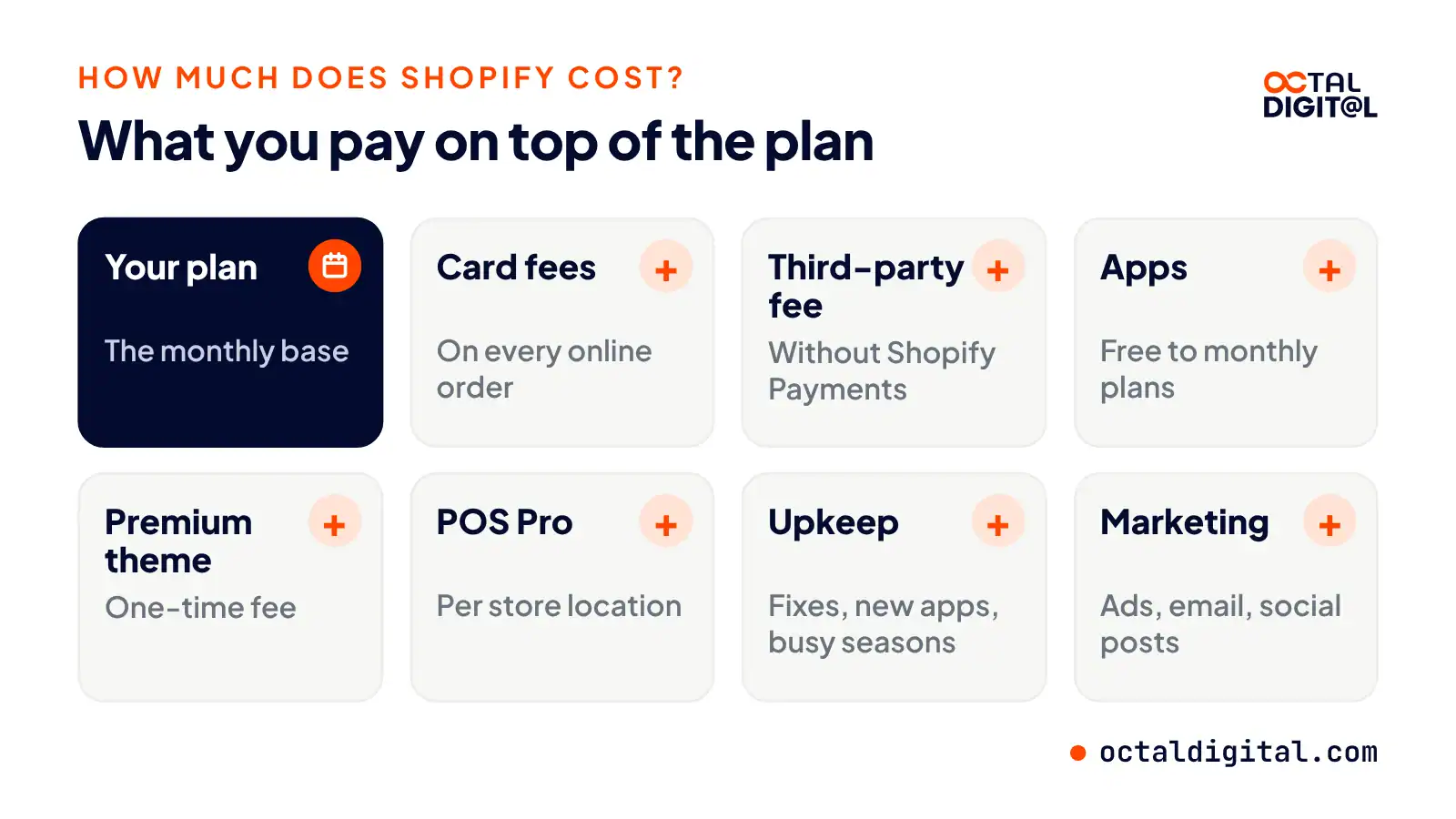
Apart from the fee paid to Shopify for the plan, there are also fees for card (payment) processing. The more payment methods you want to accept (e.g., credit cards, PayPal, Amazon Pay, international cards, etc.), the more your fees can vary per sale.
Roughly, the online card rates, like the fee on Basic, are about 2.9% + 30 cents per order. The rate will depend on the plan of your store and the provider of a certain payment for your checkout.
The Shopify App Store is surely a very handy tool for adding store features, reviews and emails. There are options to adopt free themes and apps for your needs, but finding the right one takes time. So it can make sense to buy an adequate theme to meet your brand requirements.
Depending on the store’s needs and its features, paid apps and themes can range from a few dollars a month for a basic app to a one-time fee for a premium theme.
Another point to weigh is how much does it cost to maintain a store. It usually includes theme fixes, adding new apps, getting ready for a busy sales season, and so on. It also comes down to how many changes you’d like to make per year and how complicated they are.
You should also think of setting aside a sum for your marketing plan to launch the Shopify store to attract first buyers. When it comes to planning the store marketing budget, the amount is individual. Some founders manage to start with ads, email and social posts. While others are happy to spend thousands of dollars on store promotion.
Is Shopify legit and safe?
There’s no getting around it: Shopify is a legitimate company that is traded on the stock market. Although you can find a fake shop on Shopify now and then (check the FTC’s advice here to see how to spot one), to judge the platform itself, you’re going to have to look at its security.
If you want to run a safe Shopify store and you have no security background, the best first stop is Shopify’s own security page. Compliance programs like PCI DSS and SOC 2 set strict security checks for companies that handle sensitive data, like Shopify, Stripe, and PayPal.
The checks and audits are the same ones card networks require of large payment companies, and outside auditors even review the results, all on Shopify’s side. However, your side does take some effort. The PCI DSS standard, for example, is met at Level 1, the highest level, and it will give your shoppers a solid layer of protection.
If you’re looking to start quickly (and have a little tech background), a plan like Basic with Shopify Payments could be a smart course of action. It comes with free SSL certificates and fraud analysis on orders, and covers the basic checks you’ll need to run a secure store.
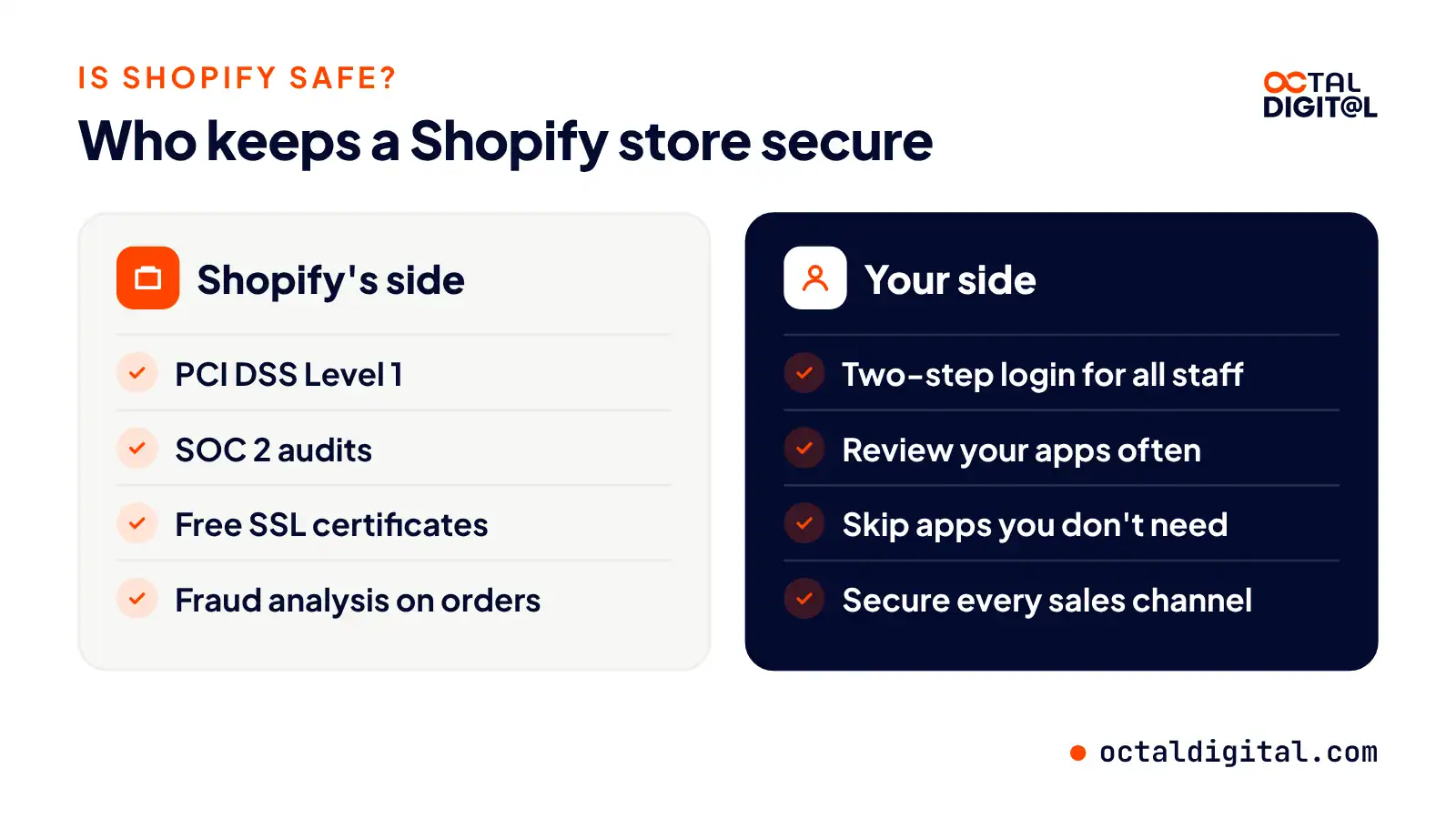
Basic platform security isn’t always enough to protect a busy store. Want it to be safe from account takeovers? You’ll need to turn on two-step login for every staff account. Want to keep apps in check? Some regular reviews (or a Shopify support and maintenance plan) wouldn’t hurt. Want to sell on many channels? You’ll have to secure each connection or hire someone who does.
None of this is beyond you, especially if you have a simple store. Owners can and do learn Shopify security on their own every day. But it’s important to be honest about the risks and decide whether it makes more sense to do the checks, hire a team, or skip the apps you don’t need.
Risks from third-party apps can vary greatly. Reports showed a malicious script in several Shopify stores in October 2026, after an app was compromised (rare, though it does happen).
Why so risky? Well, there’s a lot that goes into a modern store. One of the biggest risks is your apps’ access. Many Shopify stores run several apps, which could be reading store data for as long as they stay installed.
We move products, customers, orders and SEO URLs from WooCommerce, Wix, BigCommerce and Adobe Commerce to Shopify.
Shopify pros and cons
Now, there are plenty of upsides to Shopify for most sellers. Every plan comes with hosting, checkout and payments, from Basic to Plus. Frankly, the downsides are worth knowing too. But a good fit is a godsend, giving you a store you can run without code. Better, the security is often handled by Shopify’s team, meaning your checkout is also kept compliant when you take payments.
There’s a hard side to all of those features, however. Namely that you can end up paying for the apps that cover your every store need. Whether you gravitate toward reviews, subscriptions, upsells, or loyalty points, there’s a paid app out there waiting for you.
Pros:
- Shopify is a subscription-based platform that hosts your store, custom domain and checkout at a set price during the year (monthly or yearly).
- Shopify directly runs the servers and updates, but in some cases, apps and outside tools add features.
- The Shopify checkout comes with a long list of payment methods built straight into your store.
- In addition to the store, sellers often get free tools for the online channels they sell on, including Instagram and TikTok.
- Many times, sellers will get lower card rates and extra staff accounts on higher plans.
Cons:
- Most times when you add a feature, you will find a paid app and be offered a chance to install it on the spot.
- Since apps are a big source of monthly costs for stores, some will really add up, so make sure to do your homework before committing.
- Also, look at the transaction fees, as when you use a third-party payment provider instead of Shopify Payments, Shopify adds an extra fee of 2% on Basic down to 0.2% on Plus that you may not have had the time to notice.
- Before signing up for a plan, make sure to research the code limits in your theme, as some deep changes need a developer who knows Liquid.
Shopify vs other ecommerce platforms
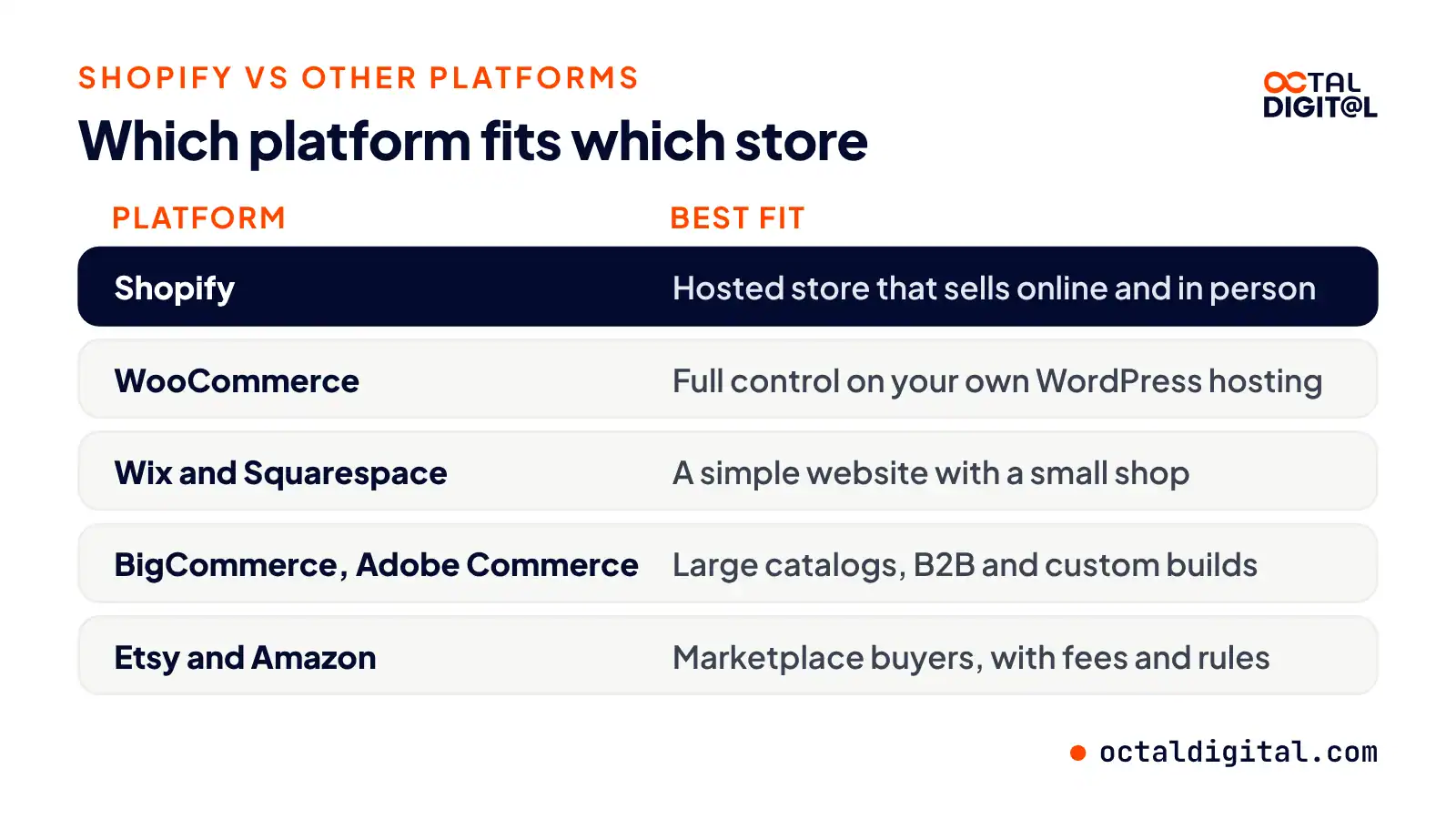
Shopify vs WooCommerce
Developers say great things about WooCommerce, which gets its plugins from all over the place. We’re talking open-source WordPress code that you and your host patch and update every so often, if not weekly.
The stores are set up on your own hosting, and there’s even an ongoing need for updates wherein the owner works with a host or developer to choose the plugins and handle the website security for each store. WordPress setup can be intimidating, but WooCommerce gives more control than Shopify’s hosted setup. Another perk? The content tools are well-built and create valuable blog pages as you wonder what exactly to write next.
Shopify vs Wix and Squarespace
If you’re looking for a simple website with a shop, Wix or Squarespace is up to the job. You may recognize the names, as the brands have been around for years, beginning as website builders set up to help small businesses make their first sites.
Today, they’re all-in-one builders of clean, design-friendly sites used all over the world. The builders set owners up with pages they can edit no matter what they’re selling on the side. The store features on both come as add-ons to a website, so show up with a small catalog or a portfolio-first brand to make your setup work.
Shopify vs BigCommerce and Adobe Commerce
As the names suggest, you get a commerce engine with these bigger platforms. That means built-in features from all over the B2B map, like price lists, quote requests, or large catalogs.
Of the two platforms, Adobe Commerce is perhaps the more flexible, an enterprise system that sets you up to build a proper custom store and shape your checkout. The code is editable so you can build through and try to fit any process you have, much like a custom build in development. On top of its hosted core, BigCommerce also offers B2B editions and a general app marketplace full of integrations.
Shopify vs Etsy and Amazon
Two of the great marketplaces of the world, Etsy and Amazon also offer some quality selling options. The companies bring the same flow of buyers to your listings that they bring to their own catalogs every day.
There are clear limits in each listing on the marketplace too, like strict branding rules, fees, and seller policies. Presently, both work very differently from a Shopify store, from Etsy’s handmade focus to Amazon’s huge catalog of everyday goods. If you already sell on Amazon or eBay, you can connect your listings to Shopify with its Marketplace Connect app and save on separate inventory tracking.
Who should use Shopify (and who should not)?
Whether you’re looking to test some new product ideas or build up a serious brand, Shopify is a simple route for many sellers to do so. If you need full control of the code, we encourage you to look at WooCommerce or Adobe Commerce and talk to a developer about your options. If there’s no tech team in your business, or you simply want a store that works from day one in the US and abroad, try one of these Shopify plans.
How to start a Shopify store, and when to hire a developer
So you’ve finally decided that it’s time to open a Shopify store. Whether you’re building a brand from scratch or moving one from another platform, the first step is working out how you’re going to build it.
You can learn how to set up a Shopify store on your own, and that’s realistic for many sellers. Hiring Shopify development services offers a custom, faster build instead.
Do you know how to use Liquid code for themes? I’m willing to bet that’s not part of your current skill set. Don’t get me wrong, it’s not impossible to pick up Liquid. But do you really have the hours for that?
If you’re currently running a business, I’m sure that eats enough hours out of your week as it is. I don’t want to stop you from learning a new store builder for online selling, but I’m just trying to be honest. As someone in this field, I know how much time and work it takes to set up a store properly.
Experience has shown me that the first store someone builds after a weekend tutorial isn’t going to be perfect. If your store has slow pages, broken apps, or other issues it can increase the chances of cart abandonment. You don’t want to land in that category.
So if you’d rather not learn the code yourself, I’ll give you the most sensible option. Hire a Shopify developer.
If you begin to shop around, you’ll find that there are lots of different agencies, from Shopify developers in Houston to offshore freelancers, and price ranges. You may be tempted to simply go with the cheapest freelancer, but you don’t want to cut corners on the store. On the flip side, you shouldn’t automatically pick the priciest agency.
Our Shopify support and maintenance team handles updates, app reviews, speed fixes and security checks, so you can focus on sales.
- A written scope and cost range
- Fixed price or hourly, your choice
- 5.0 rating from 250+ client reviews
FAQs
Is Shopify free?
In short, we’ve found that Shopify isn’t free after the trial, but the 3-day trial and the $1-a-month offer for 3 months have tiny starting costs and let new sellers test most of their store tools.
How much does Shopify take from a $100 sale?
If you sell on the Basic plan with Shopify Payments, $3.20 is the fee on a $100 online sale. If you sell on a higher plan, Grow, Advanced, and Plus have lower card rates per sale.
Do I need coding skills to use Shopify?
Fortunately, Shopify does not need any coding for its basic stores. In fact, most theme edits don’t require this skill. In our experience, custom themes and apps were the main store tasks that need a developer for Liquid.
Is Shopify the same as Amazon?
Brands use Shopify as their own store, not as a marketplace. That means you can run your Shopify store and sell on Amazon at once, which can help you pick the best mix of sales channels to work for your brand. Just be sure to plan carefully so you don’t take on an unrealistic number of listings and consider how it might raise costs like fees and stock management.
What can you sell on Shopify?
The best products to sell may depend on several factors. Shopify is an excellent option for physical goods, such as clothing, beauty and home products. Other options, like digital downloads, are not built in by default and need a free or paid app. There are many different setups for Shopify stores, so it’s important to know what you are selling to decide on the best setup.
What is the difference between Shopify and Shopify Plus?
Shopify Plus gives brands custom checkout and unlimited staff from $2,300 a month, but Shopify quotes that price on a 3-year term. Standard plans, however, are open to new sellers across the U.S. and beyond and offer monthly billing so stores can start smaller than Plus, since they pay by the month.
Have a project in mind? Get a free consultation.
Tell us what you want to build. We reply with next steps, a rough timeline and a cost range.
(800) 995-3369
Matthew Jones supports Octal Digital as a Digital Strategist and trusted technology advisor, helping guide clients through scalable solutions, emerging tools, and smart development strategies that align with business goals and growth.