Key Takeaways
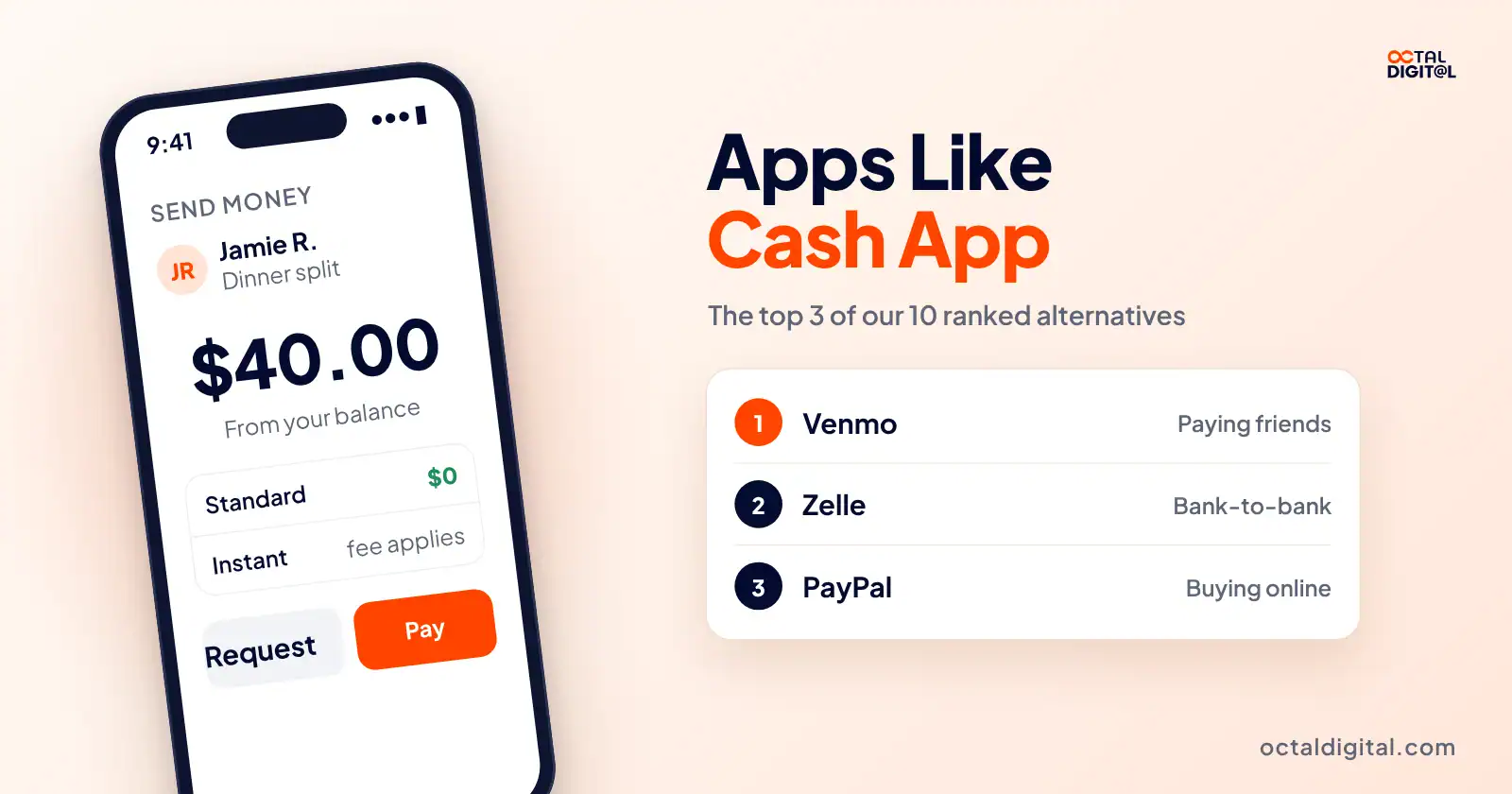
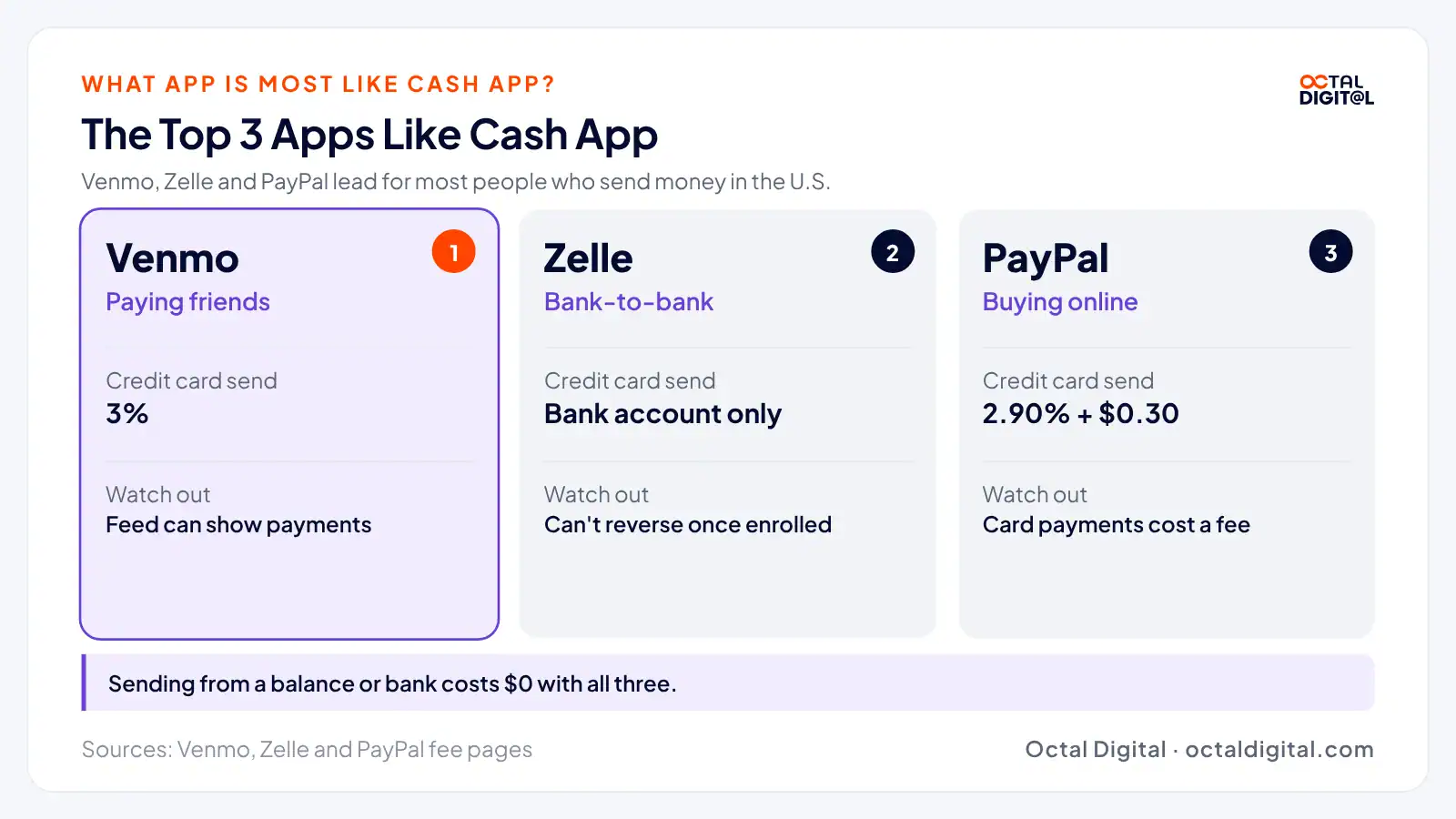
1 min summary- While it seems simple to send money with any app, Venmo, Zelle, and PayPal are our top three apps like Cash App for most people.
- These apps typically cost nothing to send from a balance or bank, as long as you skip credit cards and instant transfers.
- If you're new to instant transfers, you might want to compare fees first, since Venmo and PayPal charge 1.75% and Apple Cash charges 1.7%.
- For the most part, these apps allow you to pay whenever is best for you, but always check the name first, since Zelle payments can't be reversed once you send them.
- Make sure that you're using an iPhone or Apple Watch if you want to send money with Apple Cash in Messages.
- These apps are easy to use, and the 1099-K rule is pretty clear: over $20,000 in more than 200 payments for goods or services.
- Even if you don't have a Chime account, you can still get money from Chime members through Pay Anyone at no fee.
With all of the different P2P payment apps out there, it can be hard to work out which is the best app like Cash App to switch to.
Which app charges the least, or which one’s the easiest to send with? We did the checking, so you don’t have to.
Our list of the best apps like Cash App is based on three criteria: fees, speed, and safety because these are three things that people who send money care about the most.
Below, you’ll find our ranked list of the best Cash App alternatives, all checked against each app’s own pages.
What App Is Most Like Cash App?
Venmo may be the app most similar to Cash App, but here at Octal Digital, we always say you need to look at which apps your friends and family send and receive with, so finding the best Cash App alternative for you depends on them.
While many of the apps we’re going to discuss work a little differently than Cash App, you may find you can keep more money in your pocket sending with a different app than you can with the one you use now.
10 Best Money Apps Like Cash App in 2026
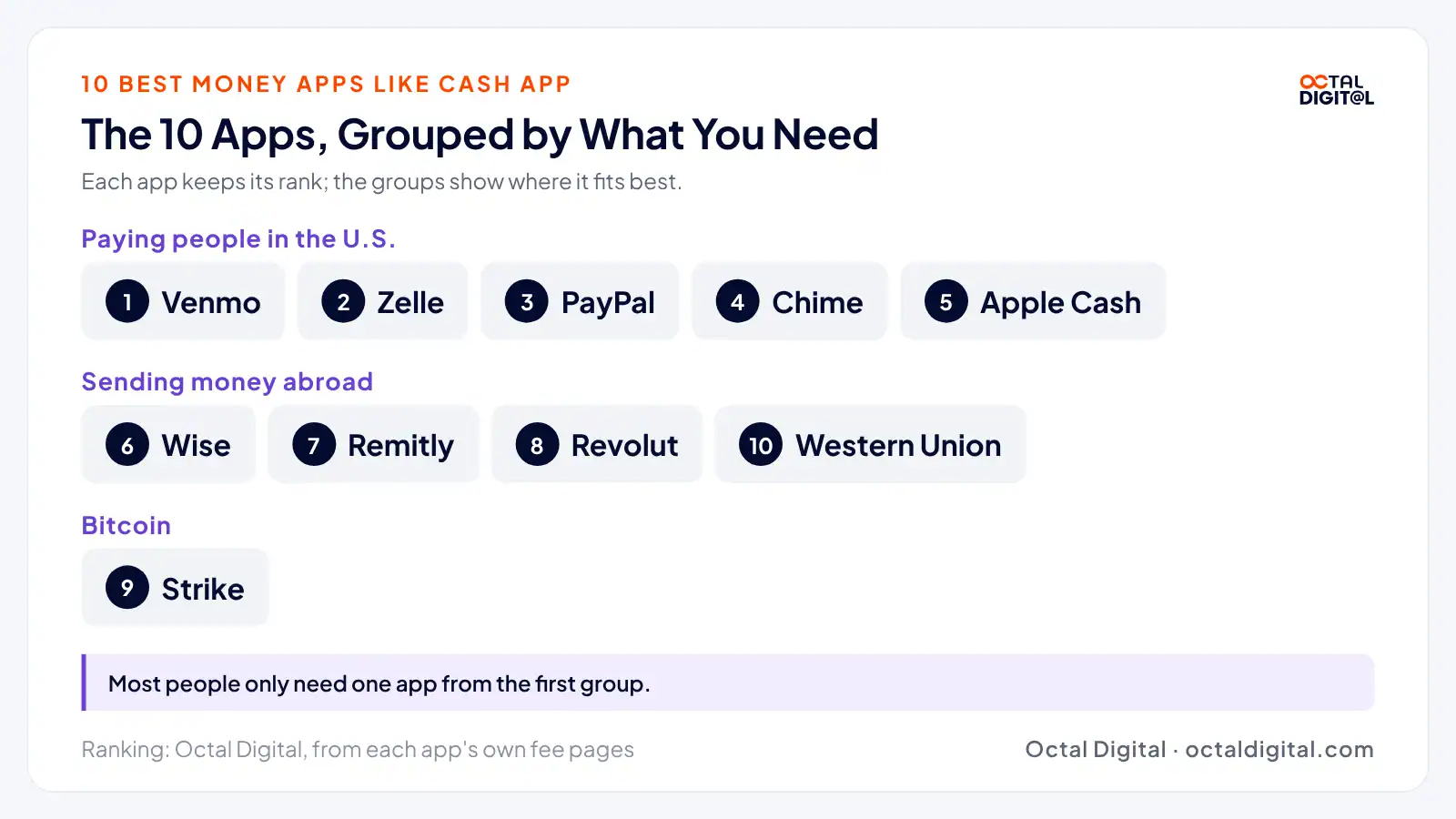
Here are the best apps like Cash App to send money with now:
| App | Best for |
|---|---|
| Venmo | Paying friends |
| Zelle | Free bank-to-bank transfers |
| PayPal | Buying online and larger payments |
| Chime | Free instant cash-out |
| Apple Cash | iPhone users |
| Wise | Sending money abroad |
| Remitly | Family in other countries |
| Revolut | More than one currency |
| Strike | Buying bitcoin |
| Western Union | Cash pickup |
1. Venmo
- Best for: Venmo is best for paying friends.
Venmo is a payment app where you send money to friends and pay back the people who covered the bill. How much you pay to use Venmo depends on your funding source and when you need the money in your bank.
As a Venmo user, you’ll likely pay less to send from your balance or linked bank account than from a credit card or an Instant Transfer. Venmo will charge you a fee when you move money out right away, so you can get it in minutes. It’s a good idea to use the free standard transfer when you can wait.
You can also get a Venmo Debit Card right in the app. This will help you spend your balance and keep it in one place. In this case, you pay at any store that takes Mastercard and skip the transfer to your bank.
Venmo Fees:
- Sending from your balance, bank, or debit card: $0
- Sending with a credit card: 3%
- Instant Transfer: 1.75% ($0.25 minimum, $25 maximum)
Pros:
- Works like Cash App for splitting bills
Cons:
- Payments can show on a social feed unless you change your privacy settings
2. Zelle
- Best for: Zelle is best for free bank-to-bank transfers.
Zelle is most definitely one of the best apps like Cash App to send money with. When you’re out paying people back, Zelle works as a separate tool, and it’s one of the fastest ways to send money to someone with a bank account.
Zelle is attractive because it’s typically a free payment option. The best feature of Zelle is that banks and credit unions typically charge nothing to send or receive.
If you’re looking to pay rent or a friend, Zelle can help with your plan. Since it lives inside so many bank apps, you can open your bank’s app and send money in minutes to people who are enrolled.
Zelle payments can’t be reversed once they’re sent. Zelle says qualifying imposter scams may be eligible for reimbursement, so check with your bank right away if one happens.
Zelle Fees:
- Typically $0 to send or receive
- Have a U.S. bank or credit union account
- Use your bank’s mobile banking app or online banking for payments
- Check the sending limits with your bank
Pros:
- Typically free at banks and credit unions
- Built into the banking app you already use
Cons:
- Payments to enrolled users can’t be canceled or reversed once you send them
3. PayPal
- Best for: PayPal is best for buying online and larger payments.
As a PayPal user, you pay and get paid by people and stores from the same account.
In most cases, you can send money as a personal payment, a goods and services payment, or an international payment where you pay an extra fee before it goes out. The more carefully you pick the payment type, the better your protection can be.
To send PayPal money for free, you need to fund it from your balance or bank and send it as a personal payment. You can pay with a card as well, but it costs a fee every time.
PayPal’s rules call for sticking to goods and services payments for anything you buy. This may let you get Purchase Protection.
PayPal is a great way to pay online stores fast, which is why it’s one of the best apps like Cash App to use.
PayPal Fees:
- Personal payment from your balance or bank: $0
- Personal payment with a card: 2.90% plus $0.30
- International personal payment: an extra 5% ($0.99 to $4.99)
- Instant transfer to a bank or debit card: 1.75% ($0.25 to $25)
- Instant transfer limit to a debit card: $5,000 per transaction, day, or week
Pros:
- Good for online shopping at stores that take PayPal
Cons:
- Card payments come with a fee
- Fees add up on international payments
4. Chime
- Best for: Chime is best for free instant cash-out. If you’re not a Chime member, you’ll still get paid by Chime members with a debit card.
Chime works as a banking app designed to hold your paycheck through direct deposit and spend from a debit card. This often means few fees, but there’s no way to send money unless you open a Chime account.
However, since Chime opened Pay Anyone to people who don’t bank with it, Chime has had a wider reach. Instead of being limited to a group of other members, Chime users can also send money to anyone with a debit card, which opens up the app to friends who bank somewhere else.
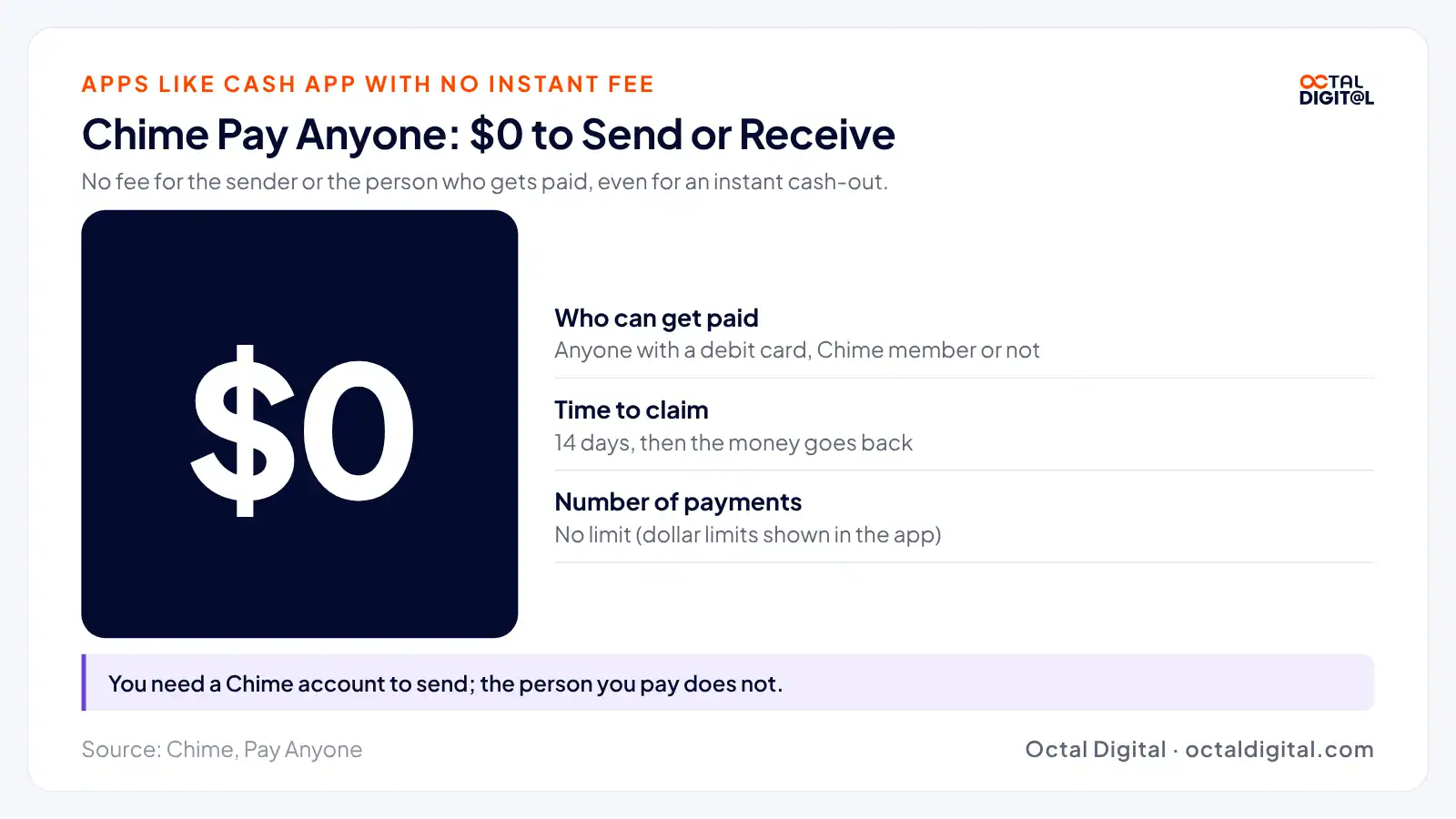
Chime’s Pay Anyone works a lot like Zelle: you pay no fee when you send a payment, including the transfer, the claim, and any instant cash-out the person picks.
Chime Pay Anyone Fees:
- $0 to send or receive money
- Non-members claim the money with a debit card
- Unclaimed money goes back after 14 days
- Dollar limits are shown in the app
Pros:
- Free instant cash-out for the person you pay
- No limit on the number of payments
Cons:
- You need a Chime account to send money
- Dollar limits vary
5. Apple Cash
- Best for: Apple Cash is best for iPhone users.
For those of you who aren’t familiar with Apple Cash, it’s a digital card in the Wallet app that works with Apple Pay. Similar to Venmo, you get to send money to friends (usually in Messages) and then spend the balance in stores or online.
The Wallet app makes all of this easy, showing you exactly what you sent.
Apple Cash was built for iPhone and Apple Watch, so a lot of the sending will take place inside Messages. You’ve also got the option to send from Wallet, which adds some flexibility to the payment experience.
The transfer fee depends on speed, but Apple’s support page says Instant Transfer costs 1.7% of the amount, with a $0.25 minimum and a $25 maximum.
Apple Cash Fees:
- Must use an eligible iPhone or Apple Watch
- Standard transfer to a bank: free
- Standard transfers take 1 to 3 business days
- Instant Transfer to a debit card: 1.7%
- Lowest Instant Transfer fee: $0.25
- Highest Instant Transfer fee: $25
Pros:
- Lets you send money right from Messages
Cons:
- Only works on Apple devices
- Instant Transfer fee went up in February 2026
6. Wise
- Best for: Wise is best for sending money abroad.
From looking at Wise’s pricing page, we’ve found Wise fees start from around 0.23% of the amount you send.
On every transfer, Wise uses the mid-market exchange rate for the currency you pick at that time of the day. Using the mid-market rate keeps the cost easy to see, but each currency has a different fee on top of it.
You can send from your bank or a Wise account, and Wise is generally big on listing its fees for each currency, even though the final cost still depends on which currency you choose.
You’ll also be limited to sending money, not the social payments Cash App is known for. For most people who split bills at home, that won’t be a big problem. But there will be times when you need to split a bill and wish you could do it in Wise.
Wise Fees:
- Fees start from 0.23%
- The fee changes by currency
- Uses the mid-market exchange rate
- Sends to bank accounts in other countries
Pros:
- Shows the real exchange rate
Cons:
- Not built for splitting bills with friends
7. Remitly
- Best for: Remitly is best for sending money to family in other countries
If you send money to family abroad and want a slightly different option than Wise, look at Remitly. The app helps people send money to another country and have it delivered the way their family needs it.
As a (brand new) customer, you pay no fee on the first transfer you make. But you also get to pick your transfer speed.
Between the Economy fee and the Express fee, you can pay less with Economy than with Express when you aren’t in a rush.
Delivery times depend on the country you send to, and the speed also depends on the delivery method and when you send it.
- Fees depend on the amount, payment method, and delivery speed
- Economy costs less than Express
- New customers pay no fee on their first transfer
- Delivery time depends on the country and method
Pros:
- Choice of Economy or Express delivery
Cons:
- Fees change by country and amount
8. Revolut
- Best for: Revolut is best for spending and sending in more than one currency
Right now, sending money to other Revolut users is an easy win. Our look at Revolut’s U.S. fee page found transfers between Revolut customers cost nothing at all. That’s handy if someone you send money to already has the app.
Judging by the Standard plan, there’s no monthly fee to get started, but there are fees for some transfers out.
Instant transfers are sent from your Revolut account to an outside debit card. U.S. cards typically cost up to 2% or $1, whichever is greater.
Sending to a U.S. bank by wire and sending abroad are also options. Wires cost $10 each, and local-currency international transfers cost 0.15% ($0.75 minimum).
Revolut Fees:
- Standard plan: no monthly fee
- Transfers to other Revolut users: $0
- Instant transfer to a U.S. card: up to 2% or $1, whichever is greater
- U.S. domestic wire: $10
- Local-currency international transfer: 0.15% ($0.75 minimum)
Pros:
- No fee between Revolut users
Cons:
- Fees on instant card transfers
- The person you pay needs Revolut for a free transfer
9. Strike
- Best for: Strike is best for buying bitcoin.
Strike lets users buy bitcoin, send money, and hold cash in one app. Think of Strike as basically a bitcoin app with payments built in.
Strike’s buying fee starts at 0.89% but there are lower fees available for bigger monthly volume. While you do pay a fee on one-time buys, recurring purchases are free after the first week, so you can buy on a schedule at no fee.
Its fee setup is simple. First, your monthly trading volume sets your fee tier. You then buy at that tier’s rate and hold or send the bitcoin. Some products may not be offered in every region, so there’s no assuming every feature works where you live.
Strike Fees:
- Buying fee: 0.89% for up to $4,999.99 a month
- Lowest buying fee: 0.25% at the highest volume
- Recurring buys: free after the first week
- Licensed by the New York State Department of Financial Services
Pros:
- Low bitcoin buying fees
- Free recurring buys
- Built around bitcoin
Cons:
- Some features aren’t offered in every region
- Not built for splitting bills
10. Western Union
- Best for: Western Union is best for cash pickup.
Western Union is a money transfer service around the world that allows for cash pickup of money sent by customers. It’s similar to Remitly, and you can pick a delivery method and also send to a bank, a debit card, or a mobile wallet.
The cost comes from the fee for the amount you send or the exchange rate on money sent to another country.
Western Union Fees:
- Fees depend on the amount you send
- Fees depend on the country you send to
- Credit card payments may cost more
- Cash pickup, bank, debit card, and mobile wallet delivery have different fees
- Western Union also makes money on the exchange rate
Pros:
- Hundreds of thousands of agent locations
- Sends to about 200 countries and territories
Cons:
- Credit card payments can cost more
- Fees change a lot by country and amount
- The exchange rate adds to the cost
Octal Digital's app team can scope your P2P app in a free consultation.
- A written scope and cost range
- Fixed price or hourly, your choice
- 5.0 rating from 250+ client reviews
Apps Like Cash App With a Debit Card
Apps like Cash App with a debit card (and banking apps like Cash App, such as Chime) are platforms that let you spend your balance whenever you shop. Some of these apps also come with cash back offers and other features that can be useful for people who want to skip moving money back to their bank.
Cards like Cash App’s can give you quick access to your money and be useful at the register. They’re especially helpful for people who get paid back by friends on a regular basis.
How Do Cash App Alternatives With a Card Work?
Debit cards from payment apps use your app balance to pay for what you’re buying and record the purchase so you can see it later.
The best of these cards are simple: they spend your balance without you having to manually move money to a bank account first.
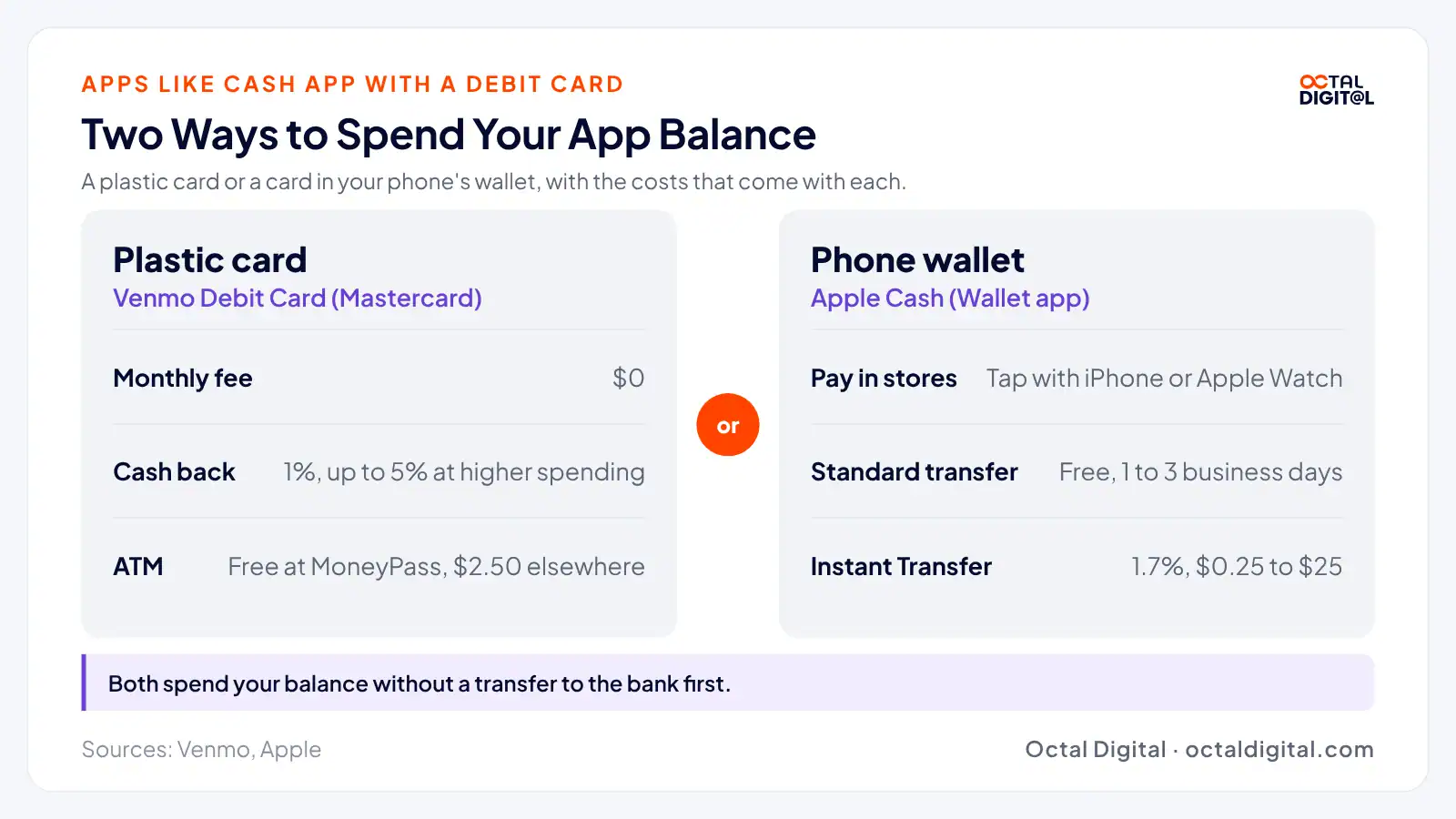
Some cards come as a plastic card and work wherever Mastercard is taken, like the Venmo Debit Card. Others live in your phone’s wallet, like Apple Cash, which you tap to pay in stores.
It’s important to check a card’s fees to keep more of your balance for shopping or cash withdrawals.
Since the Venmo Debit Card has no monthly fee, it’s important to know where ATM fees come in.
Venmo users can take cash out for free at MoneyPass ATMs in the U.S. with the card.
While Venmo gives you 1% cash back on the card (and up to 5% at higher monthly spending), it charges $2.50 at ATMs outside the MoneyPass network.
Apps Like Cash App for Android
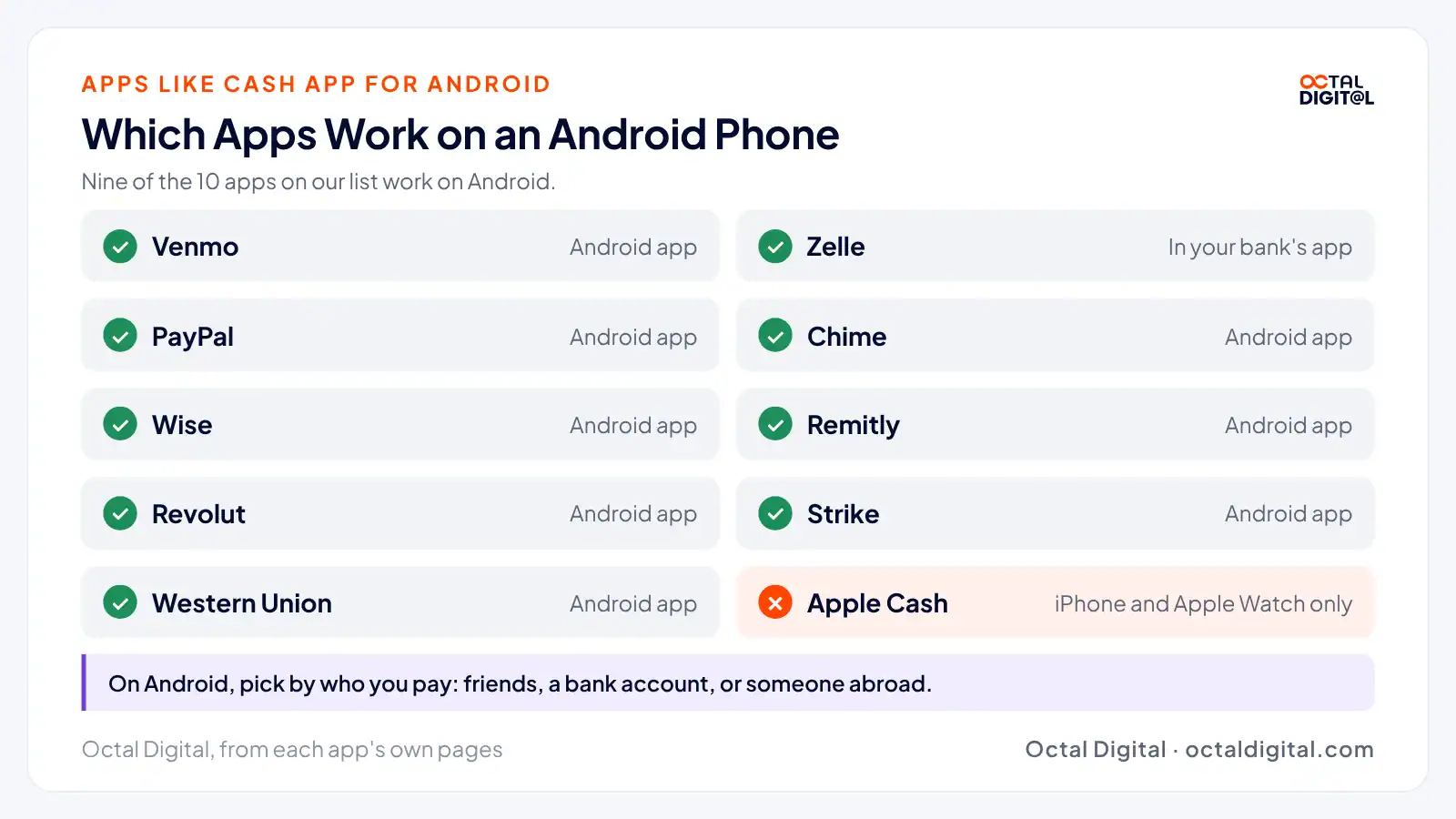
Apart from Apple Cash, every app on our list works on both Android phones and iPhones.
Venmo features a pay and request screen that allows Android users to use the Venmo app to pay for their share of a bill.
For Zelle, there is no separate app to download, because you send money from your own bank’s app as an Android user.
Android users can pick from most of the apps on this list, including Venmo, Zelle, PayPal, Chime, Wise, Remitly, Revolut, Strike, and Western Union. The one you choose depends on who you pay and how fast they need the money.
Apps Like Cash App for Bitcoin
Cash App may sound like it’s the only payment app for buying bitcoin, but Venmo and PayPal also offer crypto buying and selling, with fees on each trade. Strike also offers bitcoin as its main product.
Strike lets buyers set up recurring purchases they can repeat week after week. Recurring buys are free after the first week, giving buyers a cheaper option for building up bitcoin over time. It also lets buyers with big monthly volume pay as little as 0.25% on each buy.
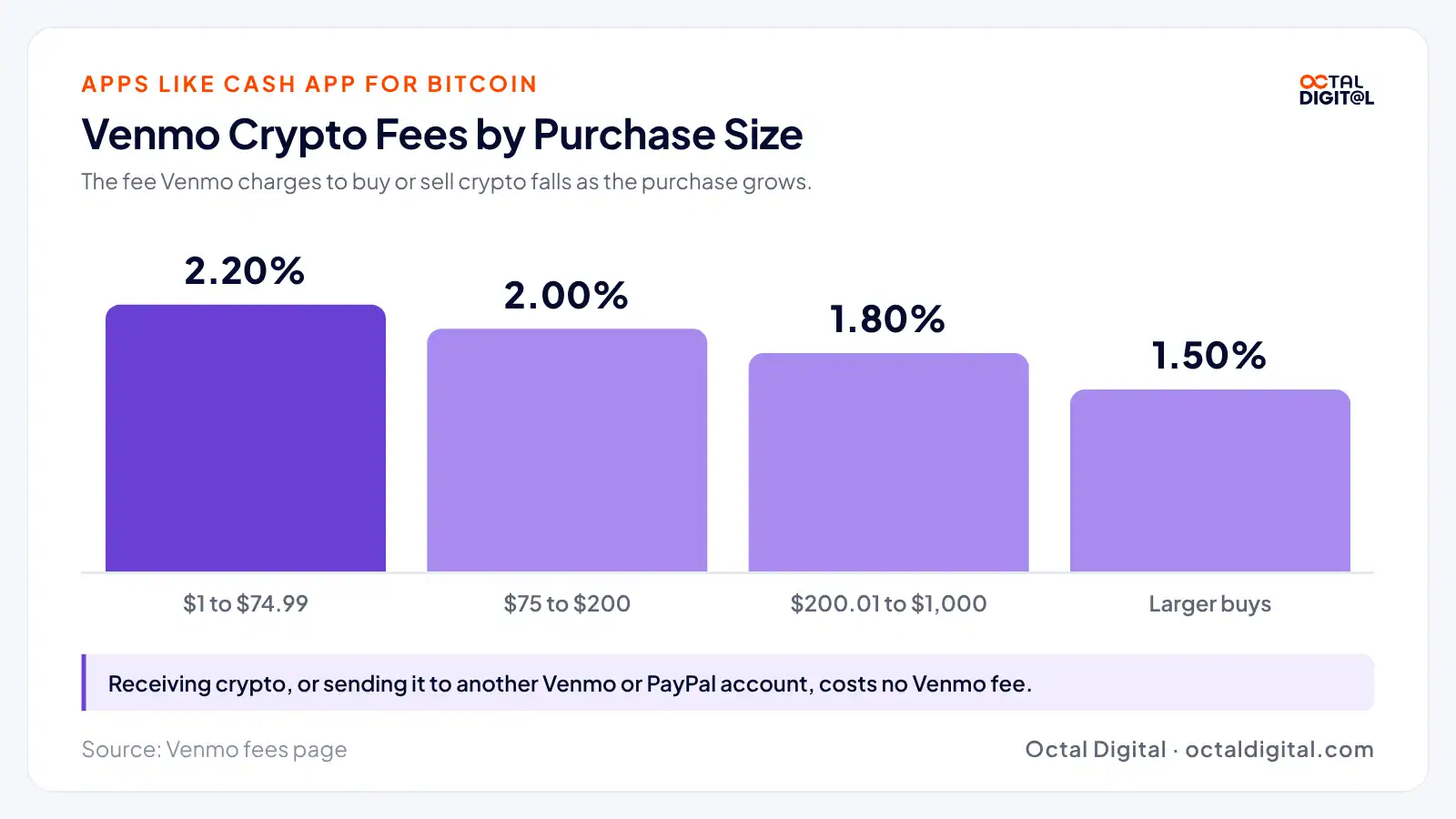
Venmo’s fees are 2.20% for buys of $1 to $74.99, 2.00% for $75 to $200, 1.80% for $200.01 to $1,000, and a lower rate on larger buys.
Venmo has no fee to receive crypto or to send it to another Venmo or PayPal account, as well as no buying fee on PYUSD. Sending it to an outside address does come with a network fee.
Strike currently holds a New York State Department of Financial Services license, though some products aren’t offered in every region. For more information on any of these, check each app’s fee page.
Can You Use Apps Like Cash App Without an SSN?
The question of using an app without an SSN is similar to asking about ID checks and comes up for people who want to send money before they verify.
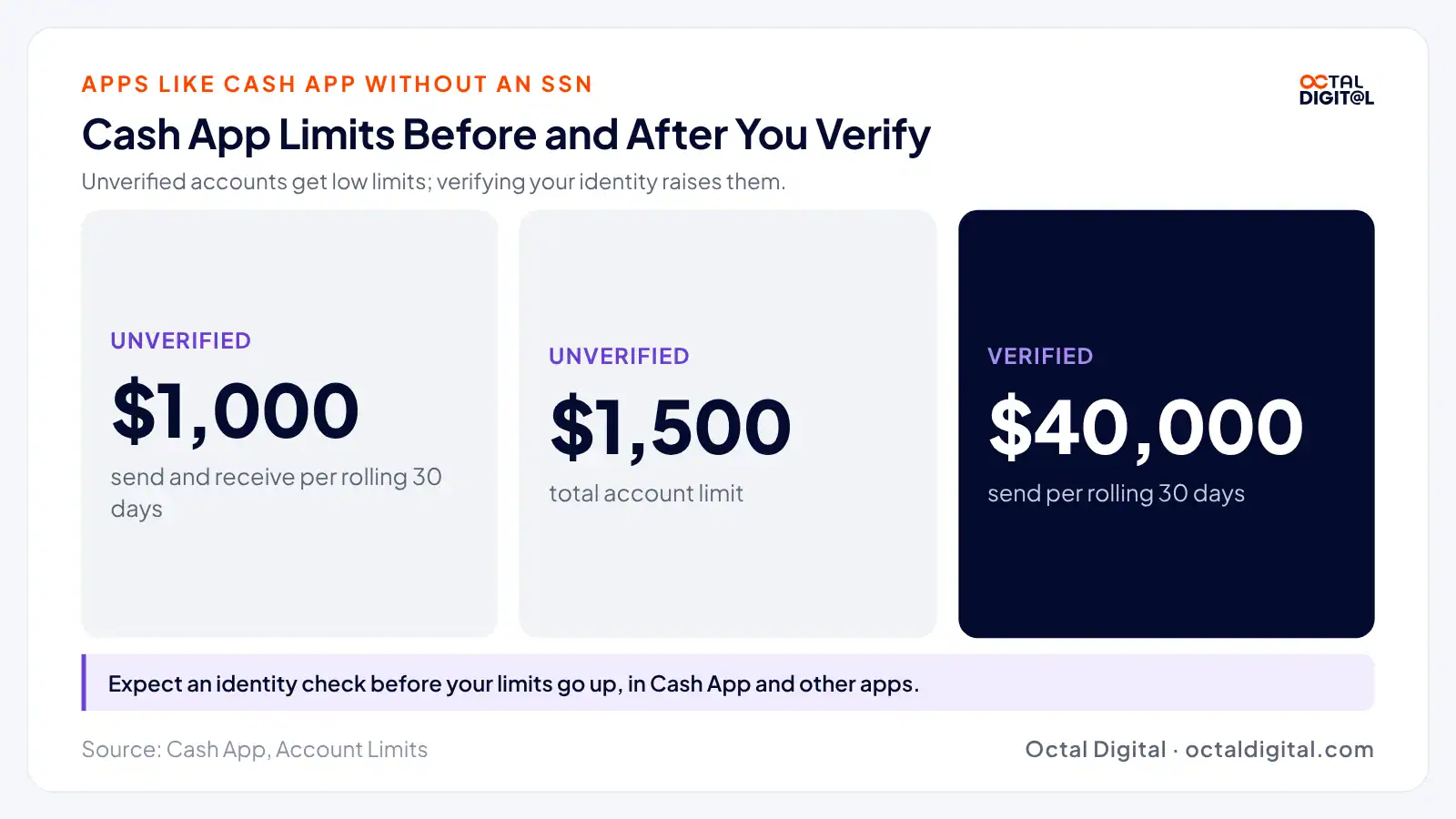
Unverified accounts, as Cash App calls them, have lower limits and can send and receive up to $1,000 in a rolling 30-day period. In addition, these accounts have a $1,500 total account limit.
If you sign up, you should expect to go through an identity check before your limits go up. Other apps on our list may ask to confirm who you are as well.
Verified Cash App accounts can currently send up to $40,000 in a rolling 30-day period.
Which Cash App Alternative Is the Safest?
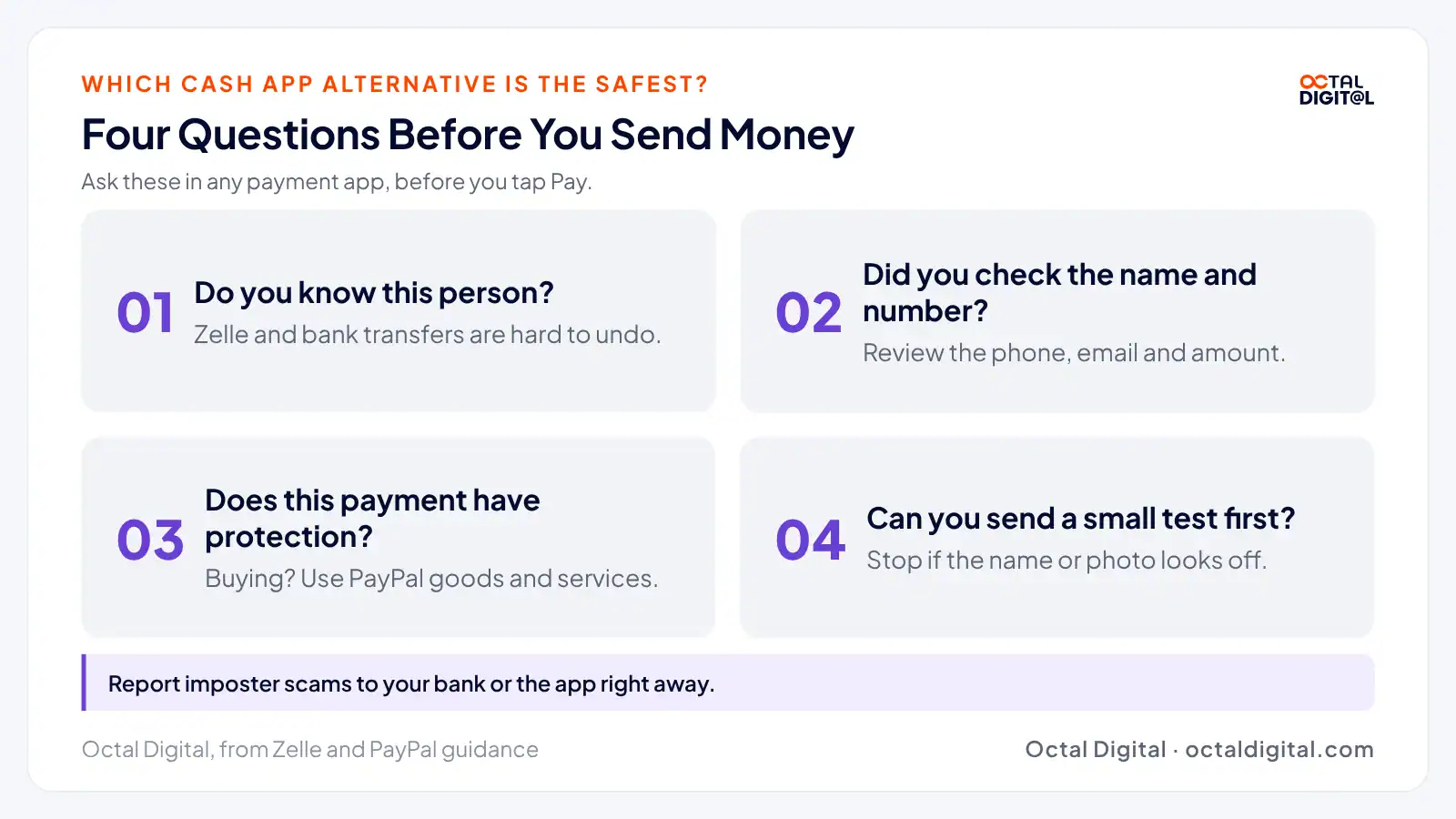
Want to send money without getting scammed? Here are some tips to protect your bank account, whether you send money once a month or every single day:
- Choose payment types wisely: If you want to buy something from a stranger, pay with PayPal’s goods and services option. Read the terms, compare fees, and choose a payment type that may give you Purchase Protection.
- Send a test payment: Try sending a small amount first to see if it reaches the right person. Note anything that looks off (a wrong name or photo) and stop before you send the full amount.
- Double-check the recipient: Review the person’s phone number or email and the amount you’re sending to ensure nothing is typed wrong.
- Use Zelle with people you know: Bank-to-bank payments will get your money there fast. When you pay someone new, use an app with some protection. It could save you from losing money to a scam.
- Report problems quickly: If someone posing as your bank stops answering after you pay and you’re out the money, don’t wait it out. Telling your bank or the app right away could matter, since Zelle says qualifying imposter scams may be eligible for reimbursement.
- Choose your settings carefully: Most payment apps let you set your own privacy and security options. Take advantage by turning on a PIN or face lock in case you leave your phone unlocked. You may want to make Venmo payments private, too, since they can show on a social feed.
- Know where your money sits: To keep your money safe (and avoid surprises later), learn how each app holds your balance, factor in any fees, and move larger amounts to your bank. Set up account alerts so you can spot payments you didn’t make.
Start with an MVP that sends and receives money, then add features.
Which Apps Like Cash App Have No Instant Transfer Fee?
Not all the best apps like Cash App will charge you for instant transfers, but several will make you pay a percentage for speed, which adds up.
If you cash out instantly just because it’s quick, you could pay up to 2.5% of the amount for convenience. Use the fees below to help find out if there’s an app you already have that will be cheaper overall.
| App | Instant transfer fee |
|---|---|
| Cash App | 0.5% to 2.5% ($0.25 to $1 minimum, $75 maximum) |
| Venmo | 1.75% ($0.25 minimum, $25 maximum) |
| PayPal | 1.75% ($0.25 minimum, $25 maximum) |
| Apple Cash | 1.7% ($0.25 minimum, $25 maximum) |
| Revolut | Up to 2% or $1, whichever is greater |
| Chime Pay Anyone | $0 |
| Zelle | Typically $0 (no cash-out step) |
Many people already use Zelle in their main banking app, so why not let it work for you even more?
With Zelle, you can send money to someone who’s enrolled, and Zelle typically charges no fee to send or receive. It also goes straight into the other person’s bank account, so there’s no separate cash-out step to pay for.
If you use Chime’s Pay Anyone, you can also send to people who don’t bank with Chime. The instant cash-out they get is free.
Is There a $600 Rule on Cash App?
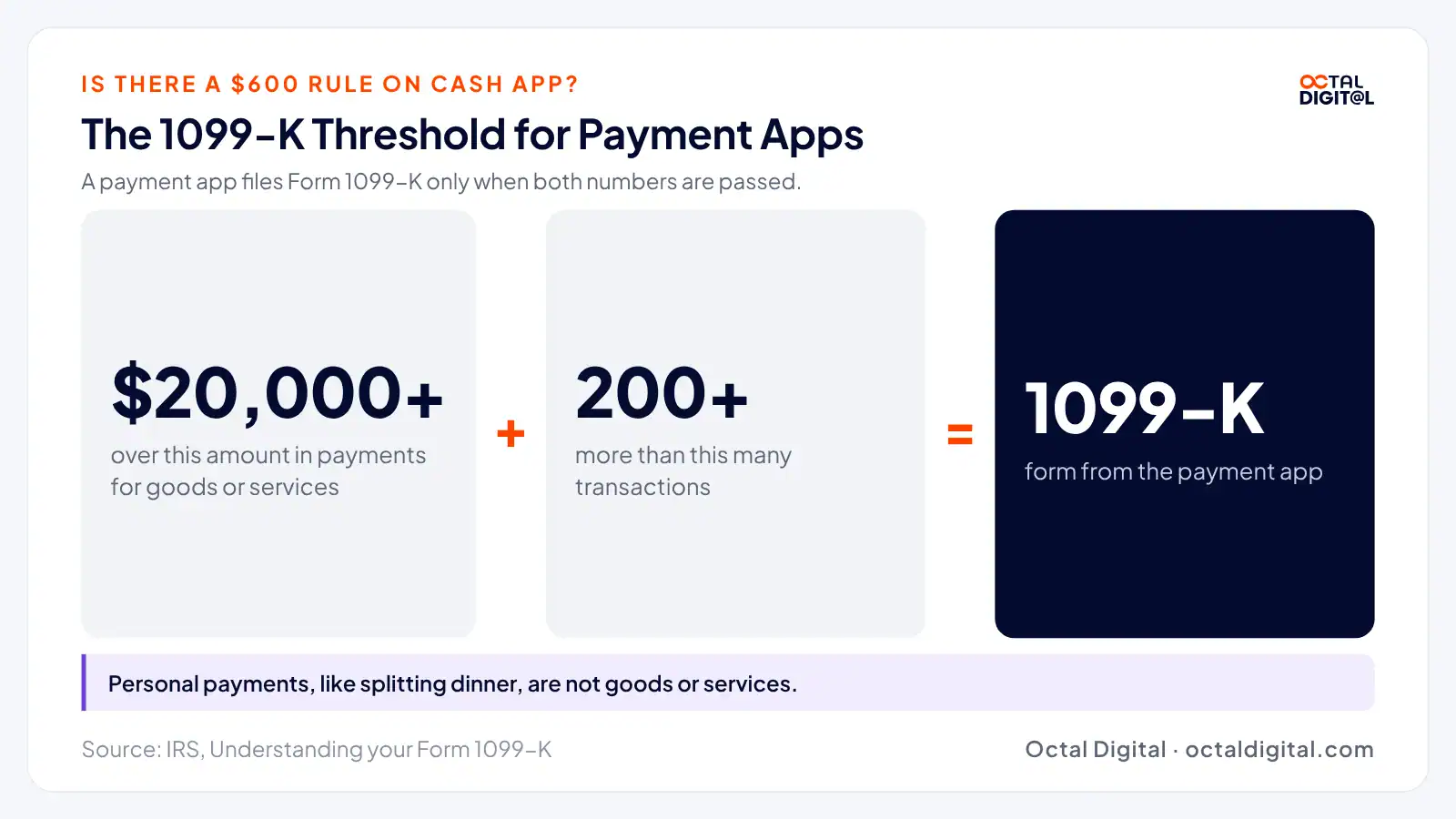
Payment apps follow the same IRS rule for Form 1099-K reporting. That means an app reports your payments when they’re for goods or services and total over $20,000 in more than 200 transactions, which is a much higher bar than $600. Just be sure to keep records properly so you don’t mix personal payments with business payments and consider how it might change what you report at tax time.
How to Choose the Right App Like Cash App
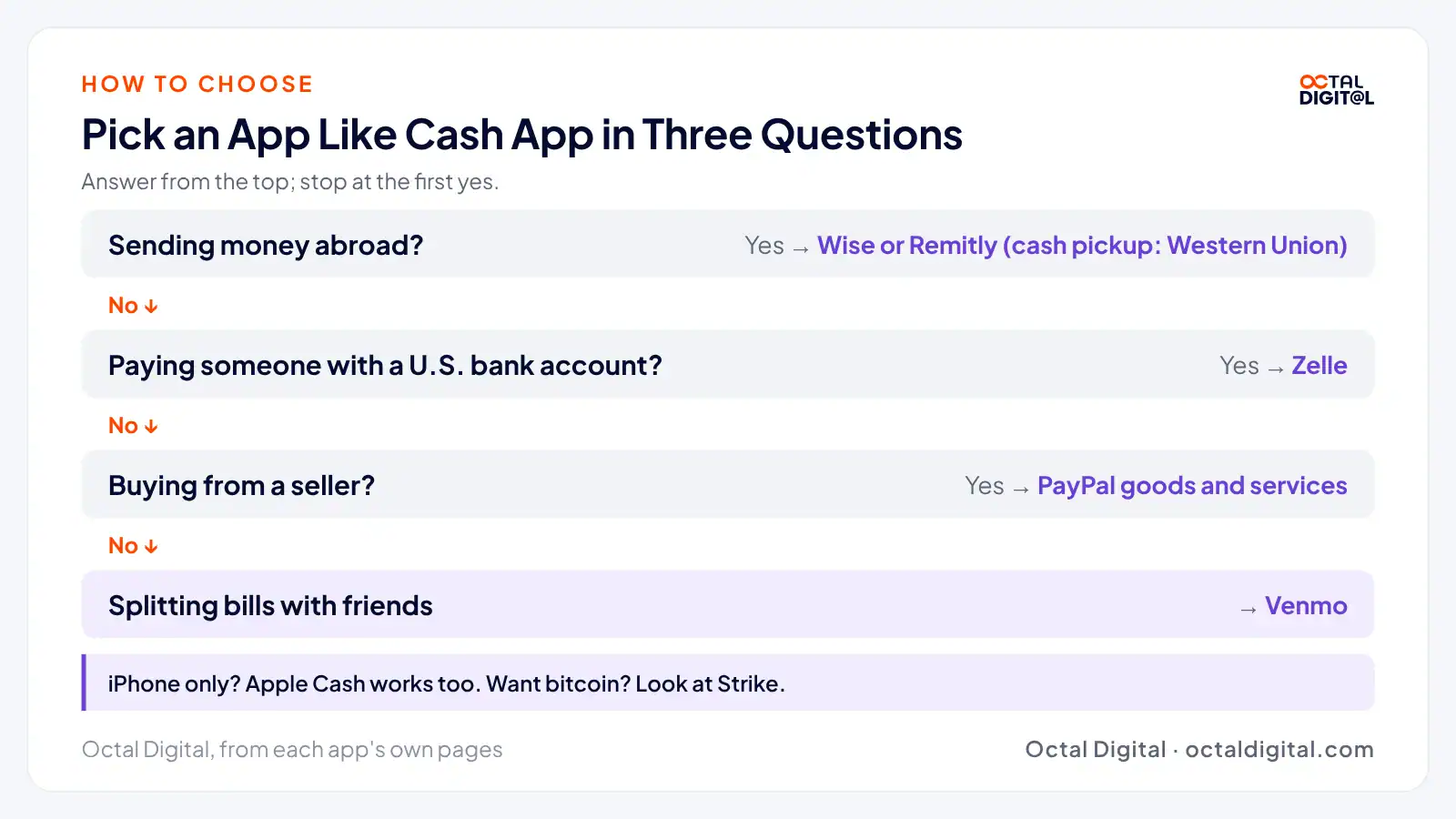
The best advice we can give is to try a few of these apps out. See which ones your friends and family use so you can pay them back fast.
For the ones you’re not the most happy with, simply delete them and move on.
The worst that can happen is you won’t keep quite as much as you were hoping to, based on the fees you paid along the way.
If you’re sending money abroad, you can compare money transfer apps like Wise, Remitly, and Western Union just to see how much the other person gets and see if it’s worth paying for faster delivery next time.
Learn more about how we build iOS and Android apps with payments.
- A written scope and cost range
- Fixed price or hourly, your choice
- 5.0 rating from 250+ client reviews
FAQs
Is Chime like Cash App?
In some ways, Chime works a lot like Cash App, but Chime is a banking app first and lets its members send money with Pay Anyone at no fee.
Is Venmo like Cash App?
If you want to split bills with friends, Venmo is the closest app to Cash App. If you want the other parts of Cash App, PayPal, Chime, Strike, and Apple Cash cover online buying, banking, bitcoin, and iPhone payments.
Can you borrow money from Venmo like Cash App?
Unfortunately, Venmo does not list a borrowing feature on its fee page. If you need money fast, look at cash advance apps instead.
Is Cash App available worldwide?
Cash App is built for people in the U.S. That means you can’t use it to pay most people abroad, which is why Wise, Remitly, and Western Union are on our list. Just be sure to compare fees properly so you don’t pay more than you need to on the exchange rate and consider how fast the money needs to arrive.
Which is better for sending money, Venmo or Zelle?
One of the most direct ways to send money to someone with a bank account is to use Zelle. Instead of waiting on a cash-out or paying for an instant transfer, the money lands right in their bank. Venmo is designed to include the social and card features that people who split bills want.
What is better than Cash App?
It depends. Zelle is typically a free option at banks. Venmo, PayPal, and Chime also offer free sending from a balance or bank.
Have a project in mind? Get a free consultation.
Tell us what you want to build. We reply with next steps, a rough timeline and a cost range.
(800) 995-3369
Olivia Taylor is a Business Analyst at Octal Digital, where she focuses on business requirements, process improvement, and digital product planning. She works closely with clients and delivery teams to turn ideas into clear project goals, practical workflows, and user-focused solutions.