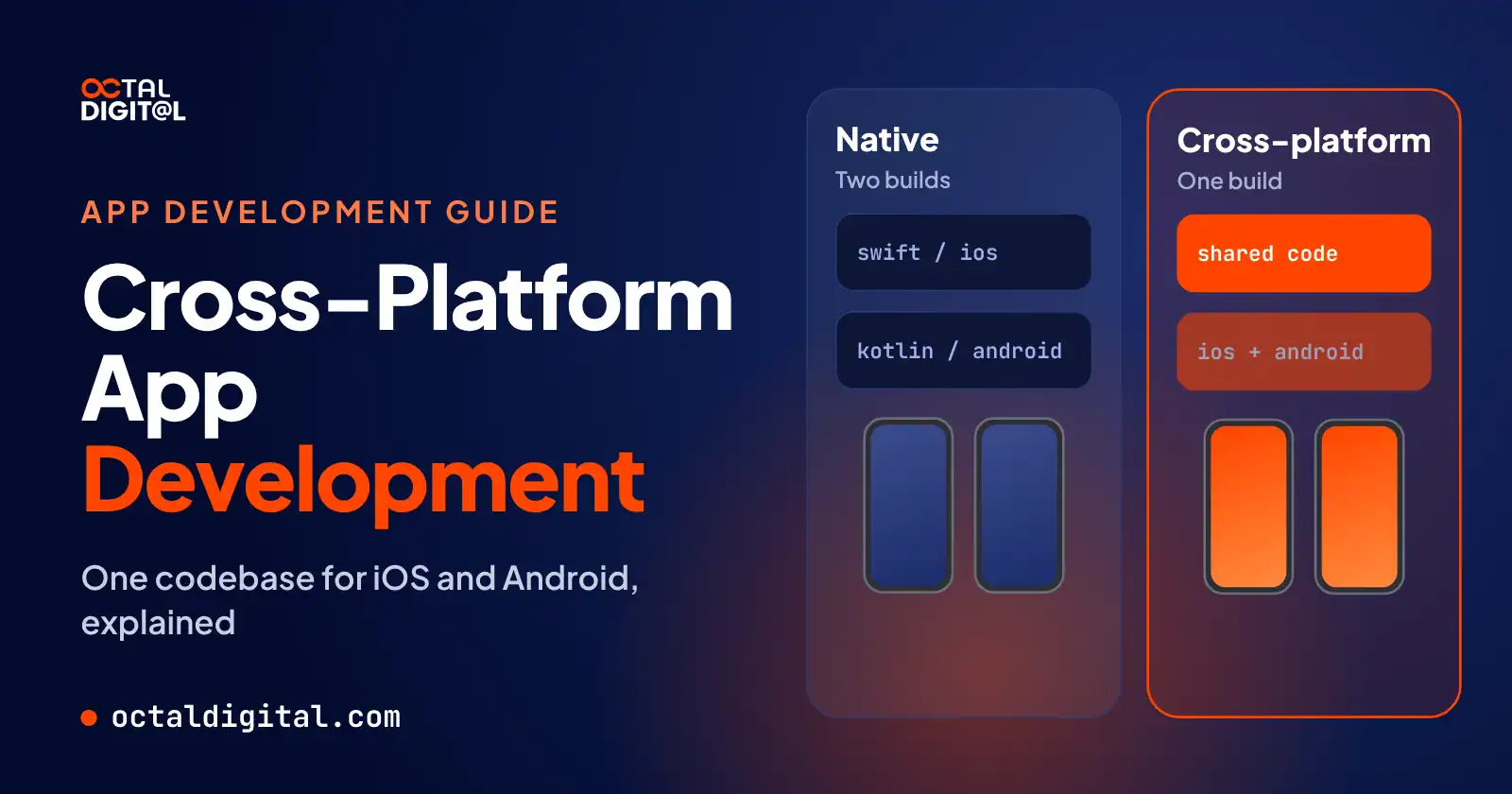
Key Takeaways
1 min summary- When choosing the best way to build, consider what features your app really needs on each phone.
- If you need heavy 3D or Bluetooth because of your product, then cross-platform probably isn't for you.
- But if you want both stores, have a tight budget, and need a launch soon, then a cross-platform build in Flutter or React Native could be a solid fit.
- Look for a framework that fits your team and complements your design, and then compare the different options by reading the official docs and real app examples.
- Additionally, consider how much native code you have and whether you have Android apps in Kotlin that Kotlin Multiplatform can share.
- It also helps to scope before you design, as planning an MVP first can trim your build cost and offer enough feedback that you don't overbuild or stall.
- Here are the costs owners ask about most: cross-platform builds at Octal Digital start from $15,000, with hourly work at $25 to $50.
As often as we talk about apps here at Octal Digital, there are plenty of business owners who ask us about the idea, like “what’s the difference between cross-platform and native?” and “how does cross-platform development work?” Our team at Octal Digital explains what you should know about how cross-platform app development works in this guide.
What Is Cross-Platform App Development?
Cross-platform app development is a pretty popular approach now, and one shared codebase runs on iOS and Android. However, some owners may not know it can reach web or desktop too.
If that’s you, don’t stress, because honestly you’re not alone. In general, not every business owner has built a cross-platform app before. Many more have heard of the idea, but some owners haven’t even heard the term yet.
If you think you get cross-platform because you’ve heard of Flutter and React Native, think again! Sometimes owners ask about a new build, and they keep telling us they want “one app for both phones” when they ask for cross-platform. Our first thought is: which kind of cross-platform do they mean?
They thought cross-platform meant one way to share code. It turns out, tools like Flutter, React Native and Kotlin Multiplatform each share code in their own way, from full screens to just business logic.
This shows us that the idea of cross-platform has grown and spread out a lot over the years. It can be a smart way to ship faster, cover both stores, and keep some budget free.
How Does Cross-Platform Development Work?
The one thing we love about cross-platform today is that you don’t have to always separately build an app for each store. Many owners remember having to pay for an iOS app first to get them onto one store before Android, and they never liked the double bill.
Nowadays, it’s so easy to share code across both stores and ship your features with one simple codebase. Shared screens aren’t the only way to share code through some frameworks though.
Teams can also use Flutter as long as they’re fine with its own rendering engine. You can also opt to render native UI components with React Native. Teams can even share business logic with Kotlin Multiplatform if they want native screens as well.
After all, the main thing you need to start a cross-platform app is one team and one codebase, and many teams can do that nowadays.
Cross-Platform vs Native vs Hybrid vs PWA
If you’re looking for app type definitions using Google, you won’t find much agreement there at all.
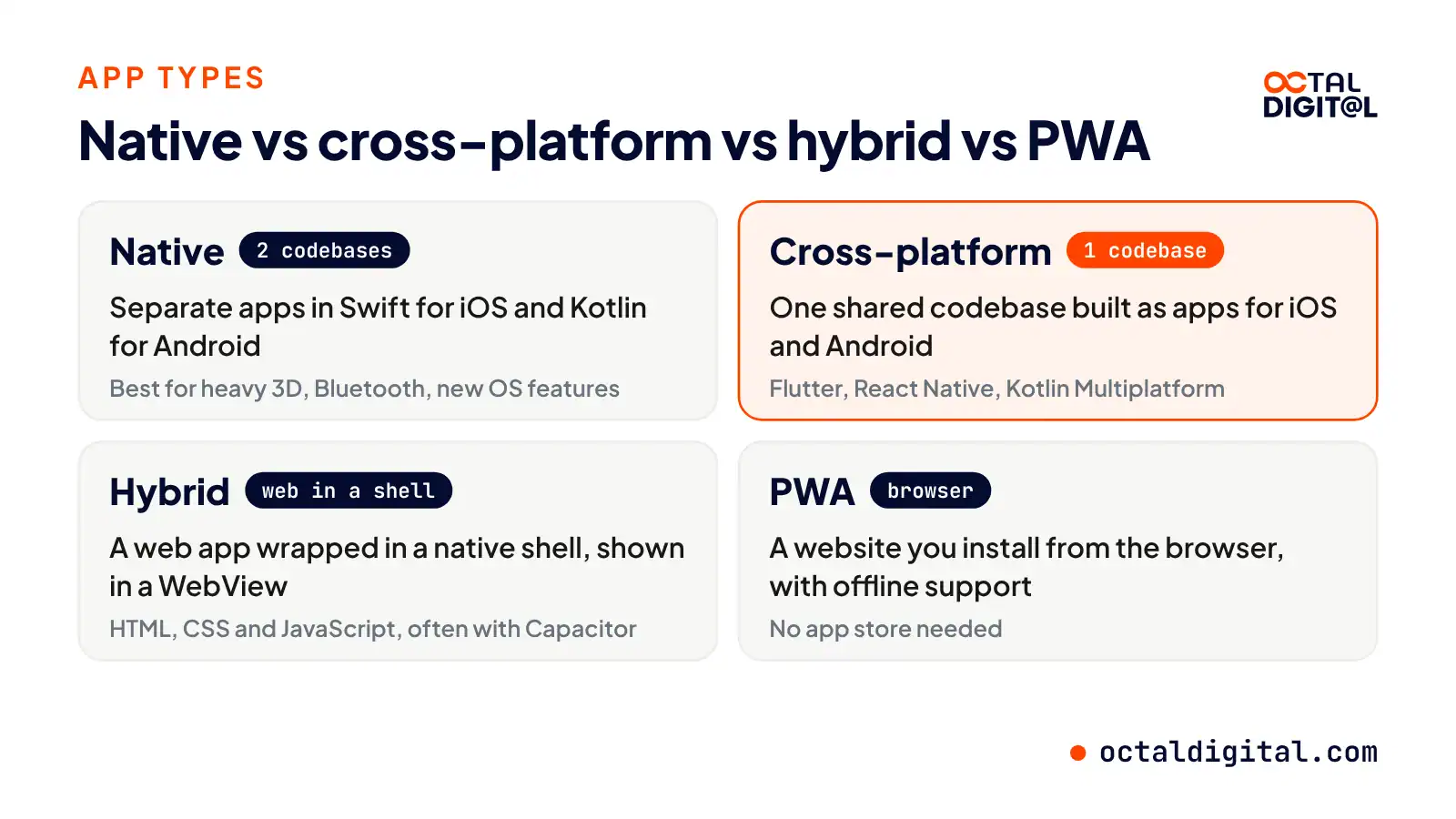
The two oldest approaches in app building are native and hybrid.
In the early days, native was the norm. Native apps are written in Swift for iOS and Kotlin for Android. They run on one platform only and stand out from other apps in speed because developers write separate code for each phone’s own system.
Native has powered many heavy apps over the years, including 3D games and Bluetooth tools. Native apps also get access to new OS features as soon as Apple or Google ships them.
Hybrid apps were built with HTML, CSS and JavaScript instead. The app actually starts off as a web app but gets shown in a native shell, through a WebView that loads the web code on the phone. With Capacitor the app goes from being a plain web app to one with native API access.
There are a range of options besides native and hybrid, but cross-platform and PWAs are the main names out there.
We all know about websites! A PWA has really pushed the website a step further than most. People can install it from the browser (Chrome, Safari etc), with offline support when the signal drops.
Here’s how the four approaches compare across the board.
| Approach | What it means |
|---|---|
| Native | Separate apps written in Swift for iOS and Kotlin for Android |
| Cross-platform | One shared codebase compiled or rendered as apps for iOS and Android |
| Hybrid | A web app wrapped in a native shell and shown in a WebView |
| PWA | A website you can install from the browser, with offline support |
Pros of Cross-Platform Mobile Development
Should you build native or cross-platform for your next app? While cross-platform isn’t a fit for every app, plenty of business owners look at it before paying for two native apps. The decision mostly rests on a few main points.
What your app needs to do on the phone
You’ll want to figure out what features the app needs and what will cost you less overall and give you the most for your budget. Both native and cross-platform come with pros and cons. While some developers swear by one or the other, it’s worth taking the time to understand what cross-platform really means and why it might or might not be the right call for your app right now.
Going cross-platform often lets you launch on both stores at once for a lower build cost. The starting price for a cross-platform build here at Octal Digital is $15,000.
If you want to get an app with more features out on iOS and Android and keep the first budget smaller, going cross-platform could save you money at the start compared to paying for two full builds at the start.
When we scope an app, we can map out what two native apps would take for the same screens and the same features.
In that case, a business would pay for two teams and two codebases, plus double the fixes for as long as the app is live. Let’s say you built that same app once with one team and one codebase.
You’d usually pay less, depending on how much of the app needs native code.
If you’re going to build cross-platform, it’s best to pick a framework that suits the kind of app you have. Most apps will need updates in some form soon after you publish them to the stores. Also, the main reasons the app looks and works alike on iOS and Android are one design, one codebase, and one team.
Another reason why cross-platform may be better than going native is when you’d rather not handle a pile of duplicate updates and bug fixes. Most fixes only have to be written once in the shared code, and this isn’t how it works when you build two native apps. Also, when an update is ready, you get to push it to both stores and not worry about matching it up or having to rewrite it twice.
Cons: When Native Still Wins
The key reason to go native over cross-platform is that you’ll get full speed on heavy 3D, advanced camera and Bluetooth work. Yes, the build cost will likely run higher, but if your app lives on those features, you’ll get smoother performance and even day-one access to new OS features. For either approach, our hourly rate at Octal Digital ranges from $25 to $50.
When you go native vs. cross-platform, you’ll also deal with fewer waits, most of all when Apple or Google adds new OS features.
Most cross-platform tools have to add support for a new OS feature first, so you risk waiting on an update. If your app is built around Bluetooth or custom hardware, this may be a poor fit, since you likely won’t want plugins to limit what the app can touch and how hard you can push it.
It’s not uncommon for cross-platform apps to need extra native work for advanced camera features or Bluetooth. There are some plugins and native modules out there that call native code, though you’ll still pay for that native work on each platform beyond the shared code. Who wants to fund a shared codebase plus a pile of native code?
Of course, you’ll be handling two codebases and two sets of fixes when you build native. However, you can often handle complex background work more cleanly if your app runs tasks like tracking or syncing while closed.
Going native may allow you to keep a smaller app size as well, since there’s no extra framework or engine shipped inside every download.
Get a written scope and cost range from our US-based team. Cross-platform builds start from $15,000.
- A written scope and cost range
- Fixed price or hourly, your choice
- 5.0 rating from 250+ client reviews
Best Cross-Platform App Development Frameworks
For most business apps, the best picks are Flutter and React Native, including for a first MVP.
1. Flutter
Flutter has reached six platforms with one Dart codebase. Flutter’s home base is Google. Flutter is available across iOS and Android, plus web and desktop.
Flutter was built on Dart, which was also made by Google. Flutter pushed the idea of cross-platform further though, because at first many tools were mostly focused on teams who wanted to wrap web pages.
Now Flutter is among the top cross-platform frameworks in the world.
2. React Native
Most screens, unlike Flutter’s, are native screens with React Native. React Native teams can choose between writing plain JavaScript and TypeScript, which is the default for new projects.
Another thing that React Native tries to do right is having web developers build mobile apps, which can help make hiring smoother. It covers both iOS and Android. The React Native docs suggest starting with Expo for the setup and build steps.
3. Kotlin Multiplatform
Kotlin Multiplatform, from JetBrains, the makers of Kotlin, offers shared code to teams. KMP allows teams to keep a native feel on each phone because they do let you build those native screens.
Shared code isn’t just logic, though, and Compose Multiplatform can even share screens and their layouts. KMP isn’t a fit for everyone. The teams it suits best already have Android apps written in Kotlin.
4. .NET MAUI
.NET MAUI is also a cross-platform framework, but it is mostly used by C# and .NET teams. It suits Microsoft shops well because it does have Windows and macOS apps in the box.
5. Ionic with Capacitor
When you check the web side of the app scene, one toolkit that stands out is Ionic. Ionic lets web teams use HTML, CSS and JavaScript for their app needs.
It’s available with Angular, React and Vue. There is also Capacitor, the native runtime under the toolkit.
Capacitor gives native API access to web apps. Ionic got its start as a web-first toolkit.
Which Cross-Platform Framework Is Best?
Back in the early days, most apps were built twice, once per store. Shared code has become one of the most common ways to build mobile apps today.
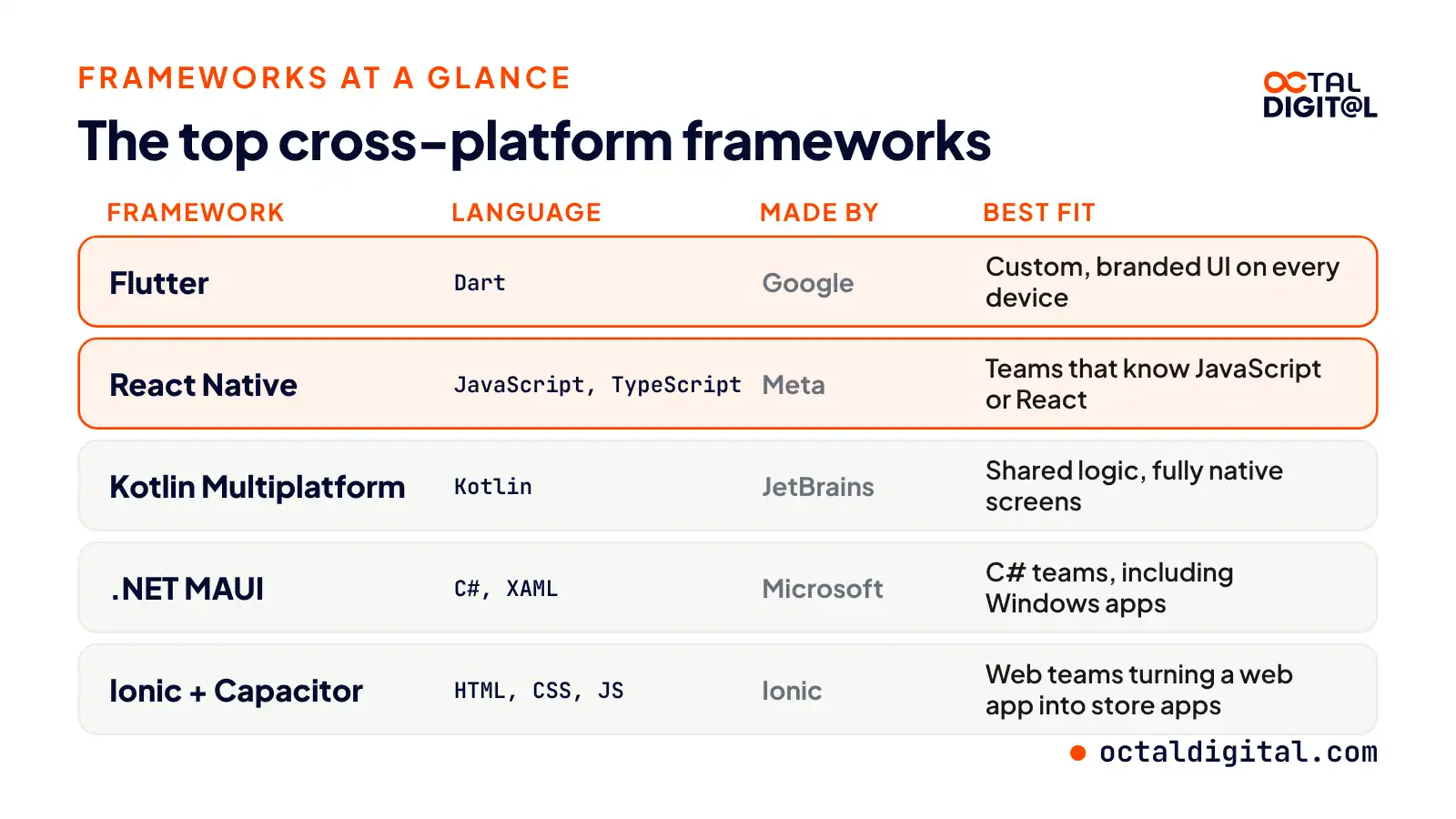
Here’s which framework fits which kind of app:
| Framework | Best fit |
|---|---|
| Flutter | Custom, branded UI that looks the same on every device |
| React Native | Teams that know JavaScript or React and want native UI parts |
| Kotlin Multiplatform | Sharing logic while keeping fully native screens |
| .NET MAUI | Microsoft and C# teams, including Windows apps |
| Ionic with Capacitor | Web teams turning a web app into store apps |
How Much Does Cross-Platform App Development Cost?
Plenty of people think a cross-platform app comes with one set price. Of course, a number helps, but at Octal Digital cross-platform builds start from $15,000 and hourly work is $25 to $50. For starters, the price is set by your scope after a free consultation, so features, backend, design, and more all count. Below we’ve laid out the main costs behind a cross-platform app. Just remember that each app’s costs will vary.
You hear that one codebase makes any app cheap.
You hear that you’ll end up paying twice after launch.
No doubt you’ve heard both of these and plenty of versions of each. Truth is, they don’t show you the full picture, and they won’t help you choose if cross-platform suits you, or if you’re budgeting it well.
Looking at the real scope will show you if cross-platform makes sense in your case. Or, if you already have an app, where you can make changes to get more from your budget.
Adding up the build plus the yearly upkeep is the simplest way to know how much you should plan to spend over time.
Many costs shift, so check your numbers often to keep the right totals.
Don’t go by someone else’s numbers, each app will have its own features and costs.
The biggest cost for most apps is going to be features. Even with a simple idea, you still pay for each screen in money and time. So how do you work out what each feature adds?
The backend is another big cost you take on to build. To work it out, take your data, user accounts and APIs and add them to your feature list. This can be hard to judge if you’re new to apps, but a free consultation gives you a written scope and cost range.
So, if you plan on taking payments, you’re going to need a payment integration. If you want a custom, branded design too, you’ll need more design hours. Take both and add them to the scope.
If your app isn’t looked after, sooner or later there will be days it doesn’t work.
Hosting, OS updates, bug fixes, security, and App Store and Google Play rules aren’t just nice to plan for, they’re things you have to plan for.
Pricing all of these is tricky, but once more an easy way is to list them out and add up a year of each.
Expect to add new features over time because your users will ask for more.
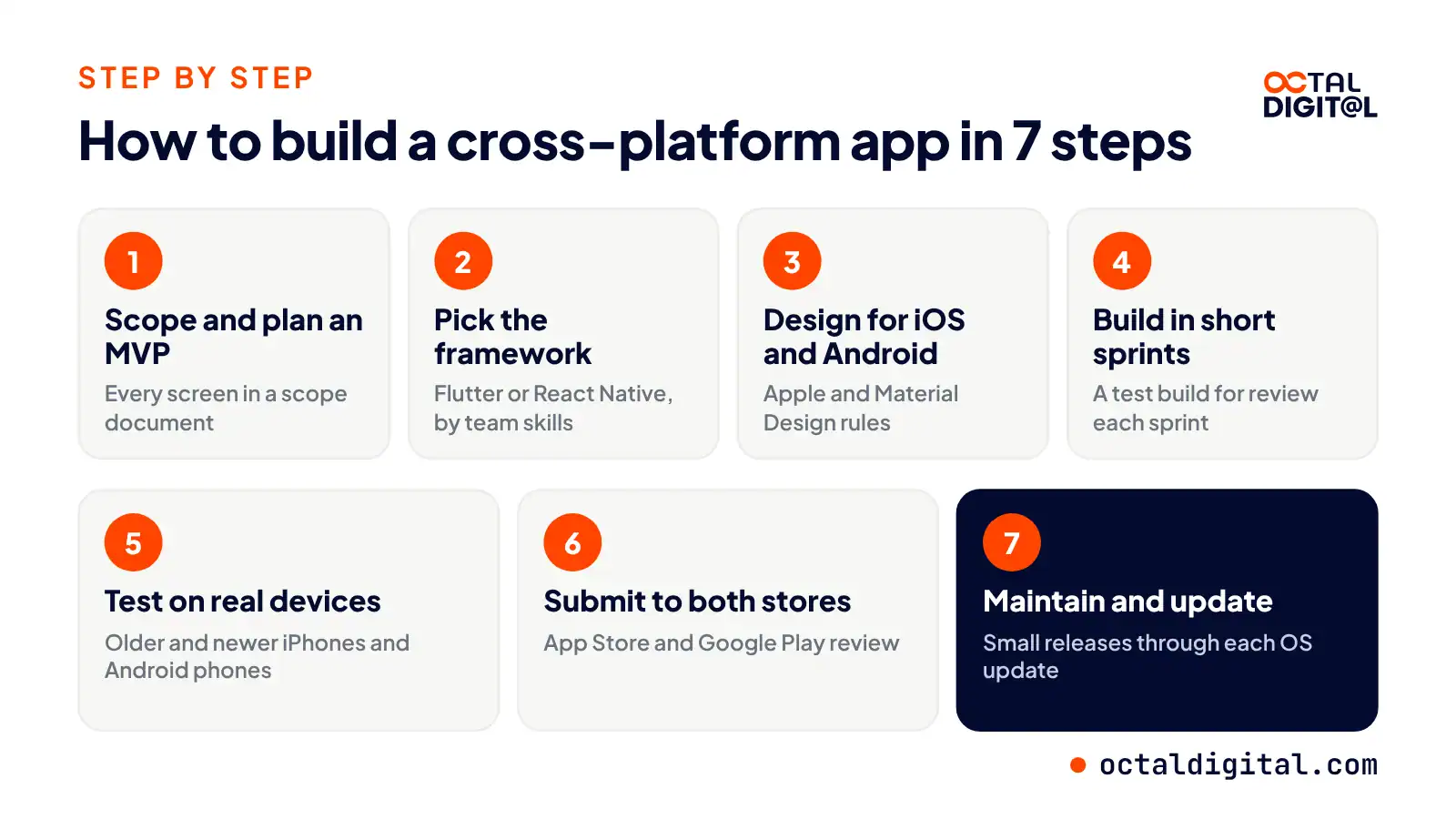
How to Build a Cross-Platform App in 7 Steps
Today we’ll go over what it takes to build a cross-platform app. We split it into seven steps since that is how it works for our team to get the app shipped. Is it easier than building two native apps? Let’s see!
Step 1: Scope the app and plan an MVP
This step is harder than it sounds. It seems like there are many app ideas that try to launch with every feature at once. Founders are actively adding features in pretty much the same way app users are often asking for features. We write a scope document because it shows every screen in the app and it also has a section to mark the MVP.
Step 2: Pick the framework
One thing you’ll quickly notice is the framework choice for building a cross-platform app is more involved than getting going with Swift or Kotlin. There are two common ways to build your app, either go with Flutter and Dart or write it in React Native. We weigh up the two routes and after checking the team’s skills and listing some native features including camera access, we have a framework which we add to the scope document.
Step 3: Design for iOS and Android
On iOS, in order to feel right to users, you should follow a few Apple design rules. Android has its own Material Design rules. To get started, Google “tabs and back buttons on Android” or your platform of interest.
Step 4: Build in short sprints
There are three parts that a sprint will need, all kept on one project board. The first is the sprint plan. The second is the shared code, and the third one is the test build for review. Look them over and sign them off and go on to the next sprint.
Step 5: Test on real devices
It’s time to grab some phones and get your app checked for the presence of bugs. The client gives us a list of phones and we pick a mix of older and newer models. Often finishing the iPhones first, we head off to Android phones to get each screen size (small ones and big ones) checked. These results are logged with each test build and used to confirm we don’t have any serious crashes left in the app.
Step 6: Submit to the App Store and Google Play
You’ll need to wait a while for your Apple and Google developer accounts to get approved. It can vary by account.
Then we head over to both developer accounts and turn in all the store listing details. The app then has to pass each store’s review, approve or reject.
Step 7: Maintain and update the app
After launch, plan when you are ready to get started on updates. We are interested in pushing small releases rather than big ones. You will keep the app, a single codebase for both iOS and Android, working from one OS update to the next, at which time you will patch the code and the stores will push it out to users. Plan to add new features in each release and see what users ask for.
Ship the core features on both stores, then grow from real user feedback.
Is Cross-Platform Right for Your App?
There are eight simple reasons why we would or wouldn’t pick cross-platform:
1. Heavy 3D or AR
The 3D story in a shared codebase, where most screens are forms, is often weak. There are fewer AR plugins, and they are usually limited. Therefore, you must write native modules and hope your frame rate holds up.
2. Bluetooth and custom hardware
We hate hardware guesswork, we do everything we can to avoid it. Bluetooth is fussy, each phone acts a little different, and a plugin in the middle does not help.
That is why we like native code for it.
3. An existing native app
You’re a native team, you have Swift and Kotlin apps, and you are typically happy with the UI.
The best time to go cross-platform is a new app, which is not your case. So a rewrite just doesn’t fit, but Kotlin Multiplatform does.
4. Ecommerce and booking apps
We admit to being picky builders, we don’t like building twice.
After you build the product pages and booking screens in Flutter for iPhone, you open the same code on Android, and it is remarkable how little of it needs to change.
5. Marketplaces
When it comes to marketplace apps, the screens are the complete product. You build the listings, buyer chat, a quick checkout, and seller payouts once.
6. Internal tools
Your staff ask for a new tool, and they wait. They wait even longer while two native versions get built.
7. Content apps
The best part of a content app is showing some great articles and playing smooth videos.
There is no special hardware in any of that. The lack of hardware work is why content apps suit cross-platform, but for video, we still test on real phones.
8. A first MVP
If there were more room in a first budget than two native builds need, we might rethink some of our advice. But there has to be a real reason to build twice.
How Octal Digital Builds Cross-Platform Apps
Cross-platform building is a service we offer at Octal Digital.
Let us build in React Native or Flutter, with a US-based team in Houston, Dallas and Los Angeles.
That’s a solid setup! And for those of you who need native, we say “no problem”, since we build in Swift and Kotlin too. We’ll be happy to talk it through on a free consultation!
Some teams also give cross-platform a shot first and find they need native. You can read about those cases in the section above.
At Octal Digital, we encourage you to start with an MVP when it fits, to find what works best for your users.
Some projects are better suited to a fixed price, while others will do well on hourly work. Either way, we set the price by scope after the consultation.
Learn what apps cost with us, starting from $15,000, and try to plan your budget around that. While we can’t promise every project is a fit, our 5.0 rating from 250+ reviews across platforms could be a good sign for yours.
Even if you’ve got a few reasons you don’t want to go cross-platform, you can book a call, check our plan against your list, then see if any of them can be fixed.
It’s possible you’ll decide it’s the right call after all or you’ll find for sure that native is the way to go. Either way, you’ll have a plan and learn something about your app.
Free consultation, fixed price or hourly, and a US-based team in Houston, Dallas and Los Angeles.
- A written scope and cost range
- Fixed price or hourly, your choice
- 5.0 rating from 250+ client reviews
FAQs
What is a cross-platform app developer?
A cross-platform developer is a coder who builds one app for iOS and Android at once, which is what many owners want. Today, these developers mostly work in tools like Flutter, React Native, Kotlin Multiplatform, and even .NET MAUI.
Are PWAs still a thing?
Yes. Before building a store app, it’s smart to check whether a progressive web app will do the job. The first step to be sure you’re not overspending is to check you are building the right kind of app. You can also ship a PWA first and add store apps later as an extra step.
Is cross-platform cheaper than native?
To save money, it usually helps to build one codebase with one team. This can’t always happen (ex. heavy 3D apps), but try and share code as much as possible. These are only a few of the ways owners keep costs down, and our cross-platform builds start from $15,000, with hourly work at $25 to $50.
What is the best way to develop a cross-platform app?
Most teams start with frameworks like Flutter, React Native, Kotlin Multiplatform, and .NET MAUI to build cross-platform apps. A clear scope is very useful to have in case a feature changes because a loose plan won’t help. If a team’s scope is set and the MVP is planned, the build steps get much simpler.
Can an existing native app move to cross-platform?
Kotlin Multiplatform can also help teams who are moving an Android app and ones that already run native screens in their app. Code on both iOS and Android can be shared under Kotlin Multiplatform, one feature at a time.
Is cross-platform good for an MVP?
Building an MVP with cross-platform is a pretty simple process. The first thing to watch out for is your core feature list (you can see our MVP page here). Read more about how the build steps work above.
Is Flutter or React Native better for cross-platform apps?
During the planning stage, you’ll need to weigh your design, your team, your budget, your timeline, your platforms, and your app’s look. The skills of your team do make a difference; pick Flutter for custom UI and React Native for JavaScript teams.
Have a project in mind? Get a free consultation.
Tell us what you want to build. We reply with next steps, a rough timeline and a cost range.
(800) 995-3369
Matthew Jones supports Octal Digital as a Digital Strategist and trusted technology advisor, helping guide clients through scalable solutions, emerging tools, and smart development strategies that align with business goals and growth.