
Key Takeaways
1 min summary- There are 7 stages in the app development process: discovery, planning, design, development, testing, launch and maintenance.
- The app development process can seem big and involved.
- There are lots of steps, and hard decisions come up along the way.
- But it's a very rewarding process and can pay off well.
- You may be tempted to skip stages, but teams that skip them usually pay for it later.
- Octal Digital builds in one-week sprints, and you own the code and store accounts at the end.
The app development process has 7 stages: discovery, planning, design, development, testing, launch and maintenance.
They say every business owner has at least one million-dollar idea inside their head. If you’re lucky, the idea might well be something as practical as an app. Yet before putting a big share of your budget into hiring a development team to turn your idea into a working product, you ought to know how a typical app development process runs. Or at least get a rough picture of it, which is just what we’re going to give you here.
Before we get going, remember that building an app needs a lot of effort, time, money, and (most of all) know-how. If you don’t yet have access to the in-house talent needed to build a high-quality product, you may want to look into an app development partner to close the gap. Anyway, let’s start from the beginning.
What Is the App Development Process?
The app development process is the set of steps a team follows to take an app from idea to a live product, then keep it running.
Each day, many new apps go live on the Apple App Store and Google Play. Some of these apps are mobile games, others are booking tools, and lots are shopping apps. Each of these apps, if built by a professional team, should follow a similar app development process. Octal Digital has been building apps since 2014. In this guide, we will lay out the strategy, design, and build steps we use.
Each app is unique and our methods keep changing, but this is a pretty standard path when building mobile apps. Our mobile app development process usually covers discovery, planning, design, development, testing, launch, and post-launch phases.
The application development life cycle (ADLC) is the software development life cycle (SDLC) applied to apps: the step-by-step method of building a complete and working mobile app.
What Are the 7 Stages of App Development?
For most kinds of apps, the app development life cycle stays the same; these are the stages usually found in a mobile app development life cycle, plus what you get at the end of each:
| Stage | What you get |
|---|---|
| 1. Discovery and research | Problem statement, user and competitor notes |
| 2. Planning and scope | Feature list, MVP scope, written estimate |
| 3. UI/UX design | Wireframes, clickable prototype, final screens |
| 4. Development | A working build at the end of each sprint |
| 5. Testing and QA | Test results, bug fixes, release candidate |
| 6. Launch | Live app on the App Store and Google Play |
| 7. Maintenance | Fixes, updates, new features |
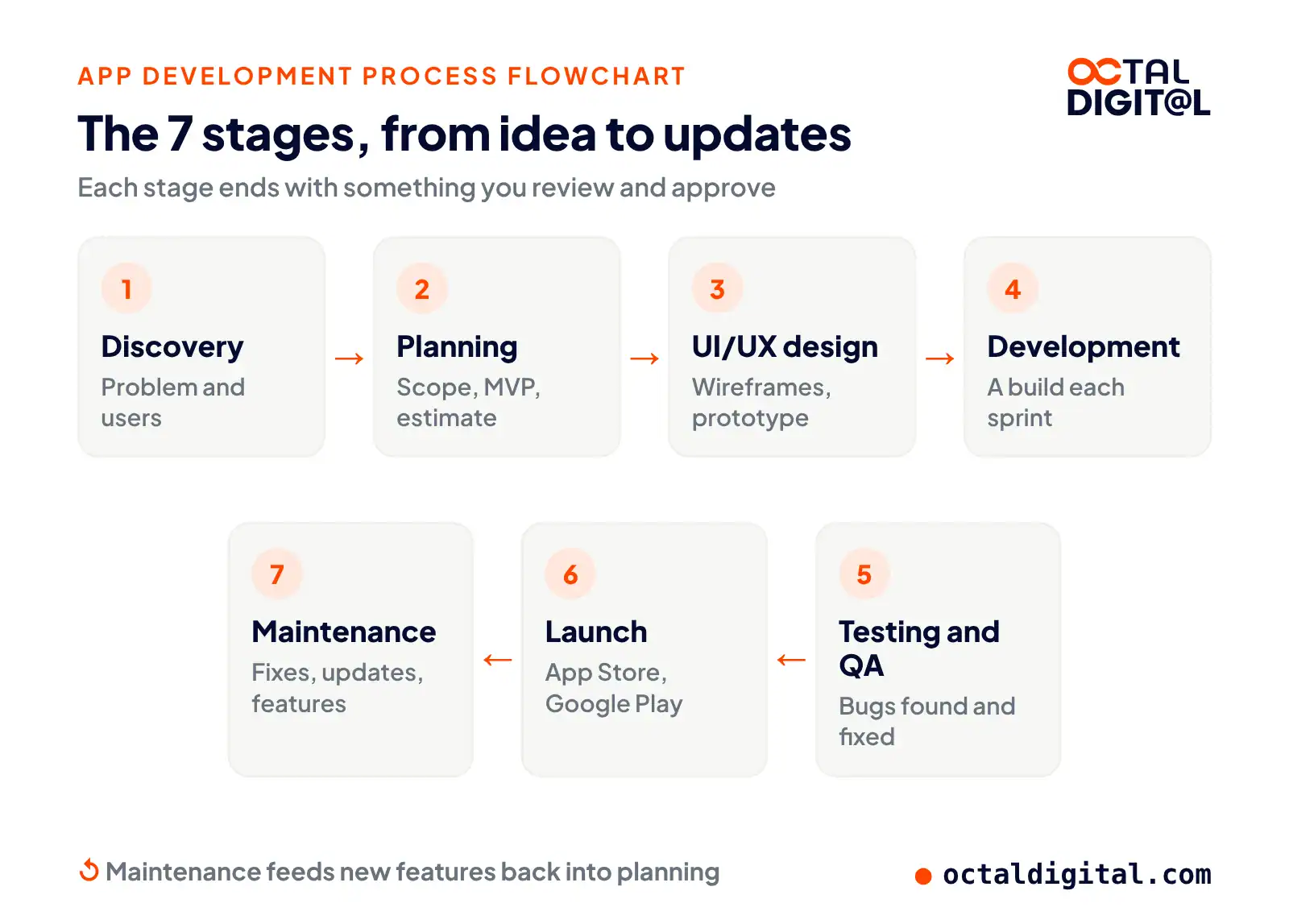
Let’s take a closer look at every stage in this development cycle.
1. Discovery and Research
As simple as it sounds, every great app starts as an idea. If you don’t have a clear app idea yet, the best place to begin is to teach yourself to always see things in terms of pain points and possible fixes. You want your mind to ask on its own “Why do we handle things like this?” or “Is there an easier way to handle this task?” If you can spot a problem or a gap in the market, you’re halfway to your idea!
Next, work out why the problem exists and ask yourself why nobody else has built an app to solve it before now. Talk to other people who have this problem. Dig into the problem space as far as you can. Once you have a full grasp of it, start to judge how a mobile app might fix it.
This is where knowing what phone apps can do is very useful. We’re often asked, “Is this really possible?” Luckily, the answer is usually yes, but it’s vital that the answer is solid. You’re about to put a large amount of time and cash into the app, so now’s the moment to test your idea’s value and whether it can work.
2. Planning, Scope and Tech Stack
A key step of planning is mapping out your app’s roadmap. The aim here is to see what your app might someday become and what it must have to succeed on launch day. This launch-day version is often known as your minimum viable product (MVP). At this point, it can help to list on a whiteboard everything you’d like your app to do. Next, start ranking those items by priority. Think about what your app’s core features are, what’s needed to win users, and what could come later. If there are a few features you guess users might like, they’re likely good picks for later releases. As you win users through your MVP, you can ask them which extra features they want.
There are many approaches, tools, and coding languages you can use to build a phone app, each with its own strong and weak spots. Some may cost less to use, but run slower, while others may take longer to build and be more than you need. The worst case is building on a fading or shaky tech stack. Make that mistake, and you may have to rebuild the app or pay extra for developers down the road. That’s why having a trusted dev partner who is experienced in making these calls is key at this step.
For the app itself, there are mainly 3 approaches: platform-specific native, cross-platform native, or hybrid.
- Platform-specific native: Apps made this way are coded separately for each platform. Code can’t be shared between iOS and Android, but each app can be fully tuned for its platform. This is often the priciest route, but it’s very well proven.
- Cross-platform native: Apps made this way share some (or all) of their code, but still run as native apps. Popular tools for this include React Native and Flutter. It’s a nice middle ground among the options since it costs less, yet each version can still be tuned and styled per platform.
- Hybrid: Hybrid apps use web tools (HTML, CSS, JavaScript) and get installed inside a native wrapper. This route can be the least costly, but it also brings some very real limits.
Tell us your app idea. We reply with a free consultation, a written scope and a cost range.
- A written scope and cost range
- Fixed price or hourly, your choice
- 5.0 rating from 250+ client reviews
3. UI/UX Design
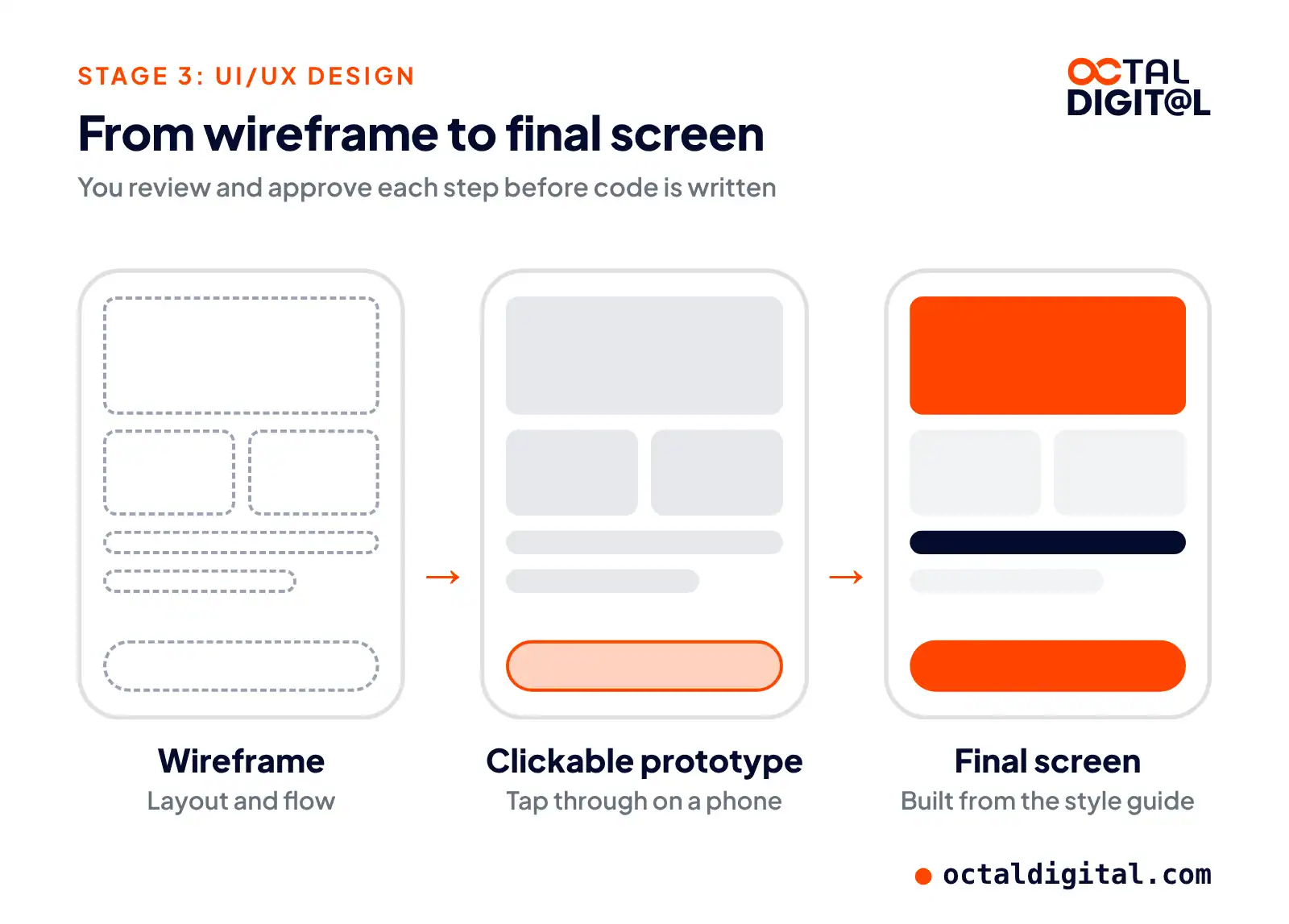
Information architecture is the step where you choose what data and features should appear in your app and how the data and those features are arranged. Most of the time, we start by jotting down a list of tasks the app should do and another list of what has to be shown somewhere in it. These are the core building blocks from which we’ll draw the wireframes.
Click-through models let you check your wireframes and user flows. They’re basically a way to try the wireframes on a handset, for more lifelike testing. As an example, our clients just get a link, which when they open it on their phone lets them click through the wireframe. Even though the app has no real features yet, they can tap on each screen and start testing the navigation. As you find problems at this step, change your wireframes and repeat until you’re happy.
Rendered design is the step of taking the wireframes and swapping the grayscale parts for parts from your style guide. Each wireframe screen should get its own rendered screen. Try to stay faithful to your style guide here, but you don’t need to be rigid about it. If you want a new or updated style, go ahead and update the style guide. Just make sure the design is consistent once this stage is done.
4. Development
During the development stage, your team will start building the screens and features of your app. As each one is finished, it goes back to a project lead or QA tester to review. Good project managers can balance developer workloads during this stage by smartly shifting tasks around within the sprint.
It’s important that your developers fully grasp the goals of the app as a whole and of the exact feature they’re working on. Few people know that feature better than the developer assigned to it. They should get the intent behind the requirements. If something begins to not add up, it’s often the developers who will be first to tell you.
During development, teams use private beta tools (TestFlight on iOS and Google Play testing tracks for Android). These let them privately and safely share the in-progress version of the app with testers, clients, and other team members. These tools alert users to new builds automatically (so everyone tests the latest version), can offer crash reports, and make sure only approved testers can reach your app. It’s a simple way to keep everyone current on progress. Throughout development, teams push a fresh build at the end of each sprint.
5. Testing and QA
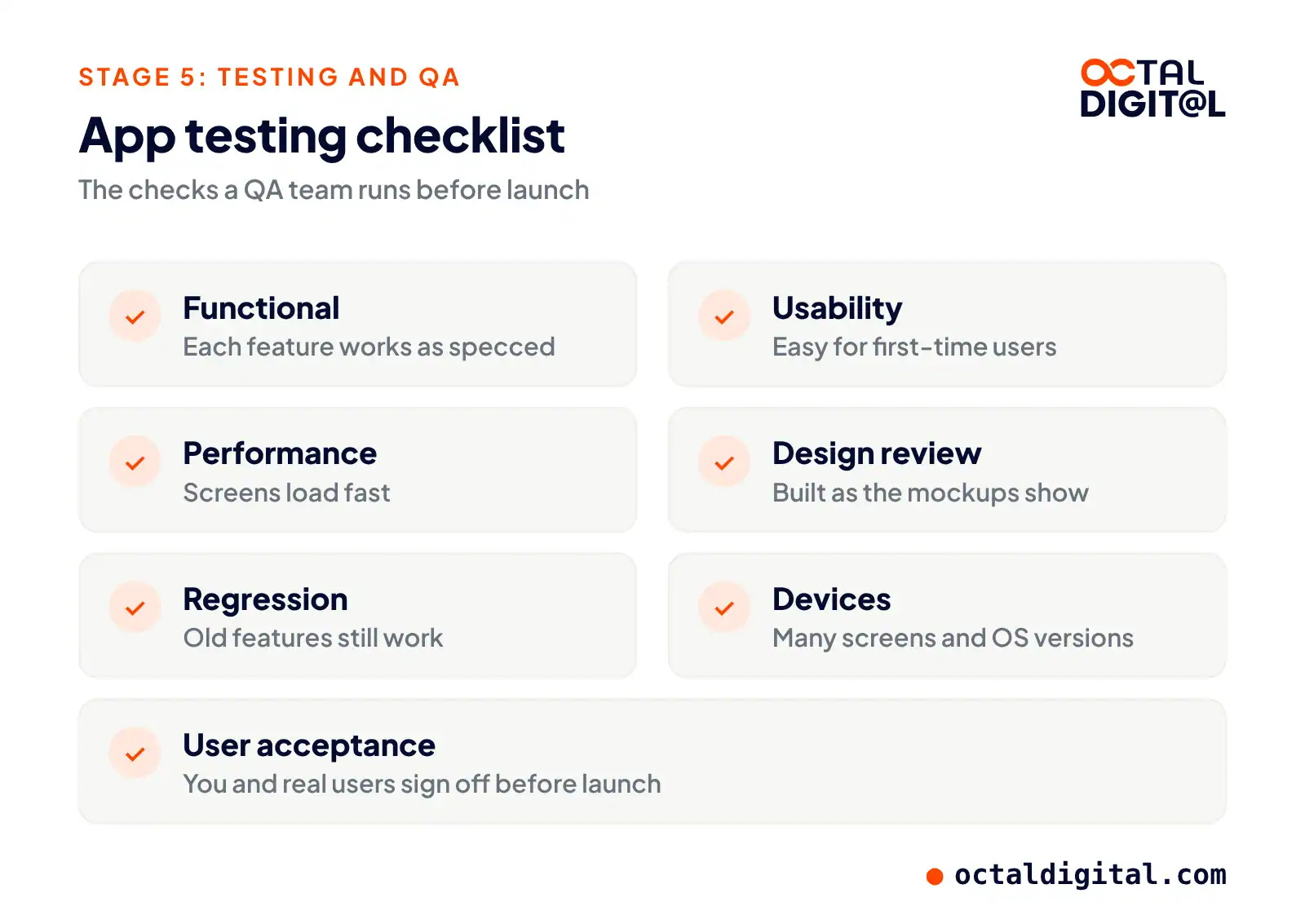
Most testing should be done by folks who are not the app’s main developer. This helps ensure a more honest testing experience. There are a few kinds of testing that should happen during the project. These usually include the ones below:
Functional testing means testing to make sure the feature works as laid out in the specs. Most often, a QA team will keep a test plan holding a list of steps and the expected app behavior.
Usability testing is testing to make sure the feature is easy to use and is as intuitive as possible. Very often, it can help to bring in fresh testers for a “first-look” experience at this step.
Performance testing matters too. Your app might run perfectly, but if it needs 20 seconds to show a simple list, nobody will keep it. Performance testing is usually more important in the later sprints, but keep a close eye on the app’s speed as you move along.
Design review is next. Just because the design stage is over, it doesn’t mean you can shut the designers in a closet. The designers should check each feature and make sure their vision was built as shown in the mockups. This is one more reason why having one team for both design and coding is so useful.
Regression testing comes after. Remember that one screen from the last sprint? Don’t assume it still runs, just because you checked it a week back. Good QA teams have a set of tests to run at the end of every sprint, which will cover tests from earlier sprints.
Device testing covers the hardware. There are thousands of device and OS combinations around the world. When testing, be sure you try your app on many screen sizes and OS releases. Tools like Firebase Test Lab can help automate this, but always try the app on a small handful of real phones.
User acceptance testing is testing done by either the app’s owner or future app users. Keep in mind who you are making this app for, and get their input all through the process. If a feature passes all the tests above, but fails this check, what use is it?
When problems are found in this phase, send tasks back to the developers so the problems can be fixed and the issues closed. Once testing has been finished and each item is done, go on to launch prep.
6. Launch and App Store Review
Before a full launch, you can run a beta release of your app. Beta tests mean getting a small group of testers to try your app out in the real world. They use it just as if it had gone live, but in far smaller numbers. Most of the time these beta users are heavy users, early adopters, and maybe your best clients. Beta testing is also a good time to check how your app runs on different devices, places, operating systems, and network speeds.
There are two main parts to launching your mobile app. The first is moving your server and API into a live environment that can scale. The second is publishing your app to the Apple App Store and Google Play.
Sending your apps to the stores is a fairly involved process. You’ll need to check that your apps are set up properly for release, complete several forms for every store, upload screenshots and promo materials, and write a store description. On top of that, Apple reviews every app sent to its store against its review guidelines. It’s possible they will ask you to change your app to better meet their rules. Sometimes, you can talk these changes through with Apple and get your app accepted as it is. Other times, you may need to make changes to get approved.
7. Maintenance and Updates
It would be very naive to think the app development process is over when the app ships. Go look at any fairly popular app and you’ll find a long record of updates. Those updates include fixes, speed improvements, tweaks, and new features. Close monitoring is key to knowing what kind of updates are needed. Here’s what is worth watching.
There are plenty of tools that can reliably log app crashes. They capture what the person was doing, which device they used, and lots of technical details your developers need to fix the issue. Apps can be set up to send an email or alert when crashes happen.
Modern app analytics tools are a gold mine of data. They can show you who is using your app (location, language, device, etc.) and how they use it (time of day, minutes spent in the app, screens viewed, etc.). Use this data to see where to put future effort. Don’t build onto parts of your app that are rarely used, but invest where the activity and the biggest room for growth are.
The point of all this tracking is to know what to do next. Most apps are never truly done. There are always fresh features to add and things to improve. Use what you learn from your users and the tracking tools. Then repeat parts of the app development process (and don’t worry, most steps are much easier after the first pass).
Who Works on Your App?
A typical app team has a project manager, a business analyst, a UX/UI designer, mobile and backend developers, a QA engineer and a DevOps engineer.
To many people, an app is just a program they keep on their phone. But as the owner of the project, you need a more hands-on view. Essentially, most app teams mix several roles. Each person has their own role to play. Our team covers every one of these roles:
| Role | What they do |
|---|---|
| Project manager | Timeline, updates, budget |
| Business analyst | Requirements, user stories |
| UX/UI designer | Flows, screens, prototype |
| Mobile developer | The app on iOS and Android |
| Backend developer | Server, database, APIs |
| QA engineer | Tests and bug reports |
| DevOps engineer | Releases, hosting, monitoring |
Agile vs Waterfall: How Sprints Work in App Projects
Most app teams use agile, which builds the app in short sprints, rather than waterfall, which builds everything in one long pass.
The most common method in app development is likely agile. Our own team runs agile in one-week sprints. They make the process more flexible and let us adjust to changes quicker.
When reading about app projects, you’ll likely come across terms like iterations or sprints. They’re often tied to Scrum. What do you need to know about them?
Our sprints run one week each. Every sprint is focused on building and testing certain parts of the app. The target of the sprint is called the sprint goal. In every sprint, there are a few meetings, also called ceremonies.
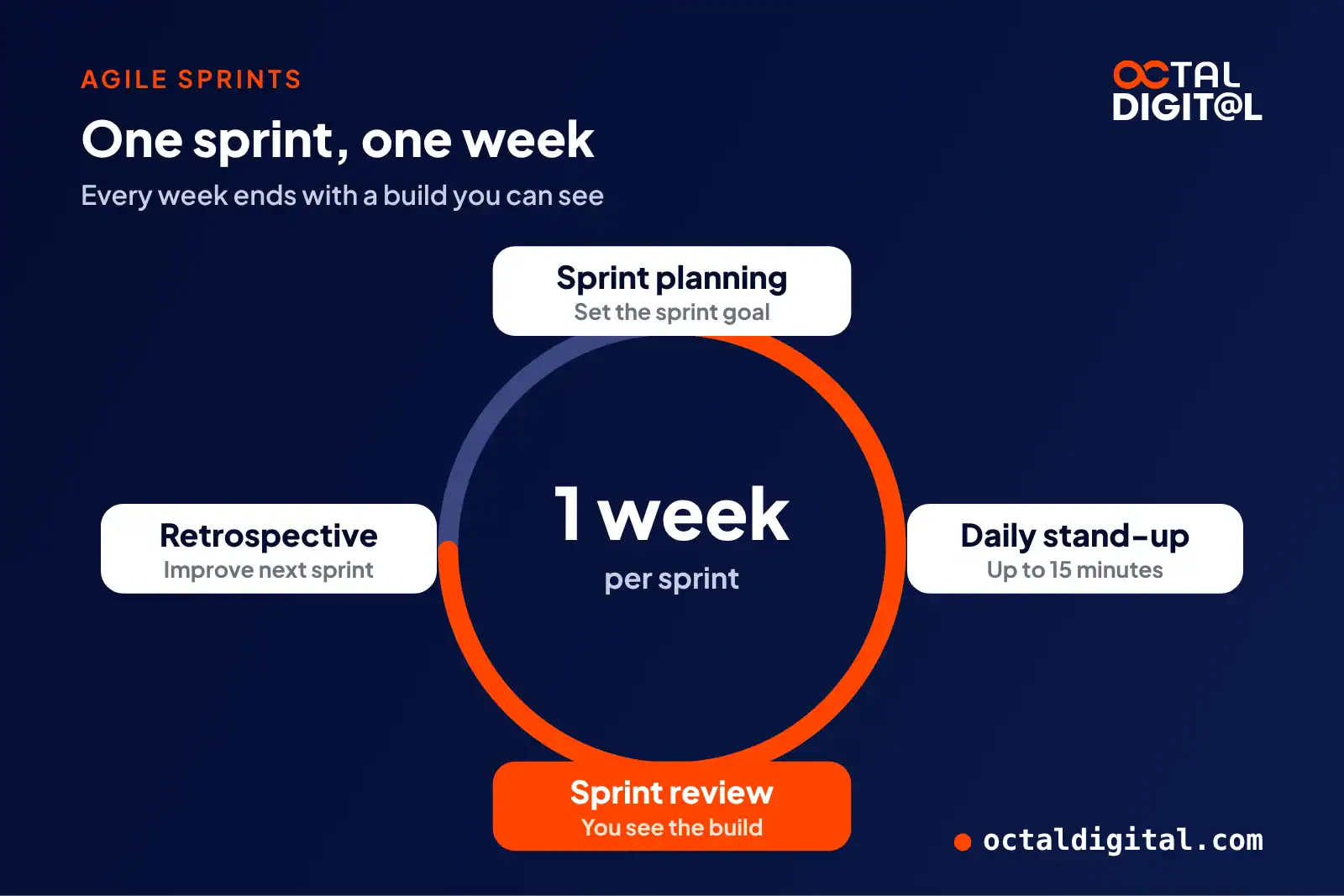
Sprint planning
It’s the first meeting of the sprint. During planning, the team talks through the goal of the coming sprint. Everyone needs to know what has to be done, how to get it done, and how long it will take.
Daily stand-up
These last up to 15 minutes. Everyone shares what they finished the day before and what they’ll work on over the coming hours. The team also discusses anything that is slowing the work down.
Sprint review
This is the moment when you step in. A sprint review is where developers show the results of their work. They walk through what has been finished, what problems came up along the way, and how they fixed them. The aim of this meeting is also to agree on what to do next and if the backlog should change.
Retrospective
It’s when the team gets together to share their views on what worked well in the last sprint and what has to get better. They agree on what to change in the following sprint to make the work run smoother.
Our US-based team builds in one-week sprints and shows you progress, so you can steer the app as it grows.
What You Should Own When the Project Ends
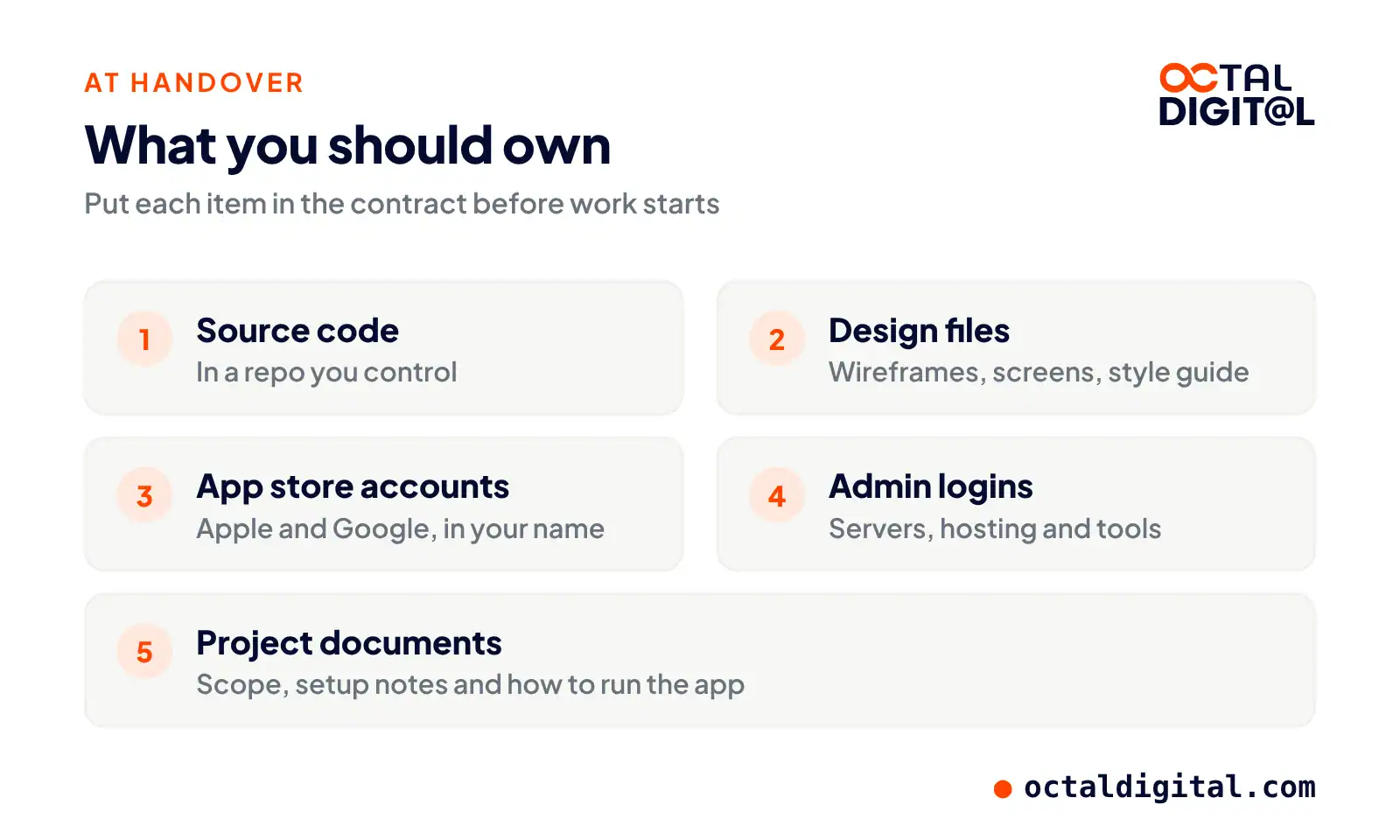
You should own the source code, the design files, the app store accounts, the admin logins and the project documents.
All projects should be built against a clearly written scope of work. If you’d like help with scope creation, ask your partner to offer it as a service. That scope of work will then be used in the development contract. Make sure whoever you hire for your app hands you a development contract with clearly stated pricing, build timeline, payment plan, and deliverables, including the code and accounts you’ll own.
How Long Does the App Development Process Take?
A simple app takes 1 to 3 months, a medium app 4 to 7 months, and a complex app 7 to 12 months or more. Enterprise projects get a custom quote.
Knowing the basic stages is not enough, especially when money and time are at stake. Most people also find they need to understand how long each stage takes and what it costs. Building a mobile app isn’t a one-stage job; there are many steps or phases that you have to plan for to budget a project. We cover the weeks per stage in how long it takes to develop an app, and the budgets in our app development cost guide.
How Octal Digital Runs the Process
We take each app project through these 7 stages, with one-week sprints and a US-based team.
Octal Digital, based in Houston, Texas, is an app development company. We’ve been building apps for clients since 2014. Our US-based team works out of Houston, Dallas and Los Angeles. If you’re looking to build a mobile app, we can build iOS apps along with Android apps, often with React Native or Flutter.
If you’ve got an idea for a new app, just send us your name or business name and we’ll sign an NDA with you. We sign NDAs with clients to make sure your ideas and files are kept private. Once the NDA is signed, you’re free to book a free consultation. You can choose fixed pricing or hourly billing, and we often start with an MVP.
Launch the core features first, learn from real users, then add what they ask for.
- A written scope and cost range
- Fixed price or hourly, your choice
- 5.0 rating from 250+ client reviews
FAQs
What are the 7 stages of app development?
The app development life cycle includes 7 key stages: discovery, planning, UI/UX design, development, testing, launch and maintenance. How your project turns out depends on how well you line up the steps, from the first idea to the updates after launch.
What is the first step in the app development process?
The first step is discovery. Any app idea needs to rest on a full description of what the app is and what it will try to do. Otherwise, it’s really easy to go off track and end up with an app that doesn’t really match your vision. And no one wants that. Start by listing as many details as you could possibly think of. Don’t be hard on yourself if you’re not happy with how much or how little you end up with.
What is the difference between the app development life cycle and the SDLC?
They are closely related: the app development life cycle is the software development life cycle (SDLC) applied to apps. Project management experts often define a project in four phases: starting, planning, building, and closing, with monitoring and control applied to each of the four. That model is rather broad, so app teams dig further into those four phases and split them into the 7 stages above.
Can ChatGPT or an AI app builder build my app?
AI tools can help with a first draft, but you’ll still need software know-how to follow what goes on in the code. AI tools, like people, are prone to making mistakes. A quick prototype may not be enough. You’ll have to test the app against what it is supposed to do, which is why teams use AI inside the 7 stages, not instead of them.
Who owns the app and the source code when an agency builds it?
You should, if your contract says so. During the development stage, app developers can rely on version control tools like GitHub to store and share source code with you and the rest of the team. Before starting development, you and your team can set up a process for storing the source code and creating builds for QA testing. Octal Digital hands clients the code and the store accounts in their own name.
What happens after my app launches?
After launch, your app moves into maintenance. The modern app development life cycle continues after launch. You can choose to stop at launch, but it’s better to keep going with user feedback in mind. A successful app gets updated often because technology and user needs change over time. For the best experience, fresh releases are key to improving on the first version of the app.
Have a project in mind? Get a free consultation.
Tell us what you want to build. We reply with next steps, a rough timeline and a cost range.
(800) 995-3369
Michael Husky is the Director of Sales & Marketing at Octal Digital, leading growth strategy, client acquisition, and brand positioning across mobile, web, and AI services with a results-driven, consultative approach.