
Key Takeaways
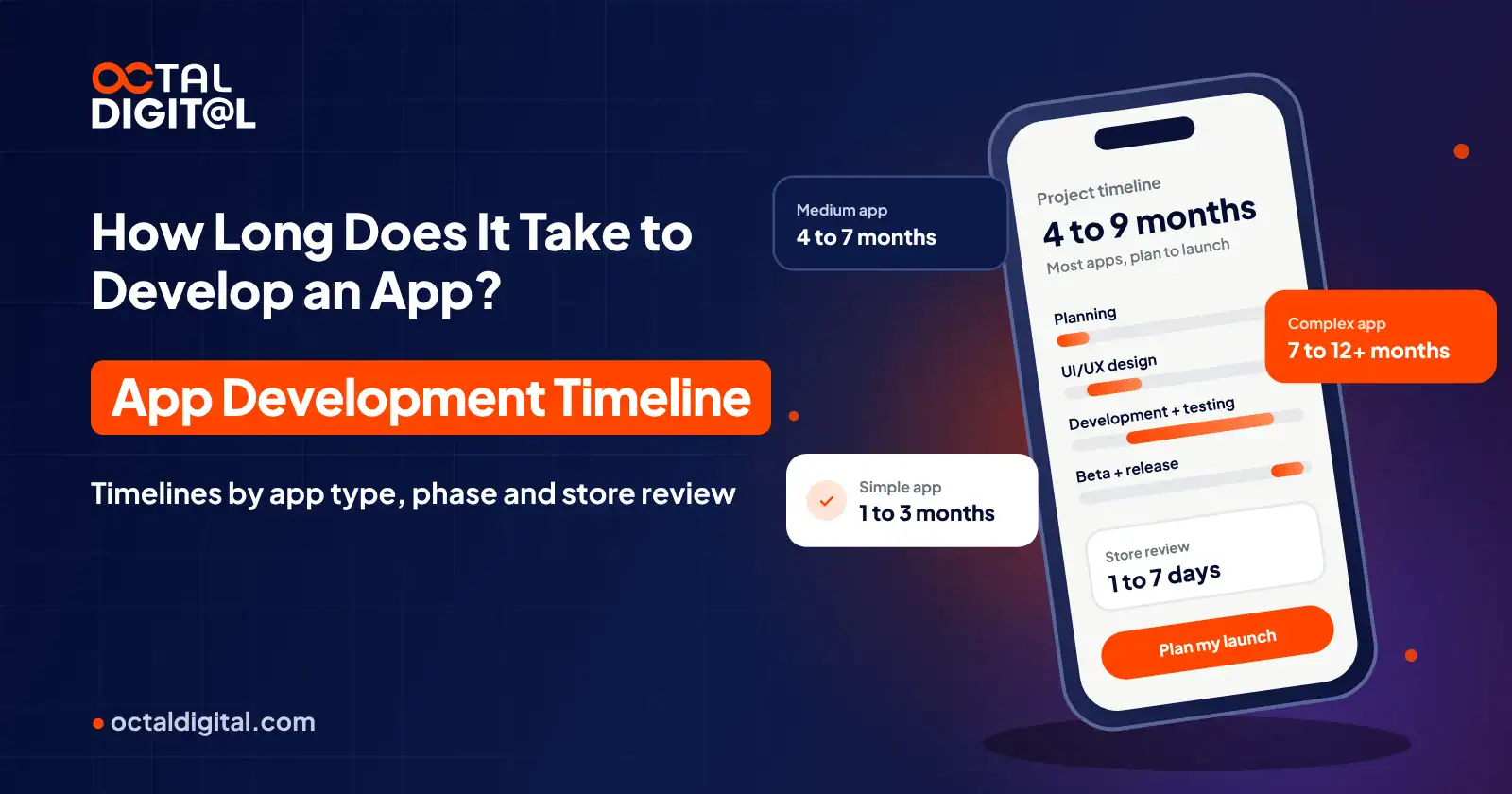
1 min summary- Prior to setting a launch date, be sure to know that most apps take 4 to 9 months to build.
- Check your app type to figure out if it needs 1 to 3, 4 to 7, or 7 to 12+ months.
- It's worth putting real time into planning and writing a scope that is clear and fixed.
- Look through your feature list to see if a smaller MVP fits your first release.
- If your scope keeps growing after coding starts, then how likely is your app to launch on the date that you planned?
- Make sure to also book a free consultation, as this can answer most of your timing questions and save time.
Whenever you’re getting ready to develop an app, your first and biggest question that will pop into your head is how long does it take to develop an app. You’d like to know since it helps you plan the release date and set up a budget for your product’s launch. The time can change based on the size of the build and the team you hire. A small app will need less time compared to a large app.
How Long Does It Take to Develop an App?
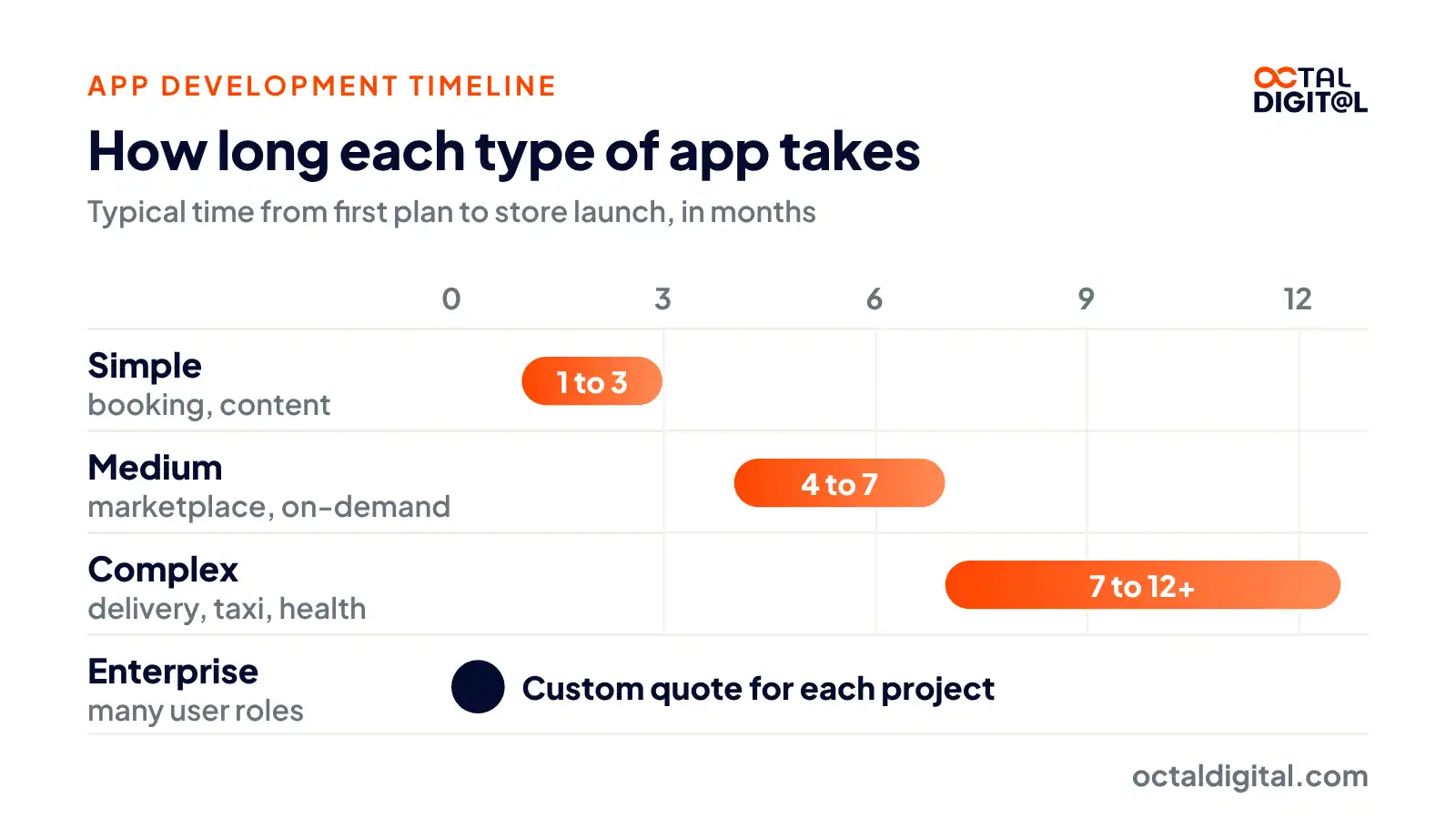
Most apps take 4 to 9 months to develop, from the first plan to the store launch. We’ll take four types of apps with different sizes and then we’ll show you roughly how much time it takes to finish each of them. That’ll give you a sense of how long your own app might take. We’re taking the kinds of apps people ask about most, we’ve listed the usual features of each one and grouped them into a simple, medium, complex and enterprise app. The table below will help you figure out which group your app falls in.
| App type | Typical timeline |
|---|---|
| Simple (booking, content) | 1 to 3 months |
| Medium (marketplace, on-demand) | 4 to 7 months |
| Complex (food delivery, taxi, healthcare) | 7 to 12+ months |
| Enterprise | Custom quote |
How Long Does Each Phase of App Development Take?
Each phase takes from one week to a few months, and the build itself takes the longest.
Planning and scope
Planning and requirement writing is the opening step for any app build. You want to list the features, write clear requirements and set the limits of the app. If your team is organized, you can finish this in 1-2 weeks on small apps, 2-3 weeks on medium apps and 3-4 weeks on large apps. You’ll have to study other apps on the market and choose which features matter most for your mobile app.
UI/UX design
The design is a big step to making the mobile app. The work involves building the wireframes for your mobile app built from the requirements and then reviewing/adjusting them. Once the wireframes are approved, the visual UI design has to be finished which covers fonts, colors, theme, and images in the app. For a small app, you need 2-3 weeks for this work, 4-6 weeks on a medium app and 8-10 weeks on a larger app design process with several UI and UX designers.
Development and testing
Most founders and small teams want to launch apps with every feature they can think of. Your feature list and kind of business will decide the time needed to code the app. You’ll need to code the phone app and also the server side for that app. All the work: iOS app, Android app, plus the server side should run in parallel. For the small version, it can be done in about 1 month, a medium app can need around 3-4 months while a large app may need around 5-7 months. This will cover system architecture, screen coding, server setup, feature work, integrations, and QA. You should have a small group of early testers during this stage.
Beta testing and release
Once your app is completely built, you want to run beta testing to catch any remaining bugs. You can give 1-3 weeks to beta testing depending on how big your app is. Be sure to have a set of beta testers on hand and run the tests hard to finish on time.
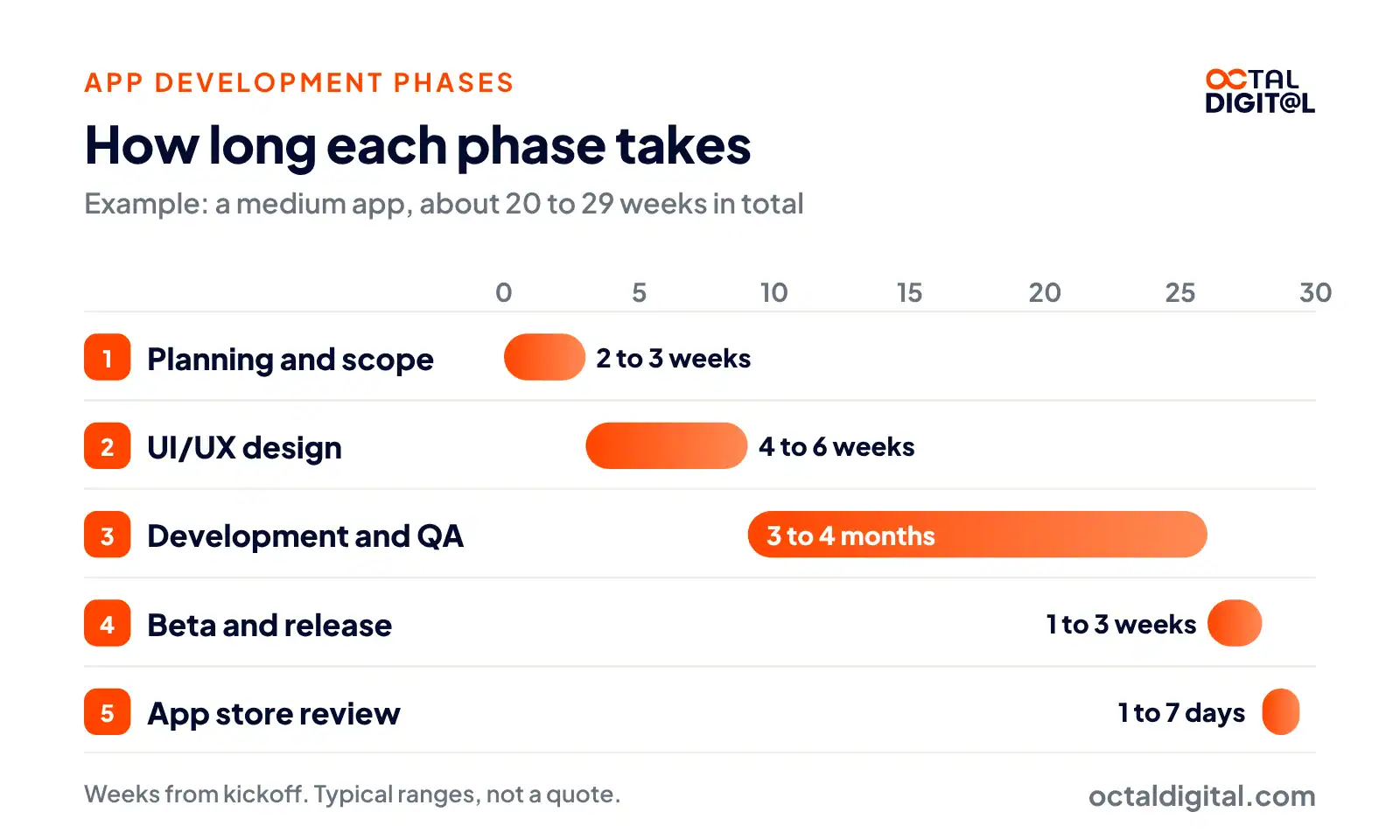
As you can see the time for each stage will hinge upon the scale of your app. At a broad level, you want to plan around 8-12 weeks on a small app, 20-29 weeks on a medium app and 34-48 weeks on a large app. You’ll also want to be sure that you have a skilled team building your app, or else it can slip.
| Phase | Typical time |
|---|---|
| Planning and scope | 1 to 4 weeks |
| UI/UX design | 2 to 10 weeks |
| Development and testing | 1 to 7 months |
| Beta testing and release | 1 to 3 weeks |
| App store review | 1 to 7 days |
How Hard Is It to Make an App?
How hard is it to make an app? This is something we hear a lot, and there’s no simple way to answer that. The word “app” spans a lot of territory, from seriously complex feats of engineering to almost absurdly simple tools.
For example, a basic flashlight app really only has one function: turning on the phone’s camera light. That’s it. It seems silly, but often the simplest app concepts are the fastest to build, and a few weeks of work sure sounds like a quick win to us.
On the opposite end, there are also apps that act as front ends to huge databases and server systems, built over years or sometimes decades to handle the hardest problems in security, health, logistics, and payments. A self-taught app coder could build the next flashlight app without much trouble, but building your own version of Uber, a real-time app matching riders and drivers across thousands of cities, would need a lot more skill and a full team.
So, the simple answer is: “it depends on the app.” But of course, the story doesn’t stop there.
How hard is it to make an app you can launch?
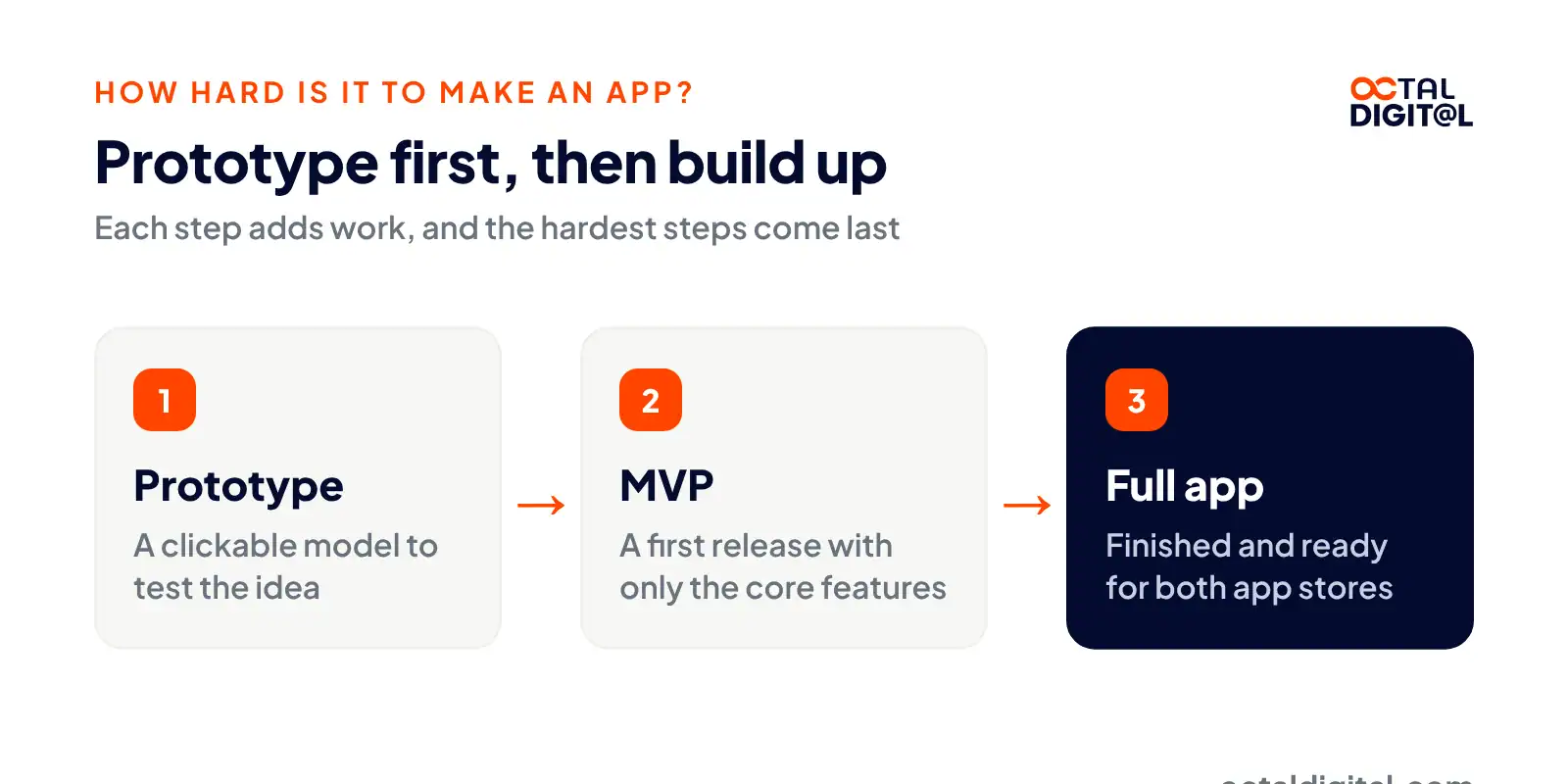
The complexity of what you build is one part of the difficulty, and the final product you’ve got in mind is the other. Building a clickable app prototype is one job. Shipping a finished, multi-platform, store-ready app is another. There are extra steps, and the hardest steps sit in the back half of the build.
After the prototype, things get more involved. There’s design and build work, coding, testing, fixing, and finally, release. On average, the full build takes 4 to 9 months, and can need a full team, depending on what you’re making. It’s also the stage of the project that needs the most specialized skill, in fields like UI design and backend code.
Tell us what you plan to build and get a written scope and cost range from our US-based team.
- A written scope and cost range
- Fixed price or hourly, your choice
- 5.0 rating from 250+ client reviews
What Makes an App Take Longer?
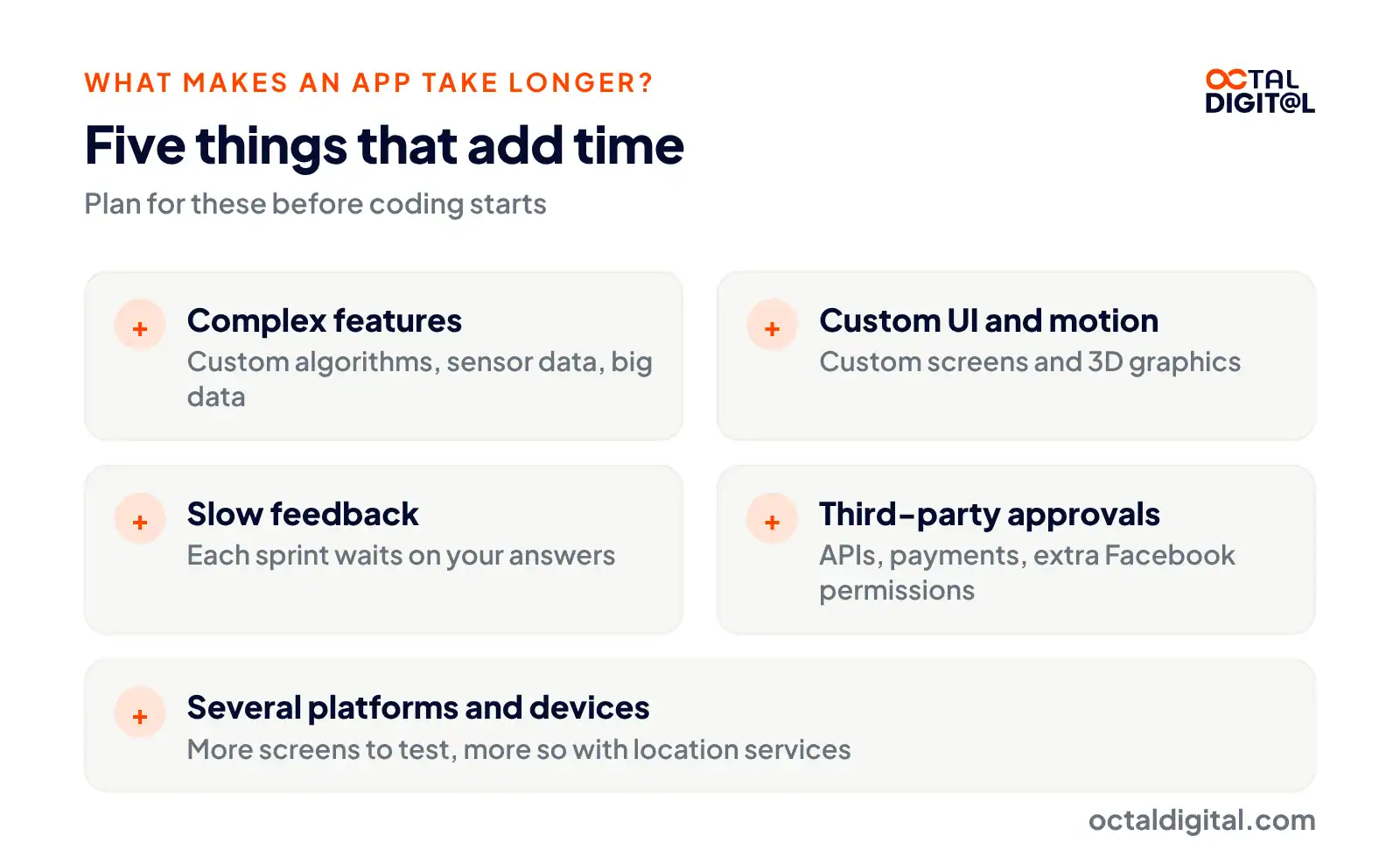
One of the most frequent things clients ask when it comes to app timelines is “what makes an app take longer?”. Generally speaking, the feature list, the design and outside integrations add the most time. The more clearly you’ve written down your features and how they work, the more reliable the schedule. Skilled developers can build a schedule by matching your planned features to an app they’ve shipped before.
It’s hard to exactly predict the time needed for building a mobile app. Every project is different and rests on the app’s own technical needs. In this section, we’re going to look at the main factors that decide how long it will take to build a mobile app:
Features and screens
Feature-heavy apps take more work to design, code, and test in every one of the app development stages. Some features that may be seen as complex include:
- Custom algorithms
- Sensor data
- Web services
- CRM integration
- High-end graphics
- Big data
On the flip side, you can count on a faster build for a basic app that doesn’t need heavy coding and lots of features. You’ll need careful planning to stop piling on new features after coding begins. Otherwise, build time and app development cost will go up.
UI/UX design
Building a clear user interface (UI) and user experience (UX) is key for mobile apps. Both shape how people use your app, and how you reach your company goals. If you plan to build a motion-heavy app, like a 3D racing game, it’ll take longer to build compared to a simple 2D game. Games need plenty of time to sketch, design, and test to land the right UI/UX that fits your target players.
In the same way, the UI design phase will run longer if the app needs custom buttons and screens. You can cut build time to a fair extent if the app is using standard UI components. These are supplied by the OS that your app runs on.
Your feedback and decisions
Your role in the app development process matters a lot. Most teams use an agile process. One of the perks of this method is that it keeps you involved throughout the build. This is because new parts of your app are delivered in “sprints”. Whenever a sprint is delivered, you get a chance to give feedback. Fast feedback is the secret here. The sooner the team gets feedback, the sooner it can begin the next sprint to add any requested changes or fix bugs that may come up.
Third-party integrations and approvals
Many apps need the setup of third-party tools or APIs. In such cases, apps need to link with external services such as:
- Social login
- Payment gateways
- Maps and GPS search
- Chat and video calls
- Text recognition (OCR)
- Shipping or stock data
On top of that, your app might have to pass through a long process to win approval from the third-party services involved. For example, with extra Facebook permissions, developers must send the app to Meta for review. That review process can take days or weeks to finish.
Platforms and devices
Launching apps on several platforms and device types is a common plan many businesses follow, as this helps them reach the widest possible group of users. However, designing, coding, testing, and releasing apps for different platforms takes extra work on the developers’ side. In most projects, the testing stage makes up a big part of the timeline, particularly if your app relies on location services.
The extra testing is to protect the quality of your build and help your app run well across different screen sizes. The time needed for this stage depends on the count of features, the complexity, and third-party links within your app.
Our US-based team can check your feature list and flag the risks before you commit.
How Long Does App Store and Google Play Review Take?
App review times on both stores vary, but most apps clear in one to seven days. From the very first upload to the final approval. The figure Apple gives is 90% of submissions reviewed in under 48 hours and it is usually only that fast when the submission is complete. The fastest half of submissions are reviewed in under 24 hours.
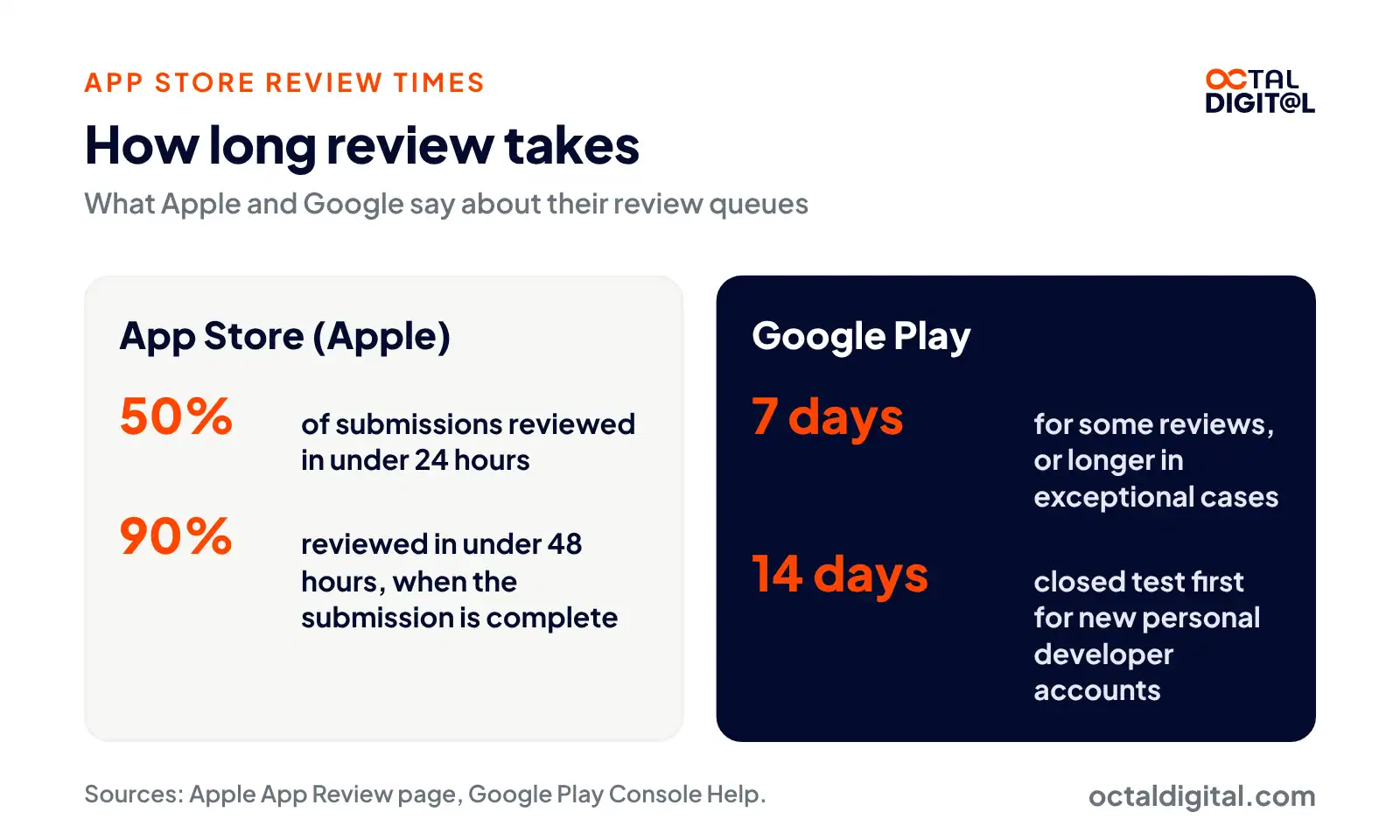
In the past only Apple had a strict review and Google didn’t. Android apps went, for the most part, live within a few hours. However, that has shifted and now apps get reviewed on Google Play much like on iOS. That being said, Google does not give a fixed review time for Android apps. However, if your build is one of the few that gets extra review, Google says it can take up to seven days or longer in exceptional cases. What we usually tell clients is to plan for a few days of review, but as you saw above it does differ based on the app and the store.
These days for most apps, they’ll be reviewed and answered usually within one to three days. Usually you will get an approval in one to two days if the app gets approved. If the app gets rejected, a fix and resubmission usually adds a few more days, and that is where a planning buffer of about one week comes from. Though it’s true that at least half of App Store submissions are reviewed within the first day. But when giving schedules we like to add the 14-day closed test that new personal Google Play accounts must run first.
How to Launch Your App Faster
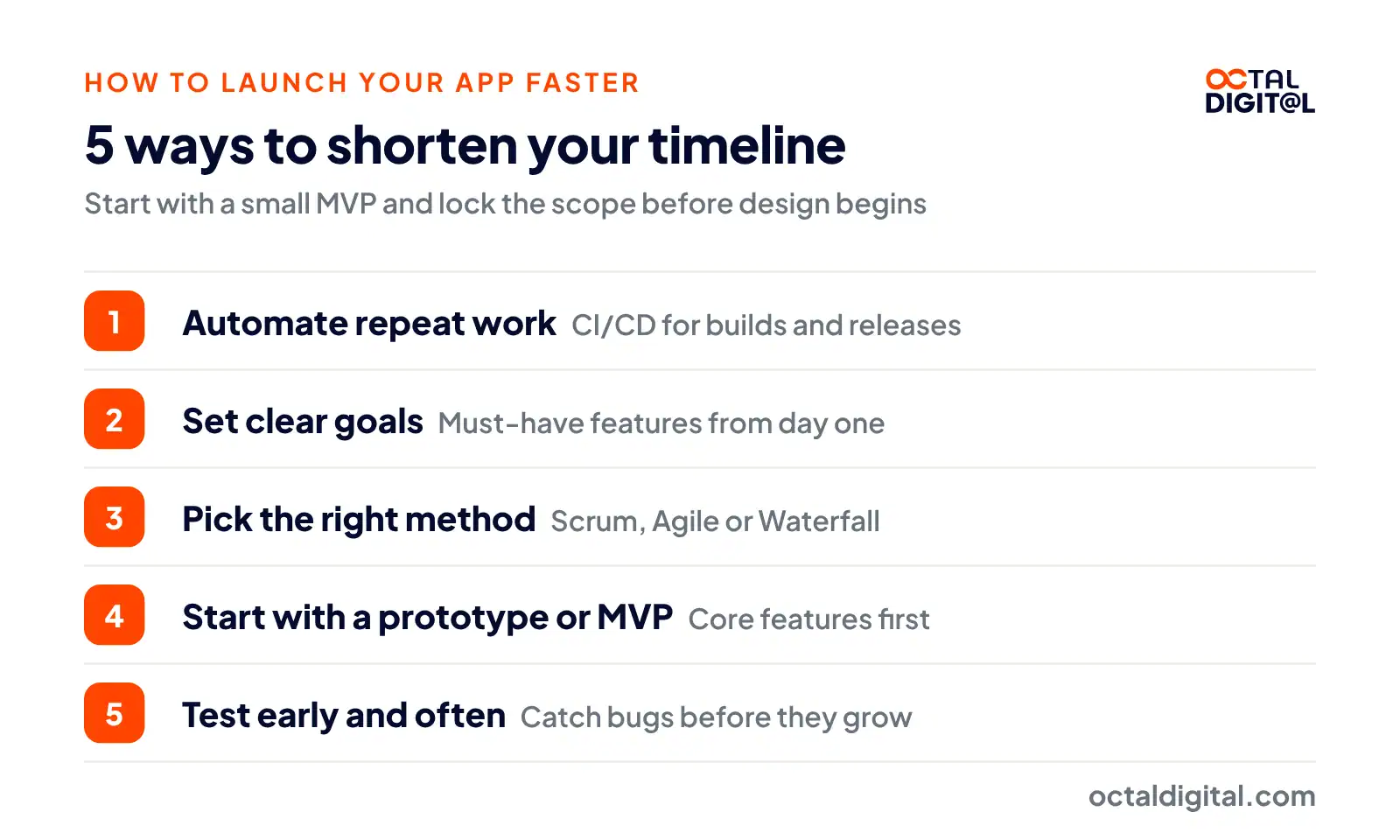
The fastest way to launch is to start with a small MVP and lock the scope before design begins. Are you fed up with slow app projects that take forever to ship? You’re not alone. Waiting on an app to go live can be stressful, a common problem many founders need help with.
If you’re wondering why your app project is taking so long, it may be due to a lack of focus in your team’s workflow. But don’t worry since there are ways to shorten the build. This section will give five tips to help you hurry up your app development work and bring your app to market sooner.
1. Automate repeat work
Automation tools can handle repetitive tasks and let your developers focus on more important work. There are plenty of automation tools out there that can help you speed up your build.
For example, if your app ships to both stores, you may need a CI/CD pipeline. Sure, you can just build, sign and upload every release by hand, but it’ll save you heaps of time to rely on an automation tool which can handle all the grunt work for you.
2. Set clear goals
You and your whole team should know what you hope to achieve with your app. Set your goals and must-have features from the start so everyone working on the build knows what they’re working towards. It helps keep everybody on track and make sure that you’re making progress toward your launch date.
For most app teams, the next step will be picking the right development method and building a prototype after naming and listing out your goals and features.
3. Pick the right method
Different development methods suit different projects. Pick a method that fits your product and team’s needs. Scrum, Agile, and Waterfall rank as some of the most common methods. However, if you’re hiring an outside team, you’ll probably follow your agency’s or project manager’s lead regarding the development method you’ll use.
You should get to know the most common methods, just like the ones named in the previous paragraph.
4. Start with a prototype or MVP
Rapid prototyping lets you build a working mockup of your app fast. This should help you gather feedback early in the build, so you’re able to make changes before it’s too costly. You can then turn that model into an MVP, a first cut of the product with only the core features.
For example, you can first use a clickable design prototype to test the idea before you start building the MVP by writing all screens and logic in the code base of your choice.
5. Test early and often
Testing is a key part of any app development process. Run tests early and often in order to catch bugs and errors before they turn into big problems. This should help you dodge costly delays and make sure your app is solid.
Usually, how and when you run tests depends on your team’s development method. For example, under Waterfall, testing is often handled by a dedicated QA team. Because of this, the test results may be out of date once the coders on the other team have moved far ahead.
On the other hand, in methods like Agile, testers and developers often work in pairs to run tests. This lets both sides know the problems they may hit and get them fixed right away as the build moves forward.
By using these tips, you can shorten your app development timeline and bring your app to market sooner. Remember to automate repeat work, set clear goals, pick the right method, start with a prototype, and test early and often. By doing so, you’ll be well on your way to getting your app live on schedule.
Plan Your App Timeline With Octal Digital
While most app teams see these factors as the main drivers of the app development timeline, skilled developers can handle them well with careful planning. Octal Digital’s US-based team of developers works in short sprints on our app projects, which helps us aim to keep apps on schedule and on budget, without cutting into an app’s quality. Reach out to our team today and find out how our mobile app development company can help turn your app idea into a launch date.
Fixed price or hourly, your choice. Share your idea and get a free estimate from our US-based team.
- A written scope and cost range
- Fixed price or hourly, your choice
- 5.0 rating from 250+ client reviews
FAQs
How long does it take to develop an app from scratch?
Most apps take 4 to 9 months from scratch to launch. Before most teams start your build, you will first go through a discovery/planning stage. When you join a discovery call, it’s important to explain exactly what your app needs to do and who your target users are. This is usually a short meeting that our team runs for free. It usually takes a few hours to get the ideas out of your head and write them down in order to build a clear plan for your project.
How long does it take to code a simple app?
A simple app usually takes 1 to 3 months to code and launch. Building an app is about more than coding. It is about building a working design that will in the end give users the best experience possible. It’s often not smart to pick a lone freelancer because development, design, and QA skills are all key to success. A full team covers core tasks like design, usability checks, and testing.
How many hours does it take to make an app?
At our $25 to $49 hourly rate, a simple app priced at $10,000 to $35,000 takes about 200 to 1,400 hours of work. When you are comparing hour estimates, it is vital that you don’t save a little now to lose a lot later. The lowest quote may look the most tempting, but cheap hours often cost more later. Some app teams will underquote the hours to win the deal and then struggle to ship. If you pay too little, you may end up paying twice.
How long does it take to build an iOS or Android app?
Both take about the same time, and one cross-platform build in Flutter or React Native can cover iOS and Android at once. The right app development team will have a solid history of building with Swift, Kotlin, Flutter and React Native. A few pointed questions will tell you a lot about the team’s skills.
What are the stages of app development?
Most apps move through five stages: planning, design, coding, testing and launch. When you are talking to an app development company, find out what their workflow is. It is key to know the way you’ll talk with them during the build and which stages the work will go through. Most app projects run for months, so make sure you pick a team that will keep you posted on your project.
Can ChatGPT or a no-code tool build an app faster?
They can speed up a first prototype, but a store-ready app still needs real developers. It is vital to think past the first draft of your app. What if you built your app in a weekend and it broke? It would be a headache to spend weeks fixing your app and getting it through the app store when it can’t handle real users. Speed is just one part of your app. The app team that you pick should be able to plan a full mobile app roadmap that will keep users engaged and bring results to your business.
What slows down app development the most?
Scope changes and slow decisions cause most delays. Many app projects will start with a signed scope, then add new features halfway through the build. Building an app can be a large project, but when you hire an app team, you want to make sure that the decisions on your side come back quickly. It helps to have open contact with the developers throughout the project. Shipping a working app needs a team of product owners, designers, and developers all working together, which runs more smoothly with weekly check-ins.
Have a project in mind? Get a free consultation.
Tell us what you want to build. We reply with next steps, a rough timeline and a cost range.
(800) 995-3369
Matthew Jones supports Octal Digital as a Digital Strategist and trusted technology advisor, helping guide clients through scalable solutions, emerging tools, and smart development strategies that align with business goals and growth.