
Key Takeaways
1 min summary- Picking a build path first is really a smart way to protect your budget because you choose between code, no-code, AI builders, freelancers and agencies.
- It is far easier for you to make an app that users want when you start with an MVP of three to five core features.
- By checking where your users are before you build, you can choose iOS, Android, a web app or a PWA with confidence.
- In addition, AI app builders can help you make a quick demo, but research shows AI-written code often has security flaws.
- If you're a business owner planning to publish on both stores, Apple charges $99 a year and Google Play charges $25 once, plus a cut of paid sales.
- And with Octal, apps start at $15,000 at $25 to $50 an hour, and you will own the code, design files and IP after final payment.
With the demand for business apps on the rise, founders everywhere are trying to learn how to build an app. It may look like a tall order to make an app, yet whether you code an app on your own or create an app with outside help, it’s a fairly clear process.
Building an app is a smart way to test your idea with paying customers or open a new sales channel for your company. Either way, to successfully launch an app is to solve a practical everyday problem for actual users. Whether you’re a business owner, founder, or developer, you can use this post as a guide on how to build an app and get it into the app stores.
To build an app, you can pick between no-code tools and writing your app from the ground up. Hiring an app development company and using AI app builders are realistic options for non-coders too.
How Do You Build an App?
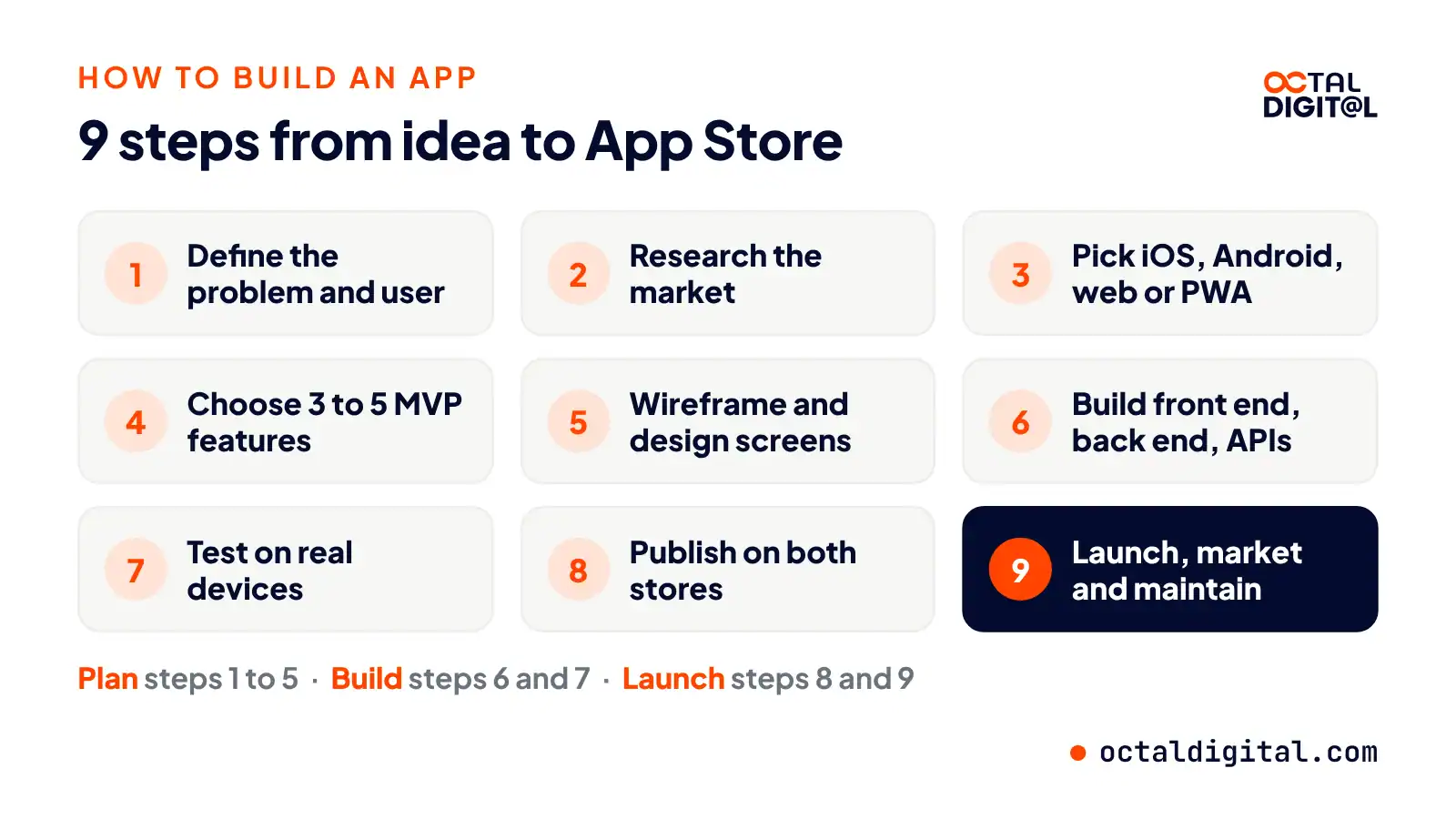
A step-by-step way of building an app involves defining a problem, studying competitors, picking a platform, choosing MVP features, designing screens, coding the app, testing it, publishing it, and keeping it updated. You don’t always need coding skills to create an app, and there’s a broad range of builders and agencies to help you.
- Define the problem
- Research the market
- Pick the platform
- Choose MVP features
- Design the screens
- Build the app
- Test it
- Publish it
- Launch and maintain it
But there are also real advantages to working with a team that knows the app development process from start to finish. Let’s look at all five paths.
Choose Your Build Path: 5 Ways to Make an App
| Build path | Best for |
|---|---|
| Code it yourself | Developers |
| No-code app builder | Simple apps, small budgets |
| AI app builder | Prototypes |
| Freelancer | Small projects |
| App development company | Business apps |
1. Code It Yourself (Native or Cross-Platform)
To give you an idea, a fitness app. With some technical, or coding skill, you can head to the Android Studio site, click on the download button near the top of the page to show you want to build an app, choose to code it in Kotlin, pick an Empty Activity template, name it, and begin dropping in your app icon art, your home screen layouts, and begin adding your workout videos, and your data and you’re up and running! We do see people come into coding this way and learn as they go. As an example, picture a hobby coder with a pretty good YouTube habit, who has shipped their app to both iOS and Android users without writing two separate code bases, they just used the Flutter framework that Google offers. At the other extreme, if you’d like to build a native app for each platform, you can spend many weeks learning programming languages like Swift for iOS and Kotlin for Android, wiring up the back-end data, and showing the data the way you want it.
2. Use a No-Code App Builder
A no-code app builder is a tool that lets you build an app, and set up screens in terms of drag-and-drop blocks and other ready-made pieces such as forms, user logins, and other common app features. How do you make an app without coding? Choosing a no-code builder that grows with you is a point that I’d urge every founder to think about as they plan their app. With tools like Bubble or Glide, you can begin small, and test, so that half-way through the build, you’re less likely to change platforms, because you’ve hit the tool’s limits and have to rebuild from scratch. Most builders have a monthly plan that covers hosting and any updates related to the platform. Their limits show up in the form of custom features and integrations the builder doesn’t support.
3. Try an AI App Builder
Can an AI app builder make the whole app for you? It’s partly true. (If you’re wondering, that means tools like Lovable or Bolt can turn a written prompt into working screens in minutes…) How do you check the code quality and security of what it builds? You need a developer reading the code and running tests on it to make sure that each feature is safe. When there is a problem with a feature the AI may patch one part and break another, and a developer has to step in and fix the issue.
4. Hire a Freelancer
Who should hire a freelancer to build their app? Usually, there are a few kinds of founders: there are founders with a design who need a few screens coded, and a freelancer builds them, and they’re off to the races. The second type doesn’t have a tech background, and they’d like to launch an app, and handle most of the planning but need support from a developer. Are there any projects for which a freelancer would be a poor fit? If so, why? In the event a business wanted to build an app that handled payments, needed a back end and an admin panel, we would recommend hiring a full team that covers design, development and testing for iOS and Android.
5. Hire an App Development Company
If someone wanted the whole package, to hand off the build, and get design, code and testing from one team, how much should they plan to spend? An app development company has a project manager, and a design crew, and over a set of sprints they can work next to a client to guide them with the technical parts that the business owner may not know how to handle themselves. At Octal, apps start at $15,000 at $25 to $50 an hour. For that price, we’ll have a team plan the features with you, and design and build your app, and hand over the code and design files, so once you’re ready to launch the app it’s tested and ready for whoever is going to install it. From there, the price goes up. It depends how many custom features you need.
Tell us your idea and we will suggest the right path, from MVP to full app, in a free consultation with our US-based team.
- A written scope and cost range
- Fixed price or hourly, your choice
- 5.0 rating from 250+ client reviews
How to Build an App From Scratch in 9 Steps
Your app project starts here. Just follow the nine steps below to develop an app from scratch.
Step 1: Define the Problem and the User
The first step you should take in the planning process is defining the problem. Before you spend valuable time and money working out how to build an app and its features from scratch, it’s always a smart idea to write down who has that problem and how they deal with it today.
In terms of app ideas, there are questions that cover the basics every app needs. I’m talking about answers for things like the user, their pain point, the job the app does, and how you’ll measure success.
Why would you build a feature for users if you can’t name the problem it solves for them?
It’s always easier to sell something people need as opposed to something you think is cool. You can usually test the problem with a short survey or a few customer calls as well.
Learning how to make an app is hard enough. Don’t make this process more confusing than it has to be. Only build for the user you named. For everything else, just keep a list of ideas for later.
This saves you time, money, and gets your app to the right people faster. Plus, it leaves you with a one-line problem statement and a clear target user.
Step 2: Research the Market and Your Competitors
Researching the market will keep you and your budget on track through the app building process. Without real data, you’ll have no way to prove your idea.
The point here is to study the apps your users already download. It’s much easier to learn from a few existing apps than to guess at the whole market from start to finish.
This is one of the basics of market research, which is a key part of mobile app planning.
Each competitor app should be checked through its App Store and Google Play listing. Depending on the category, this could cover anywhere from a few reviews to millions.
You can compare your idea against these competitor reviews to make sure that you and your future users want the same things.
Use a simple spreadsheet that works well for comparing features. Price and ratings are two useful columns to start with.
Whatever your approach here, you must make sure you have a reason users will switch to you.
This will give you a clearer picture of what your app has to do better, so you can plan ahead.
Step 3: Pick Your Platform (iOS, Android, Both, Web App or PWA)
A platform pick is just what it sounds like. You’re basically choosing a home for the app and shaping it for your own users.
You’ll pick iOS, Android, a web app, and other app options like a PWA that align with your target audience. Your research makes it simple for you to build for devices that users carry, and skip platforms that they don’t.
There is no single answer for this platform choice. A consumer app typically has a fairly mixed user base. So you may need both stores to reach them all.
Building for one platform this way might be cheaper, but it’s not very wide or complete. Your reach will be fairly limited, mainly if you want to grow.
Web apps and PWAs are fine for internal tools, booking apps, or MVPs with small budgets. But they’re not really a match for every phone feature.
Step 4: Choose Your MVP Features
An MVP (minimum viable product) is basically a first working version of your mobile app. It doesn’t have to be too polished either, and you don’t need to think about your app’s extra features just yet. You can plan an MVP on a sticky note, a whiteboard, a spreadsheet, or use a short feature list.
The purpose of the MVP is to simply prove the app’s core value and test the main idea.
Don’t worry about the nice-to-have features in an MVP. This version isn’t supposed to be an exact match of how the finished app will work. Instead, the main focus of your MVP should be on three to five core features.
List the user’s main task. Show what happens when they sign up for the first time. What will the home screen show? What happens in the app when a user picks Feature A vs. Feature B?
An MVP helps put your team in sync about your budget for what the app will do first and launch with.
Step 5: Sketch Wireframes and Design the Screens
Take the MVP features that you picked during the planning process and turn them into a “wireframe.”
These are the rough screen layouts behind the design of your app that users never see.
Sometimes, it’s smart to visually move things around because it’ll spare you lots of rework and money.
A UI/UX designer has to review your wireframe and judge the user experience, not just the visual one.
Your wireframe can potentially find simpler ways to lay out your screens.
These changes can save you weeks of work and a lot of dollars if you catch them now.
At the very least, sketch the screens, and then you get the chance to test a Figma prototype.
You could always say that the visual design matters more than cutting some of the steps and coding more quickly. But the wireframe process is still a key part of design.
It’s smarter to do it early, rather than three or six sprints later, thinking, “I wish we drew things differently. It might have spared us so much code.”
Step 6: Build the Front End, Back End and APIs
Front end (user interface). The front end is the part of the app that users see and tap on the screen. The main pieces of a front end are screens, buttons, forms, menus, and animations. Some front ends are built for one platform, such as SwiftUI for iOS.
Back end. An app’s back end is used to store and process the data. It is useful to developers since it handles the whole process of logins, payments and records. If you don’t want to build a back end from scratch, you can use a ready-made service, such as Firebase, Supabase, or AWS Amplify.
APIs. There are plenty of outside services that are used throughout a modern app. For this reason, you will need APIs to connect your app to them and pass data. Some common APIs include Stripe for payments, Google Maps, Twilio, and Firebase Cloud Messaging for push notifications.
Step 7: Test on Real Devices and Run a Beta
You should test how your app works on real phones just as much as you test it on your laptop. You can catch and fix more bugs in your app if you know what devices your user base carries. Since some of the bugs, you will find in your app won’t show up on a simulator, testing on the right devices is very important.
However, doing this well requires a good plan. You can test your app based on unit tests, device labs, beta testing groups, and more. Dig into your app and see where it breaks. Make a list of those bugs and fix them before launch. For example, if your app shows lots of images and video, it might run slower on older phones. Like this, you can check screen sizes, OS versions, and more to find hidden problems when you build an app. Apple’s TestFlight and Google Play’s testing tracks are open to you, and by using them well, you can get feedback from real beta users.
Step 8: Publish on the App Store and Google Play
One of the jobs you should sort out before you launch an app is how it will be published. This depends on your platform and your developer accounts. If your app is a web app or PWA that people open in a browser, you might not need an app store listing for the app itself. However, if you’d like to put your app on iPhones and Android phones, then you need to submit your app to the App Store and publish it on Google Play.
Apple charges an annual fee of $99 and Google Play charges a one-time fee of $25. You can also launch your app on two stores, one first and the other later. This way, you can reach a large audience while giving each store the details it asks for. Both stores, the App Store and Google Play, ask for a privacy policy link.
Before sending the app you’ve picked, you should read what each store’s review rules want. Apple can reject apps that are too thin to be useful, while it also wants apps with sign-up to let users delete their account in the app. If you’re going for both platforms, you can expect two review processes as well.
Step 9: Launch, Market, Make Money and Maintain
The success when you launch an app can hinge on the effort you put in after it. There are several jobs to handle after the day your app goes live. This work can also grow as your app gains users. You might find only later that some areas need more attention than what you had first planned, for example, during updates and support.
The money your app can make depends on factors like what revenue model you pick. You can use in-app purchases, subscriptions, or ads, and each one can bring different results according to your audience. As the user base of your app grows, its server load grows as well. You can expect higher hosting bills for more popular apps.
Whether you go for an app store optimization (ASO) approach or a paid ads approach can also change the results. You should consider the budget and goals of your app before making that decision. Beyond this, you will also need to take into account the costs required for security patches and OS updates later on.
We plan, design and build iOS and Android apps, with fixed price or hourly options and a free consultation.
Can You Build an App With AI?
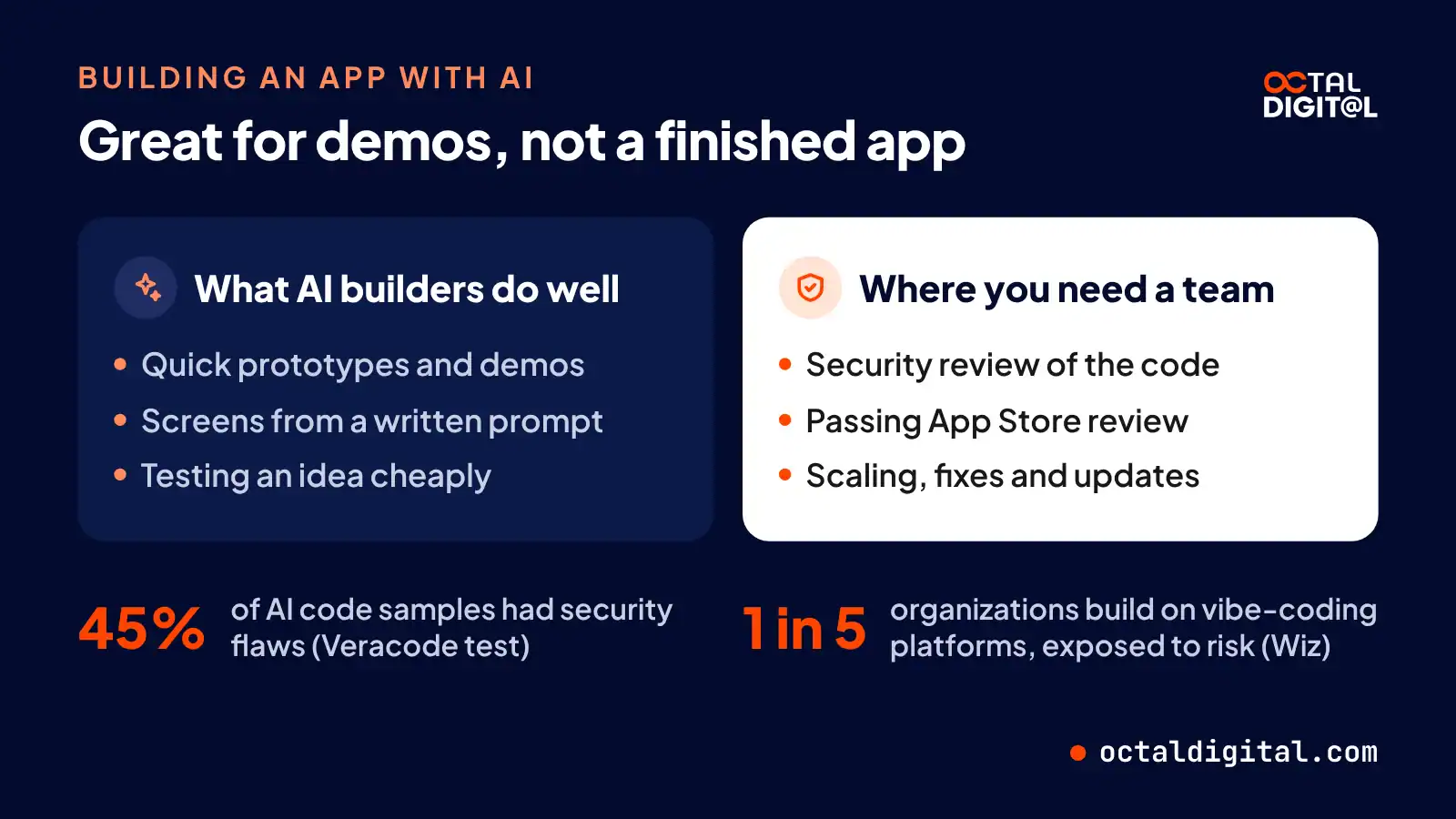
So, the short answer to “can ChatGPT build an app?” is: “yes, a demo.” But of course, it doesn’t end there. Because of this, there are plenty of cases where starting with an AI-built prototype is the most sensible approach. For example, let’s say you’re a founder with a strong idea for an app, but zero coding skills or budget. What makes more sense for you: hiring a crew of designers, coders, and testers to make your idea and bring it to launch, or spending a week or so prompting and tweaking a working demo and showing it to investors?
If your goal is to launch a real product, the answer is different. Unless you’ve already got a developer, a security review process, and plenty of testing, shipping an AI-built app is almost always the riskier approach.
This method brings a few problems into the usual app workflow, for example, AI tools have a weak memory on big projects, so they lose track of code written earlier in the session. On the flip side, it lets you test the idea until you have the budget to invest in it. All you need is a demo that proves a real need, then let a professional team do the production build.
The Security Problem With AI-Built Apps
AI coding is based upon the quick prediction of code patterns. A Stanford study found developers using AI wrote less secure code. Founders are at a disadvantage since they must check all possible weak points, while attackers just need to find and use one bug or loophole. This gap helps attackers, which means even neat AI demos can struggle to stop hackers from getting access to their user data. In Veracode’s 2025 test, 45% of AI code samples had security flaws.
AI builders may leave any database or API key open, exposed or both, which means founders and companies of every size are at risk. Arguably, since they often skip formal code reviews, solo founders and small businesses can face greater risk than bigger ones, despite looking like less obvious targets at first glance. Small and early-stage apps can store customer data for bigger brands, which means if a single API key leaks from a small app’s code, the entire database can be compromised. Wiz found 1 in 5 organizations build on vibe-coding platforms, exposing themselves to risk.
What AI Can’t Do for You Yet
Basic AI prompts aren’t always enough to ship a commercial app. Want it to pass App Store review? You’ll need to study Apple’s review rules and privacy basics. Want it to scale up? Some back-end work (or help from a developer) wouldn’t hurt. Want to fix it next year? You’ll have to read the code yourself or hire someone who can.
None of this rules out AI, particularly if you have a small app idea. Founders can and do build demos with AI tools all the time. But it’s key to be realistic about the risks and accept that a real launch usually needs professional help to review, secure, and finish the app.
How Much Does It Cost to Build an App?
Sometimes simple answers are the best: the price depends on your features and the team you hire. There’s no better way to get a real number than to ask a development team for a scoped quote. They will clearly walk you through the costs of each feature and platform. Thanks to that, they can give you a budget you can plan around. For instance, at Octal apps start at $15,000, at $25 to $50 an hour, with the price set after a free consultation.
Imagine pricing a kitchen to remodel your home. Would you take a random quote from the net? Well, you’d most probably get a few estimates and first ask around about what drives the price. Surprisingly, it works pretty much the same way for the cost to build an app.
How Long Does It Take to Build an App?
At the end of the day it’s nice to know when your app will launch, right? However, the timeline is not only about the number of features. First of all, it depends on how clear your scope is and how fast you give feedback on designs, builds and test versions. No one wants to guess at the launch date of their app. Make sure your team gives you a timeline for each phase, and read how long it takes to build an app in our timeline guide.
How Do You Legally Own Your App?
Paying for an app should lead to a number of things you own. Make sure that your contract with the development company has a written IP assignment and states that you own the product you paid for. Information about who holds the source code, the design files (like Figma, Sketch, or Adobe XD) and the store accounts might be very helpful. Signing an NDA before you share your idea will be a big step towards protecting the value and details of your plan.
Taking a look at the ownership terms might be also a reason to check and change your first contract. Your developer might hold accounts and logins that should belong to your project, but you may not even know they exist. The right development partner will hand over all the files and access to you and will be ready to move them to your name if such a need comes up. For instance, at Octal we sign an NDA and hand over the source code, design files and IP to our clients after final payment.
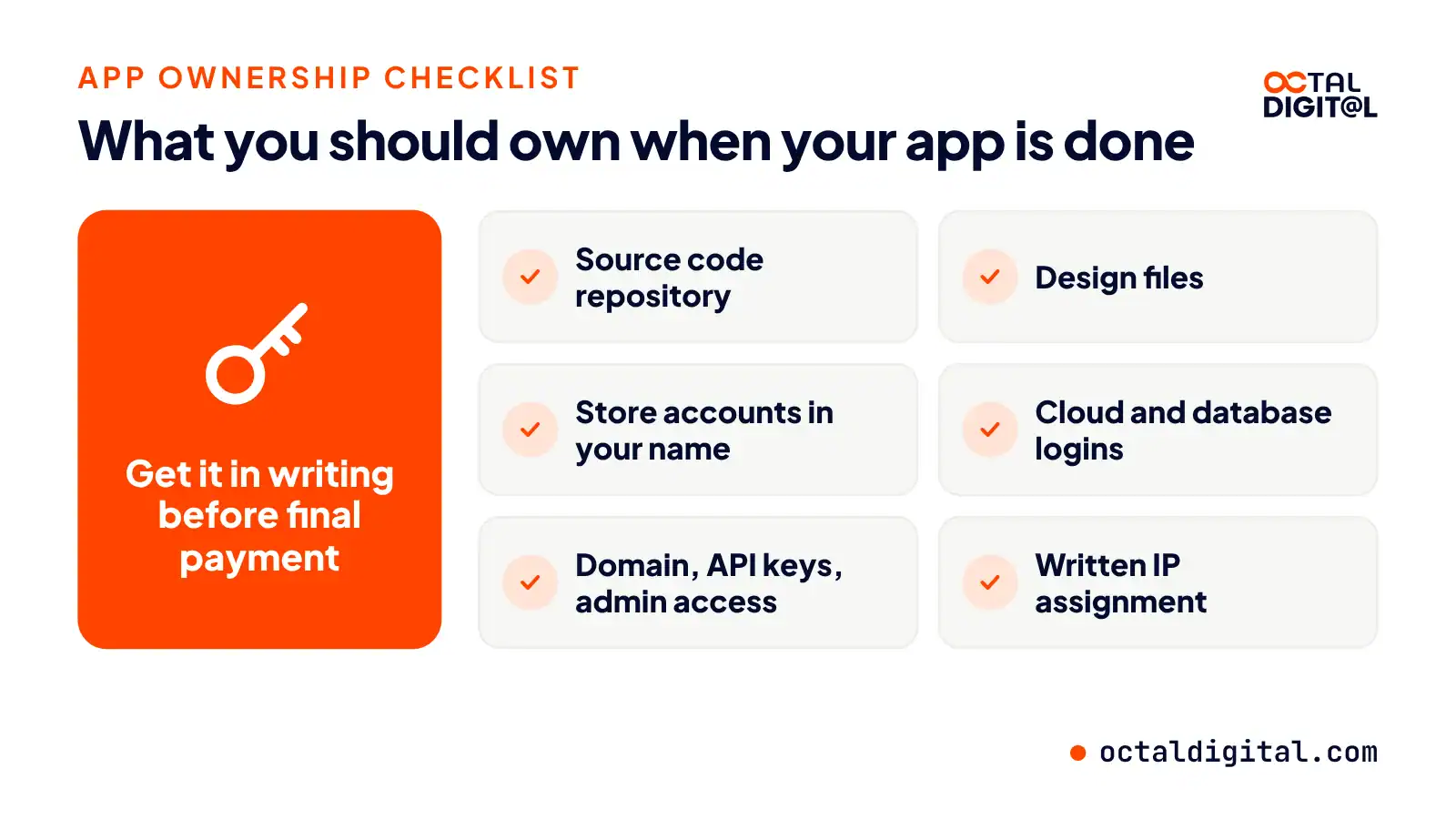
| What you should own | Why it matters |
|---|---|
| Source code repository | You can change developers |
| Design files | You can update the design |
| App Store and Google Play accounts in your name | You control the listings |
| Cloud and database logins | You control your data |
| Domain, API keys and admin access | You can run the app |
| Written IP assignment | Legal proof you own it |
Build It Yourself or Hire an App Development Company?
First, let’s take a look at when it makes sense to build an app yourself.
After all, plenty of apps have been built by a single founder with a no-code tool. And there are plenty of apps built by app development companies, with designers, developers and testers working together to take an app to market.
Whether a founder is coding an app alone or relying on a full design and development team to build it for them, there’s always a level of risk. The risk of failing with a DIY app is far higher when the app handles money, user data or scale.
This shouldn’t stop you from trying DIY or no-code but act as a reminder that a business app is a serious investment. To see your app do well, you need to plan well and keep improving, test with users, and work to build something that will genuinely help your customers by solving a real problem.
Finally, there are the moments when you should hire an app development company. These are the signs that a DIY or no-code build might not hold up long term and that you’ll end up rebuilding as the app grows.
One of the first signs to consider is your app’s payments. This might not seem like a big deal at first, but yes, your app has to handle money safely, and payment security isn’t simple.
User data is another common sign. After all, you need people to trust your app, so you’ll need to invest in protecting your users’ data.
Connecting your app to a CRM, adding third-party integrations, scaling services like AWS, and passing app store review are other jobs that can pop up when you aren’t expecting them. When deciding on a path, think about these sorts of needs to get a more honest answer to the question, “Should I build this app myself?”
One of the final things you’ll want to know when hiring an app development company is how the team works with you. After all, no app is ever truly “done.” And it’s certainly not done right after a no-code or AI build. That’s when bugs, store rejections, and other problems pour in.
Fortunately, Octal can take over an app started with no-code or AI tools, though each project begins with a free consultation to check the code. And it’s one reason to pick our US-based team, with fixed price or hourly billing.
Launch the core features first, test with real users, and add more once the idea is proven. Apps start at $15,000.
- A written scope and cost range
- Fixed price or hourly, your choice
- 5.0 rating from 250+ client reviews
FAQs
How do I build an app for free?
Partly. There are free plans that a first-time builder can pick from to set up a basic app for simple ideas. Additionally, a first-time builder can code an app with free tools like Android Studio, Xcode and Flutter, but the stores charge $99 a year (Apple) and $25 once (Google Play).
Can I make an app without coding?
Yes. No-code builders give the ability for a founder to build their app from ready-made blocks and pay them a small monthly or yearly fee to keep it “live” whilst still keeping access to the app. In the case they cancel the builder subscription altogether, then the founder could lose access. In the event a founder needs a custom feature (integration) for a client, they will often need a developer for that code because the builder limits it.
What is the best way to build an app?
The best way to build an app depends on your goal, budget and skills. If you’re not careful, you’ll play “path ping-pong” with tools in particular, which will bounce your app from one builder to another if it’s not up to your needs. Leave plenty of time for choosing a path, especially if you’re new to building apps, because you may have to keep rebuilding your mobile app till the setup behind your app matches your goals. This is also why a business app that takes payments, and stores user data, is so often built by an app development company.
How do you legally own an app?
You own it through a contract. You need terms that assign the IP and code to you. We hand over code to you after final payment, or you can let your own coders, or designers keep the files for you. Alternatively, you can hold the accounts yourself.
What are the four types of apps?
Be aware of the four types available. When we do a call with a client, or lead we’ll explain them and tell them: “You can build a native app for each platform, and potentially get a fast product, and the app will use every phone feature, and feel right on the device, but you’ll be paying for two code bases. Or, you could build a cross-platform app with React Native or Flutter for one shared code base. Then there are the web apps which are quite basic, and progressive web apps (PWAs) that you can install, and add to the home screen.”
How do apps make money?
We’re well aware there are lots of revenue models in this space, and you get 2 main options: i) ads where you’re quite limited to the income each view brings, or ii) in-app purchases and subscriptions with features where you still have to give users a reason to pay using your app, although for many business apps, charging users directly just isn’t the main goal.
How do I create an app for my business?
Your app gets started with a clear problem. Many business owners start off listing features, and get some feedback from customers who are asking for iPhone and Android apps. They find developers for the build, and start building an MVP for their customers from scratch. A few releases in, they start to realize which features are worth building for every customer.
Have a project in mind? Get a free consultation.
Tell us what you want to build. We reply with next steps, a rough timeline and a cost range.
(800) 995-3369
Michael Husky is the Director of Sales & Marketing at Octal Digital, leading growth strategy, client acquisition, and brand positioning across mobile, web, and AI services with a results-driven, consultative approach.