Key Takeaways
1 min summary- When choosing between a PWA and a native app, think about what your customers will actually do on their phone.
- If you need Bluetooth or NFC because of your product, then a PWA probably isn't for you.
- But if you sell online, take bookings, and want an app soon, then a PWA built on your website could be a great fit.
- Look for an approach that fits your budget and complements your website, and then weigh the options by reading the official docs and real PWA examples.
- Additionally, think about how often customers will open the app and whether you need an App Store listing on iPhone.
- It also helps to start with a PWA, as adding native later can keep your first build lean and give you enough real usage that you know what native should add.
- The price question comes up first: Octal Digital apps start from $15,000, and hourly work runs $25 to $50.
In the choice between a PWA (progressive web app) vs native app, many business owners already lean one way, so we had our app team break down which kind of app is really better for a first launch. Which kind of app do you think works as the best fit for your customers and your budget?
If you’re tired of sending customers to a clunky mobile website or just want to level it up, you have two good choices with a PWA and a native app.
In 2023, Apple brought push notifications to Home Screen web apps on the iPhone with iOS 16.4. Sure, they can both sit on a phone’s home screen, but if you’re wondering “what’s the difference between these two” you’ll find some noticeable ones. A PWA and a native app both put your business on a customer’s phone but each one does it in its own unique way.
This is why you’ll see some owners who are set on building a PWA and others who favor native. When we look at which kind of app most small businesses actually need, a PWA wins fairly easily, but you’ll still find quite a few native apps worth building!
What Is the Difference Between a PWA and a Native App?
A PWA uses web technologies like HTML, CSS and JavaScript from the web browser while a native app is written for each operating system alone. Native apps are more tied to the phone in what they can do with its hardware. As a result, native is more device-driven while a PWA is more web-driven.
The two also get onto a customer’s phone a little differently. Both of those paths are pretty important, mainly for owners who are on a tight budget. With a PWA, you can install the app simply by tapping the Add to Home Screen option in the browser menu.
If they want it as a quick visit, users can just open the link in the browser (mainly for shoppers or first-time customers). If they come back often and/or want more speed, then they can also just install the icon.
Native apps give the classic option for download and install choices on the App Store and also on Google Play. The stores also include pictures of the app and reviews customers have shared online. Both kinds of apps don’t come standard on any phone. Most customers carry an iPhone or an Android and of course, your app isn’t preloaded on the phone yet, but they can easily get it, along with your PWA.
Android phones typically will show Chrome’s install prompt for a PWA while iPhone users get their own Add to Home Screen step in Safari ready on their device.
What Is a PWA?
Built with web tools but made to feel like a phone app, a PWA is a website that installs to the home screen, works offline and can send push notifications, and it has a few key parts that set it apart from a plain website, including:
- A web app manifest gives the PWA its name, icons and colors to show while using the app. Over the years it’s covered things like the app name, the icon, the start page, the theme color and the display mode to name a few.
- A service worker handles many tasks that even keep pages working offline.
- The cache and many other offline tools don’t need a signal just basic files saved on the phone. A plain website doesn’t give as much of a safety net when the signal drops.
What Is a Native App?
A native app is built for one operating system, in Swift for iPhone or Kotlin for Android, and customers get it from the App Store or Google Play. Another big gap between the two kinds of apps is native’s focus on hardware. Hardware is something a PWA can reach in the browser, but native goes more in depth.
- Some of the features open to native apps are Bluetooth, NFC, background location, widgets, and health data.
- A PWA does have basic access to the camera, location, or notifications. Having these features gives you a clear view of what’s possible and if a native build should be used.
- A PWA does a fine job of keeping up to date pages for customers and giving them a clear idea of what to expect before they reach your checkout.
One of the more annoying things we’ve found with native apps is that they do sometimes need store review while you’re waiting on a fix or pushing out an update. This is slow and can hurt conversations with customers, plus if you’re shipping a fix for a broken checkout, you could lose a day (or lose a sale!).
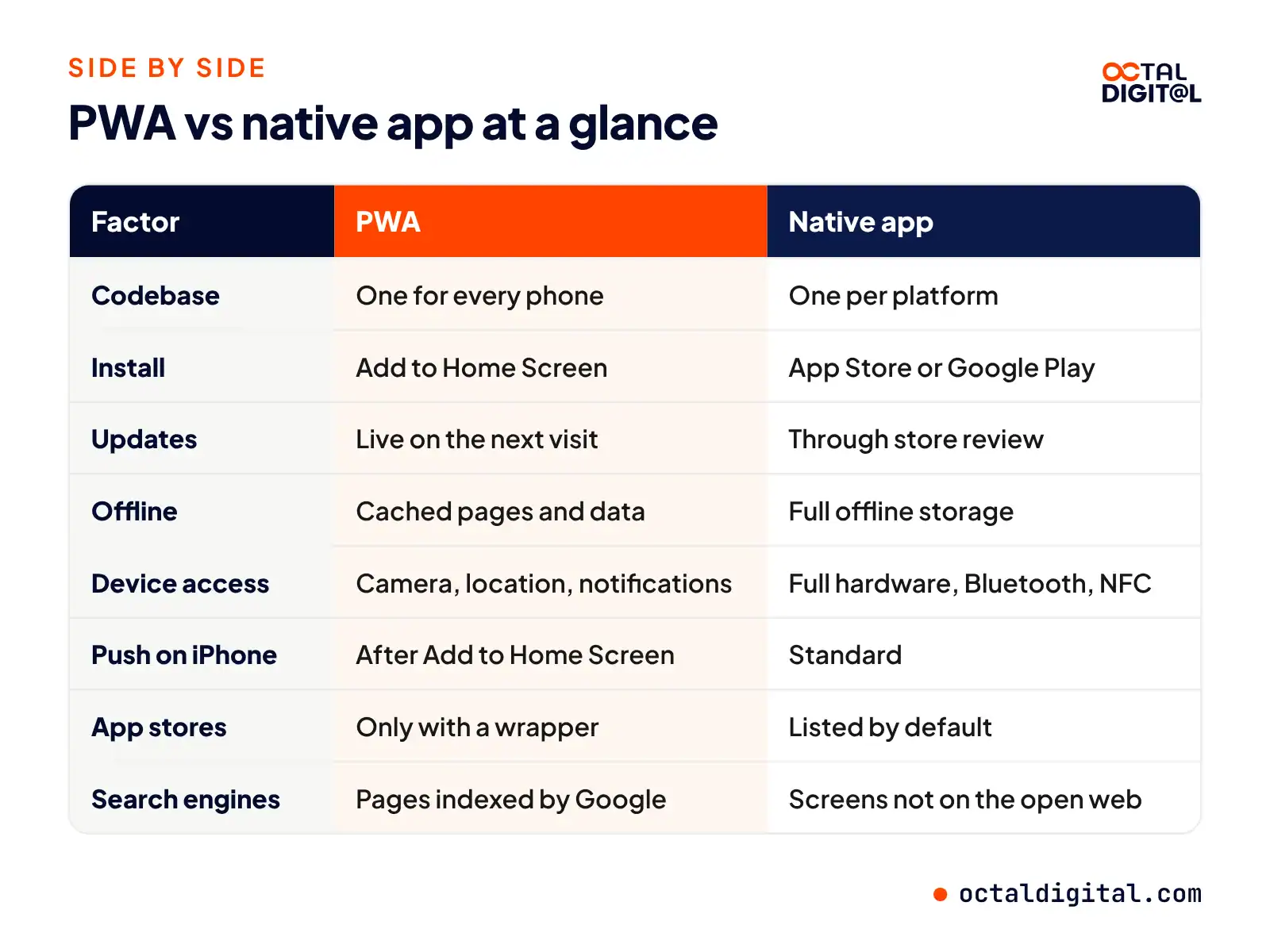
PWA vs Native App: Side by Side
So you’ve decided to put your business in an app and are wondering what’s the difference between building a progressive web app vs native app?
PWA work is growing in popularity because it’s fast and flexible. People were saving websites to their home screens long before PWAs, but the new web tools only added to the popularity of these apps.
And it’s not just a trend. Big apps have us all trained to expect a tap on an icon while waiting for the next screen to load, whether it’s a menu, a booking, or a loyalty card.
Read on to learn more about how a PWA vs native app measure up when you put them next to each other, because raw speed might not be the thing that matters most.
| Factor | PWA | Native app |
|---|---|---|
| Codebase | One for every phone | One per platform |
| Install | Add to Home Screen | App Store or Google Play |
| Updates | Live on the next visit | Through store review |
| Offline | Cached pages and data | Full offline storage |
| Device access | Camera, location, notifications | Full hardware, Bluetooth, NFC |
| Push on iPhone | iOS 16.4 and up, after Add to Home Screen | Standard |
| Performance | Fast for most business apps | Best for games and heavy graphics |
| App stores | Only with a wrapper | Listed by default |
| Search engines | Pages indexed by Google | Screens not on the open web |
| Store fees | None | $99 a year Apple, $25 once Google Play |
PWA Examples From Big Brands
Both PWAs and native apps are used by popular brands.
Customers reach the app via a link, a search result, or a store listing, and then they open it on their phone and use it at home or wherever they happen to be.
Twitter Lite
Launched in 2017, Twitter Lite connected mobile users with Twitter as a PWA that ran in the mobile browser around the globe.
In total, Twitter saw a 65% increase in pages per session and a 20% drop in bounce rate.
Beyond pages, Twitter Lite also saw a 75% increase in Tweets sent, according to Google’s web.dev case study.
In the PWA world, Twitter Lite is best known as an early case study. Within that story, the PWA cut data use from images by as much as 70%.
Starbucks, Pinterest and Uber
Starbucks is one of the OGs, part of the first big wave of PWA brands.
Its PWA gave customers a way to order coffee on the web without waiting on an app download from the store. Bit by bit, a web ordering app was born.
Earlier versions of mobile web ordering felt a bit clunky before PWAs. Brands like Pinterest and Uber also moved parts of their mobile web into fast, app-like PWAs. Starbucks’ PWA streamlines the process for building a drink and placing an order.
Currently, PWAs are a common choice for retail, news and booking sites in many industries.
Pros and Cons of PWAs and Native Apps
The two options are fairly similar: put your business on a phone and let customers come back when they want to. Either path offers enough features for a full business app, but many owners use an app more casually.
PWA Pros
- Launch on iPhone, Android and desktop from a single codebase.
- Or skip the stores, which enables you to go live and push changes on your own schedule. Usually, there are plenty of new visitors from search, especially for local and product pages.
- Share the app with a link, with no download and no store fee, to see if customers want to use it.
- You’ll also get the home screen icon, push notifications, offline capabilities, and fast repeat visits.
- A PWA’s pages can be indexed by search engines like any website.
Pushing an update is a simple single-deploy process. Users will usually have the new version the next time they open the app.
PWA Cons
However, it takes extra effort to reach the hardware in a PWA. When you choose to use Bluetooth or NFC, you’ll be blocked on iPhone before getting very far with a new feature to build.
Or you can plan on background sync and Safari will skip it, leaving your data a step behind.
If you need a spot on the App Store, a PWA needs a native wrapper to get listed. In addition, iPhone users have to add the app to the Home Screen, which can also be a step many skip.
Native App Pros
- Get full access to device features (Bluetooth, NFC, sensors) or
- Run tasks in the background when it’s needed to sync data on time.
- The App Store will display the app’s name and icon and how many people have rated it.
- The app is easy to find on the phone (even in the app drawer) once a customer has installed it.
It’s also simple to send a push notification in a native app, just ask for permission once. If you want smoother animation, you can easily get it from native code. Then add features like widgets for the home screen.
Compared to a PWA’s Add to Home Screen process, it’s much easier.
Native App Cons
“The budget is too tight” is a common reason owners skip native as many apps need separate codebases, one for iOS and one for Android. (There are plenty of cross-platform options too.)
To help you reach the stores, Apple and Google offer review steps. In addition, the Apple Developer Program costs $99 a year, while Google Play takes a $25 one-time fee.
Both kinds of apps have widespread support on phones today. Native will have the deeper hardware access and store presence to keep heavy users busier.
As a tip, owners can run both kinds of apps together to increase their reach to catch new visitors from search and loyal users on the stores.
Some growing brands build both, so they max out things like search traffic or store ratings.
Do PWAs Work on iPhone and Android?
PWAs work on both, but of all the phones to plan for these days, the iPhone is the one that has been holding PWAs back. Its browser engine is called WebKit, and it’s always been the engine behind Safari and every other browser on the iPhone in the US. Since 2023, Apple has added web push similar to what Chrome on Android already had.
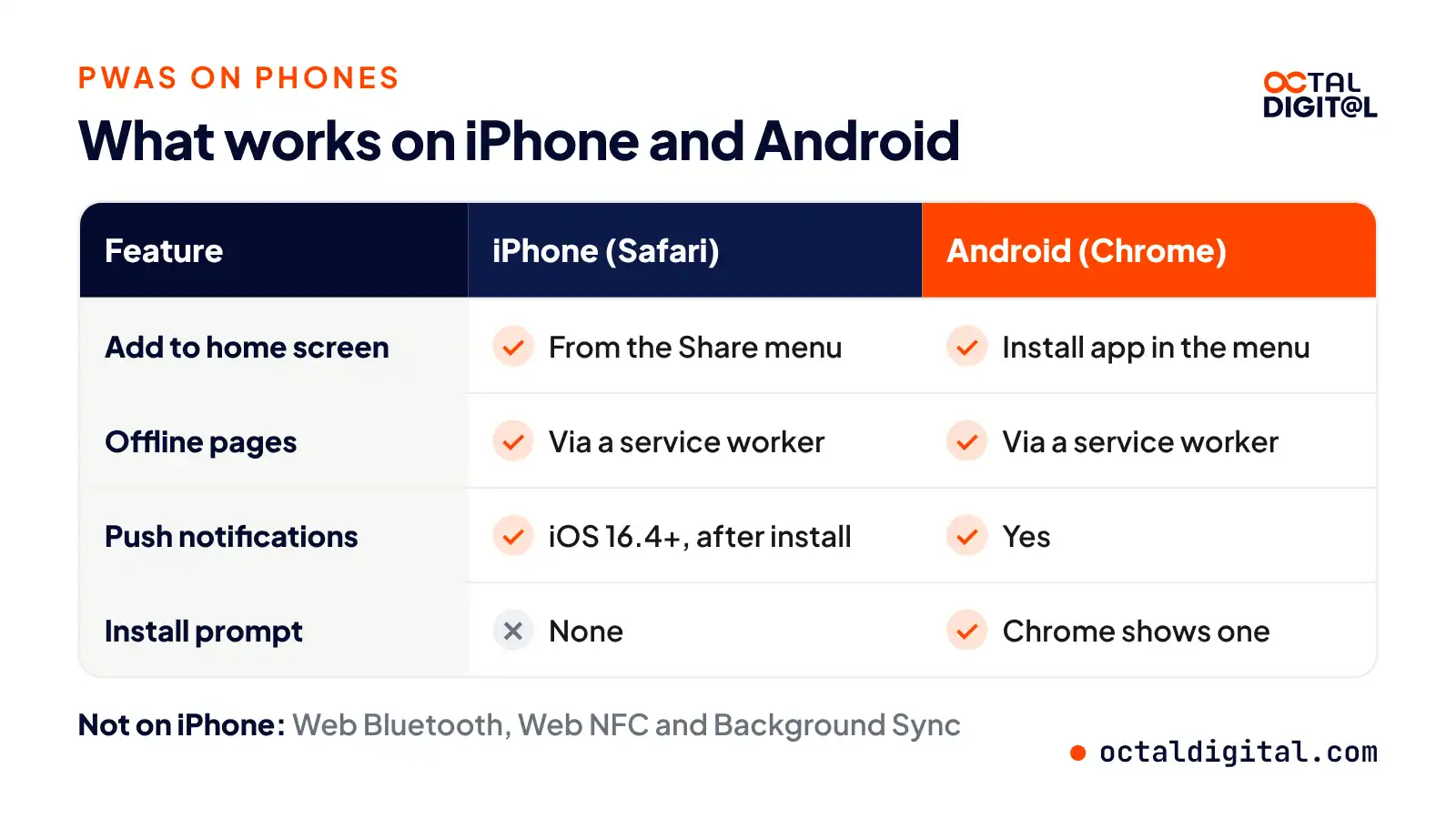
Here’s the lowdown on what works, and what you should expect from a PWA on each phone.
PWAs on iPhone
Yes, PWAs work on iPhone in the form of Home Screen web apps. You set them up from Safari (or another iPhone browser) whenever you like; users can also get offline pages, and push notifications from iOS 16.4 on once the app is added. Worth noting: here in the US, every iPhone browser runs on WebKit, so switching to Chrome won’t unlock more features.
Before a customer can get push alerts, Safari will give them a Share menu where they’ll need to tap to begin the install. If they’re on an iPhone, this option will be the Add to Home Screen button.
Once they add the app, they’ll see an icon for the PWA on the home screen. There will be no browser bar, and the app will open in its own window, a nice touch! Permission requests come after a tap from the user, so you may need a clear button if you want people to turn on notifications.
The service worker will save a mix of pages and/or images from your site into the phone’s cache. When users lose signal, they’ll still see each saved page using your app. Once the signal is back, the app picks up new data and loads up. The app will give them fresh content on the next visit, and they’ll be on their way.
PWAs on Android
If you’re using an Android phone, the install step you’ll be given in Chrome won’t be buried in a share menu. Instead, the browser will show an install prompt, or an Install app option in the menu. If you’re on Android, push, offline pages and installs all work in Chrome much as they do in a store app.
When Apple first added web push, they didn’t do a great job of explaining it, nor did they add any install prompt to Safari itself. When visiting a PWA in Safari for the first time, the page itself still looks something like a normal website, with nothing that says “tap here to install this app.” But on an iPhone, there’s no prompt, and no banner! As you might guess, there are many users who never find the install step on their own.
Once a PWA is on the home screen, it acts a lot like every other app on the phone. The icon will open the start page, and skip the address bar. When it loads, you’ll find the same screens your website already has. You tap a button, and the app will ask for notification permission. You’ll send an alert to them, they tap it, and the app opens to the right page. Pretty standard stuff.
As a team that builds both, however, we do notice some differences between a PWA and its native rivals.
Tell us what your app must do and get a written scope and cost range from our US-based team.
- A written scope and cost range
- Fixed price or hourly, your choice
- 5.0 rating from 250+ client reviews
Can a PWA Go on the App Store or Google Play?
When PWAs made their debut, there was plenty of confusion around the app stores, so here we’re going to sort things out. Here’s a glossary of the store terms to know:
- Google Play: This is the easier store for PWAs. A Google Play developer account costs a $25 one-time fee and it gives you access to list Android apps and PWAs in the Play Store. These PWAs are typically packaged by tools from Google though like Bubblewrap.
- Trusted Web Activity: As part of an Android app, you also get to use a Trusted Web Activity in Chrome. A TWA gives you a full-screen view of your PWA inside an Android app from the Play Store. The pages may be product pages, booking screens, or account pages and all of these pages are typically served by your own website, with Digital Asset Links proving you own it.
- App Store: This is the stricter store for PWAs. When a business applies to the App Store, they’re applying for the chance to list an app using their own Apple Developer account at $99 a year.
- Native wrapper (our plain name for this option): web teams can now wrap a PWA in a tool like Capacitor where you keep the web code and ship it as an iOS app. Online, you’ll sometimes see developers referring to these wrapped apps as “hybrid apps.”
The wrapper route for the App Store has no outright ban so far, but that doesn’t mean it’s always safe. For this article, we’ll just call it a native wrapper. But Apple’s guideline 4.2 asks that an app go beyond a repackaged website, and a plain wrapper may get rejected at review. But it’s doable, and it can work.
When Should You Choose a PWA or a Native App?
Are you ready to put your business on phones and win more repeat customers? Our team builds both PWAs and native apps, and we like both and recommend both! We’ll walk through your two main options, PWA vs native app (including which one costs less!)
Maybe you’re a little unsure, are you truly ready to fund a full native build? The PWA option sounds a lot simpler and maybe that’s right for you. But what if your app really needs native features?
Below, we’ll go through each type of app and help you pick the one that’s right for you.
When You Need a Native App
Native is just what it sounds like. It’s straightforward:
- Build an app for each platform (or one cross-platform codebase)
- Go to the App Store and Google Play where your customers already shop
- Ship!
- Update that app through each store review
Native development gives you the chance to use hardware, either via Bluetooth or NFC.
It also runs work in the background more. You aren’t “stuck” in the browser all day waiting. Instead, you get tasks in the background where the app can track a route, sync health data, or play audio.
On top of the hardware, most games and media apps tend to run smoother with native meaning more value from that speed. If the app is used more often than normal, you’ll get paid back for building native, and you’ll see that when you check retention.
A typical native build will cost more than a typical PWA build.
Even so, there are ways to get more out of a PWA build as well.
For example, smart app owners know you need to plan for your users the way you’d plan for yourself.
- Don’t just pick the first framework you hear about, check that it has no gaps for your features, and that it will hold up long enough for the app to grow.
- Check the hardware list and make sure you won’t need Bluetooth soon, or worse, already need it (it happens!).
- Make sure the key features, payments, logins, etc. are fully supported in the browser from the day you plan them right up to launch day.
- Channel your inner product manager to plan more efficiently, as an app team ourselves, we can say this makes you a sharper owner even for your next app!
- Before you launch, check that everything is tested right. If the customer asked for an App Store listing, plan for it. Put native features in a list together, and don’t overfill the first version.
Never ignore the small things that add up to a big difference, smart owners know these “little” choices can decide whether an app stays small or gets busy!
When a PWA Is Enough
A PWA means that you build one web app for every phone. Fortunately, there’s a way to build the app so you reach everyone at once, you’ll get iPhone and Android users. You can still mix the two, though, if you want a PWA first and then a native build.
Okay, while we did say native apps can do more than PWAs, we still have to say a PWA is our favorite way to start a business app. Why?
It all comes down to keeping one codebase (which your web team already knows) and staying part of the open web, where search can find you.
In addition, a PWA works with your website (it’s often the same project!). Building a PWA has been great for small budgets, as owners can use the savings to pay for marketing and new features.
As a PWA owner, all your updates for customers are through the web. So, which apps fit this best?
Our team makes sure we pick a PWA for clients when the app is mostly:
- Booking and ordering
- Retail and catalog shopping with a cart and checkout
- Customer portals and content, many of the same screens as if you were building a website.
One thing works differently for a PWA owner, though. Once you’re done building, you will need to get people to add the app to the home screen.
Our tip in this case? Ask at the right time, for the customer’s benefit! If a customer has just ordered, then show the install button on the order page and on the receipt and in the email. It seems small, but we think it helps people find the app later when they come back to order again.
Once you’ve done that, you’re set and can start on the next feature right away.
PWA or Native: Which Fits Your App?
As you can tell, there isn’t a single answer that fits every app. In general, you’re going to get more features with a native app because you’ll get the hardware and the stores, but a native build does require more budget. If that works for you, then native for iPhone and Android can be very rewarding!
However, maybe you’re pressed for time, can’t fund two apps, or just want to test the waters of mobile with a first version. In that case, try a PWA!
In the end, neither choice is wrong for every app, but hopefully, this table will help you decide.
| App type | Best pick |
|---|---|
| Booking and appointments | PWA |
| Restaurant or retail ordering | PWA |
| Ecommerce store | PWA, then native for loyal shoppers |
| Customer portal or dashboard | PWA |
| Content or news | PWA |
| MVP to test an idea | PWA, or cross-platform if both stores are a must |
| Fitness tracking with wearables | Native or cross-platform |
| Bluetooth or NFC devices | Native |
| 3D games or heavy video | Native |
| Delivery or field app with background GPS | Native or cross-platform |
Start With a PWA, Add Native Later
A PWA isn’t a dead end. If you need an app and really can’t fund two native builds yet (for any reason) then a PWA can help you get your first users.
If you go this way, we suggest this approach:
- Build the PWA as lean as possible.
- Track every. single. install. (and sign-up)
- Make a budget to build the native app you’ll need.
- Keep the same backend, read the store rules, and plan your App Store review early.
- Pick the leanest cross-platform setup, Flutter or React Native, that fits both stores.
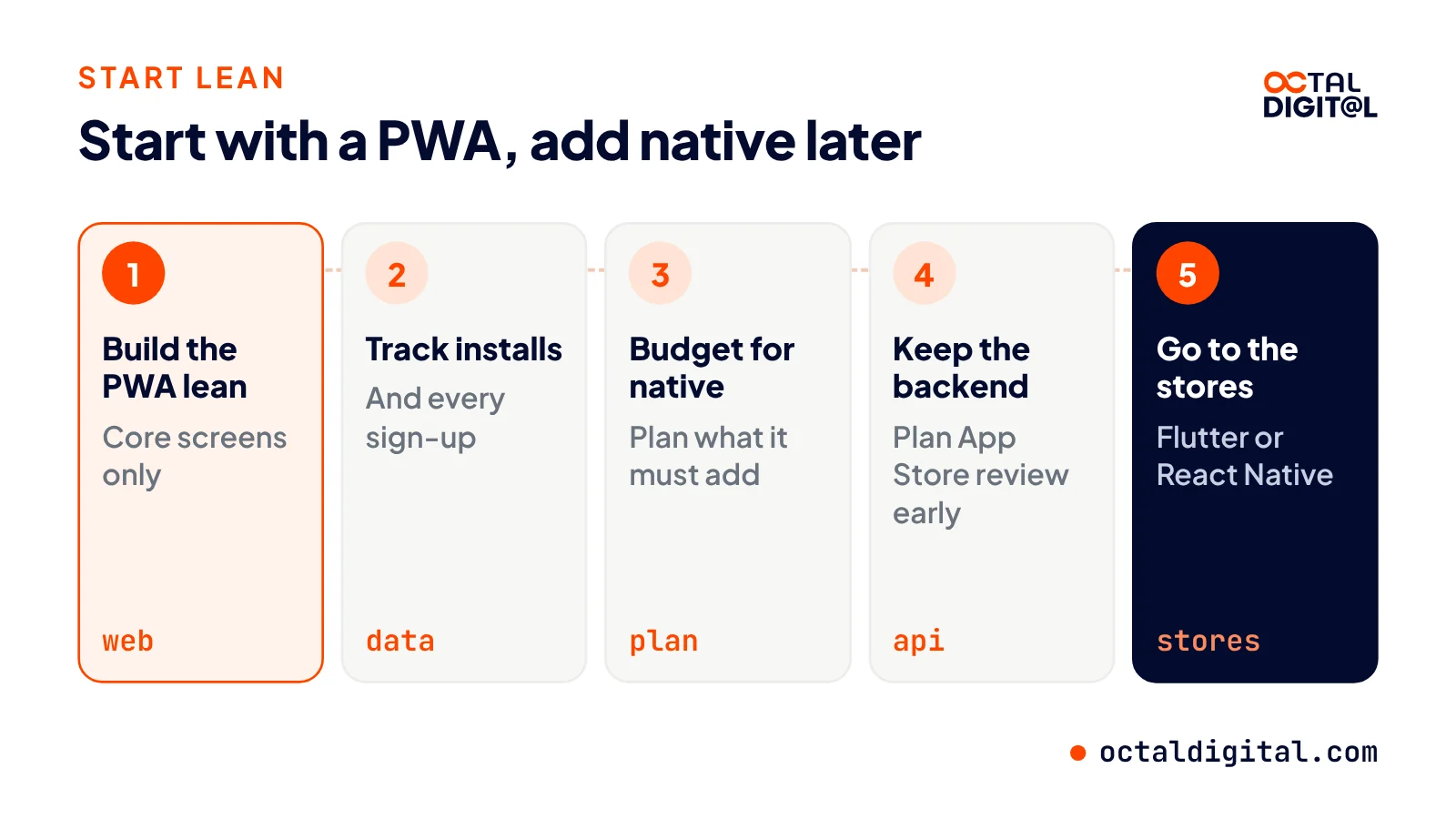
A PWA is also really useful for new products or owners who are testing an idea before making a bigger commitment to build for the app stores. We highly recommend using a PWA before building native as a new app owner to make sure your users like the app first.
Launch fast on the web, then add iOS and Android apps when your users ask for them.
How Much Does a PWA Cost Compared With a Native App?
Websites have been around long, long before the app stores boomed, allowing almost any business to reach phones for less. So, in a PWA vs native app match-up, which costs less? There’s just one way to know, and we’ll break it all down for you!
We’re keeping it general in this section because there’s not a huge difference between every app project, so we’re using a typical business app, but it could apply to most of the apps we build.
You won’t really know the final price until you’ve scoped the features. Just like with any build, it depends on your features and other factors. But below is how our team at Octal Digital prices the two, based on how we quote real projects.
As far as price goes, apps start from $15,000 at Octal Digital, and the final price is set by scope after a free consultation. The biggest difference is that a PWA is one codebase, while native means an iOS app and an Android app to build and keep up.
On top of the build, native apps pay $99 a year to Apple and $25 once to Google Play, so you’ll want to count store fees when planning native because a PWA skips them.
What Drives the Price
The biggest drivers of price are the features you need, the screens to design, the backend, and the systems the app has to connect to, as opposed to just the type of app you pick.
With native, you build for each store and it might mean two sets of screens to test. Cross-platform tools like Flutter or React Native can cut that back to one codebase.
Going native, owners definitely get a lot more features, but a bigger share of their budget goes to upkeep as well. At Octal Digital, when a project is billed by the hour, rates run $25 to $50 an hour.
With a PWA, your website provides the base, and the app is expected to use the same pages and backend. As far as hosting and other basics for launch, most businesses already have them on hand from their website.
One thing we find essential is a clear scope so we can price features more easily at the start. Basic PWAs can take from 3-5 weeks, as our PWA page notes.
Similar to our web projects, we usually suggest native for a first app when the hardware has to be there on launch day. Pricing is based on how many features you need and how many platforms you launch on, and our US-based team in Houston, Dallas and Los Angeles works fixed price or hourly. There’s a free consultation for every project too, PWA or native.
How Octal Digital Builds PWAs and Native Apps
Both have their strengths, but our team at Octal Digital leans toward a PWA over native for most first apps mainly because owners can launch faster and reach more phones at once to test their idea. Our team also likes being able to build native when it’s needed instead of having to force a PWA to do work it can’t.
For owners on the app fence, how do you feel about PWA vs native app for your business? Would you take a quicker launch, even if it meant less reach into the hardware your app might use?
Free consultation, fixed price or hourly, and a US-based team in Houston, Dallas and Los Angeles.
- A written scope and cost range
- Fixed price or hourly, your choice
- 5.0 rating from 250+ client reviews
FAQs
Will PWAs replace native apps?
Of course, this is all up to the app, but in our opinion PWAs won’t fully replace native apps for every business. Native seems to have more features that help heavy apps during use and has given deeper hardware access and background work in a more reliable way.
However, when we look at small businesses, many owners may only need a PWA. Whether or not that’s because they like PWAs over native or if it’s due to the budget for native remains to be seen!
Is a PWA cheaper than a native app?
A PWA usually costs a lot less than two native apps. The usual starting point at Octal Digital is apps from $15,000, or around $25 to $50 an hour. Native apps also pay $99 a year to Apple and $25 once to Google Play on top of the build.
Can a PWA send push notifications on iPhone?
Yes. The feature was added by Apple in iOS 16.4, for web apps added to the Home Screen.
Is a PWA a mobile app?
A PWA is a web app that is more browser-based and designed to install on the home screen while a native app is store-based. A PWA gets its code from your website and can still act like a mobile app on the phone while working offline.
Which websites have PWAs?
Twitter launched a PWA version for users on slower networks, known as Twitter Lite. The big difference between it and a native app is that you do not need a download to use Twitter Lite. On its web.dev site, Google breaks down the results that came out of the Twitter Lite launch. Some include more pages per session, more Tweets sent, lower bounce rates and less data use. Starbucks, Pinterest and Uber have run PWAs too.
Are PWAs still around today?
PWAs are still very much around. This is very similar to the early setup and lets you add a website to the home screen with a manifest file, with no store needed. This would be ideal for businesses who want customers to use the app on a regular basis. Of course, just like with any website, this setup does not include the hardware access you’ll be getting through a native app.
What are the four types of apps?
Four common types are native, cross-platform, hybrid and PWA, and it’s currently native that gets the most hardware, not a PWA. With that in mind, a PWA is available everywhere that a browser is available. With a PWA, your first version is lean, so you’re able to try out the app and see if it’s right for you before paying for a native build.
Have a project in mind? Get a free consultation.
Tell us what you want to build. We reply with next steps, a rough timeline and a cost range.
(800) 995-3369
Matthew Jones supports Octal Digital as a Digital Strategist and trusted technology advisor, helping guide clients through scalable solutions, emerging tools, and smart development strategies that align with business goals and growth.