Key Takeaways
1 min summary- To make an Android app, you'll need Android Studio, Kotlin and an Android phone for testing.
- If you don't already code, a no-code or AI builder is an OK short-term option, but not advised for apps with payments or custom features.
- Not every owner has a developer as an option on staff, so hiring an Android team could be a good way to launch on time.
- It isn't complicated, and as long as you test on real phones, fill in Data safety, and keep the app updated, an Android app may be right for your business.
- Cross-platform tools like React Native and Flutter allow you to launch on Android and iPhone with one codebase.
To make and publish an Android app, you must meet certain Google Play app requirements. While Android Studio and Kotlin are free, Google has strict rules to ensure every user’s safety.
Getting started is simple; if you have a computer, you can begin building today.
Google must ensure all apps are safe, can legally run on its store, and don’t have known bugs that would put anyone’s data at risk.
Even though you’d need a computer to build an app, that’s not enough. You also need a plan, a design and the right tools in Kotlin and Jetpack Compose, so the app you build is stable, simple and ready to reach people’s phones.
What Do You Need to Make an Android App?
Google has app requirements to protect the safety of its users.
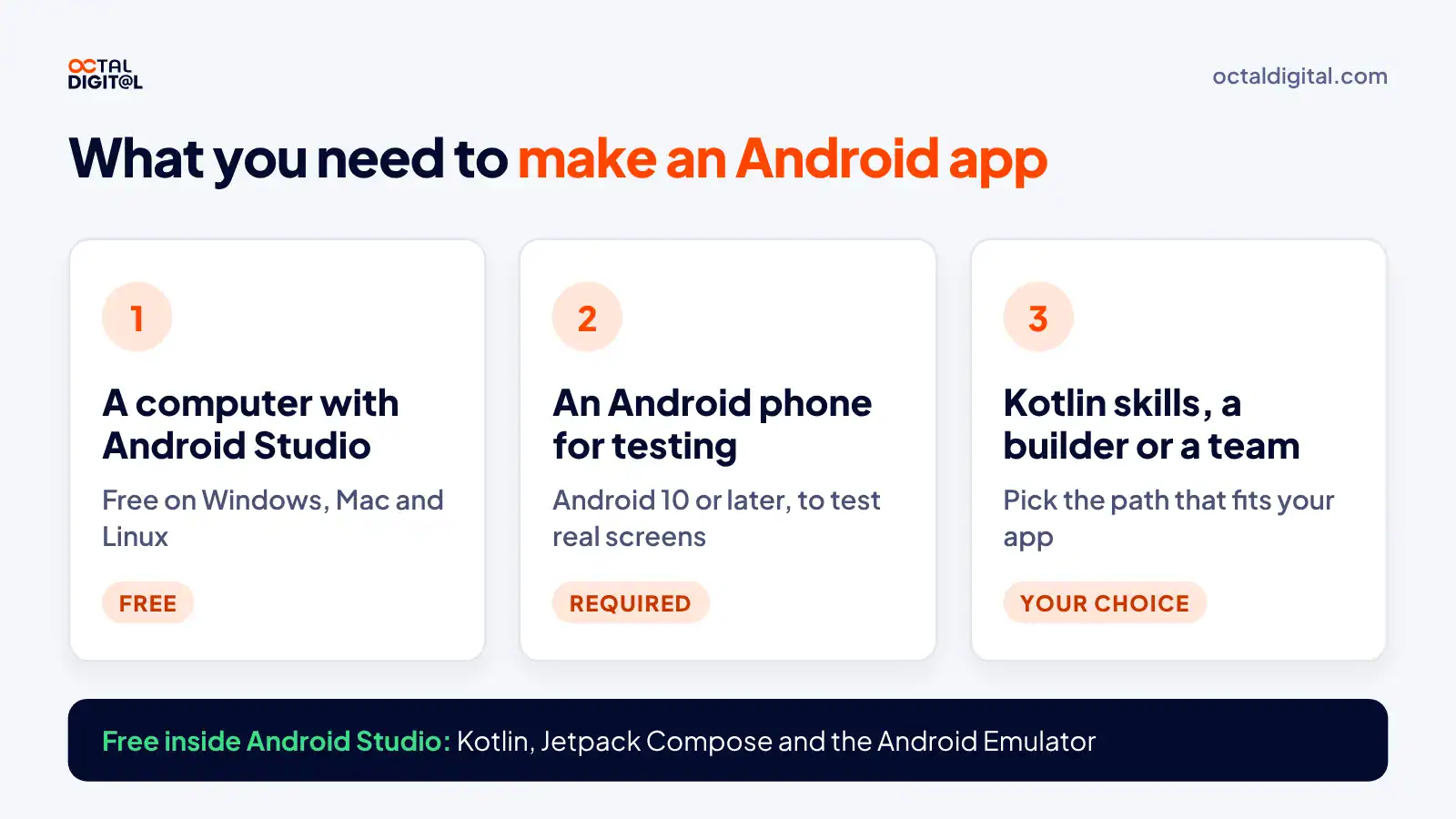
You must have a computer that runs Android Studio on Windows, Mac or Linux and an Android phone for testing, so Kotlin skills or a builder also belong on your list.
Here is what you need.
1. A Computer and Android Studio
To build an app for Android, you must install Android Studio, Google’s free editor that has everything you need to write and run Android code.
Of course, you must have a computer with enough memory and storage. You should also update Android Studio on time to keep building for Android once set up.
Some apps need at least one more piece besides Android Studio to be built for Android, including:
- Kotlin
- Jetpack Compose
- The Android SDK
- The Android Emulator
- Firebase
- Gemini in Android Studio
- Git
- Figma
2. An Android Phone for Testing
All new personal Google Play developers must have an Android phone to install the app, verify their account, and run tests. The Play Console app connects your phone and account and provides developers with many tools to run their releases, including crash reports should they need to fix bugs fast.
To qualify, you’ll need a phone with Google Play and a data connection. In addition, it must run Android 10 or later and have enough space to download and run your test builds.
3. Coding Skills or a Builder
Google leaves the coding choices up to developers. Since you’re the app owner, they don’t tell you what to build with. However, if you hope to increase your speed and stability, it’s best to start with Kotlin to provide a smooth experience for your users.
| What you need | Cost or rule |
|---|---|
| Android Studio | Free on Windows, Mac and Linux |
| Kotlin and Jetpack Compose | Free |
| Android Emulator | Free, inside Android Studio |
| Android phone | Android 10 or later for testing |
| Skills | Kotlin, a builder or a team |
3 Ways to Create an Android App
Though some start building apps because they want to learn to code, many begin so they can get something specific.
They have bookings to take online, a store to put on phones, or a service they want to sell. They don’t plan on this app being their main job or even replacing their website.
But is it reasonable to actually build enough on your own to launch whatever you need, especially if that app is very complex?
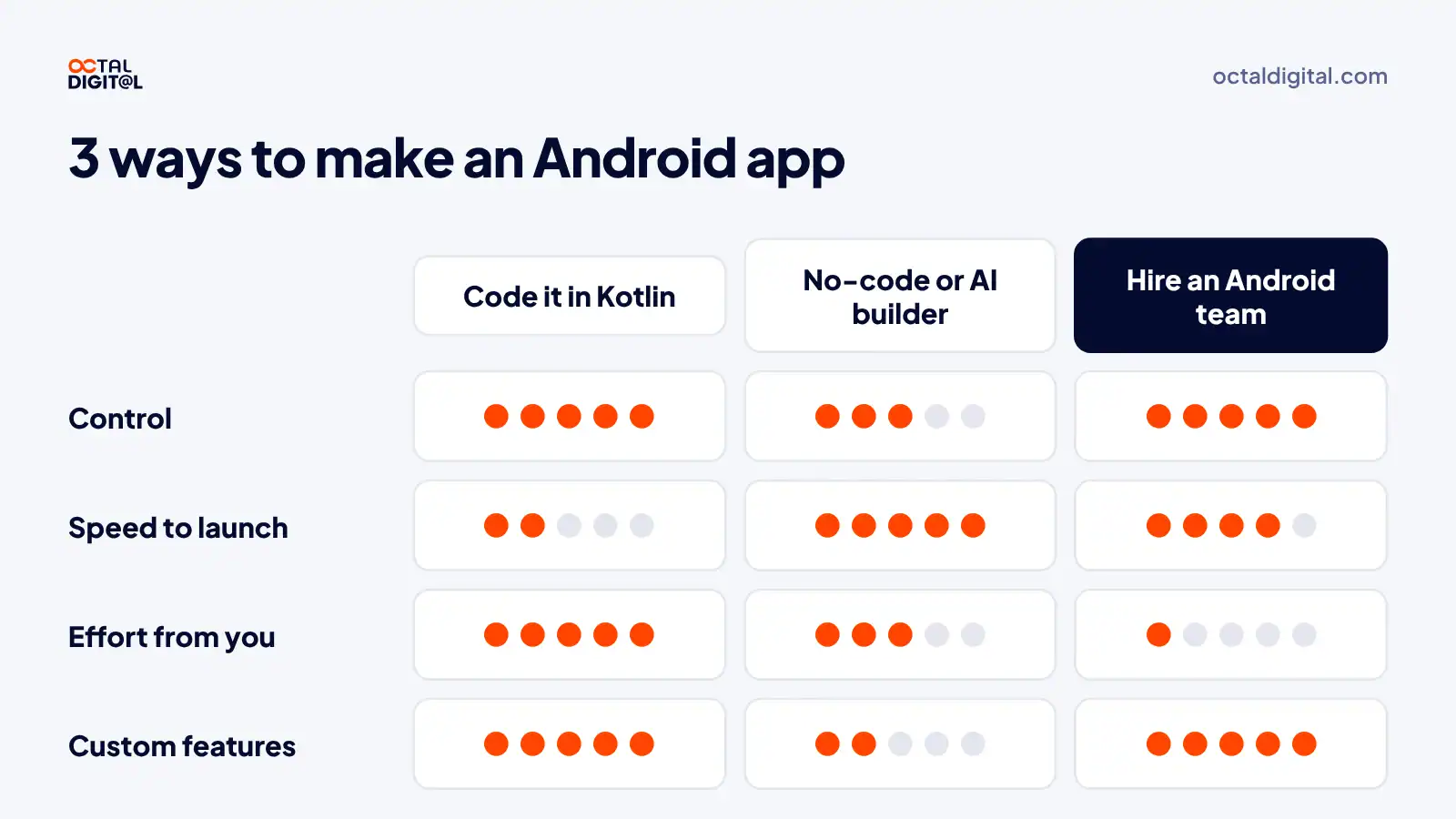
If you’re considering coding the app yourself in Kotlin, using a no-code builder, or hiring an Android team, we’ll lay out the reasons why each path makes more sense for some owners, both in terms of “less work” and “more control.”
1. Code It Yourself in Kotlin
The first thing you need to settle is how much are you really willing to learn, and how long are you willing to learn it.
Say you already work 40 hours a week at your own business. Are you willing to code another 10 to 20 hours a week?
Maybe you can do long, 60-hour work weeks for a stretch, but how long can you keep that up before your business begins to suffer, or your customers and staff start to wonder about you?
We’ve done heavy build months, and then we take a few months of light updates.
For instance, a launch may be a busy work month where we code a lot more than we typically do. We let our clients and partners know that we will have that month blocked off for the build, but afterward, we’ll be far more available for at least two months.
Some have found coding a lot one week at a time works best and then they take the next week off.
If you have a big app in mind, maybe you plan on learning Kotlin for one to two years.
Whatever it is you’re trying to build, decide before you begin how much, and for how long, you are willing to code, then plan accordingly.
2. Use a No-Code or AI App Builder
One question owners ask a lot about builders when they first start is why not just use a no-code tool at a low monthly price rather than hire for Android.
Most builders do have a free plan available, and every so often it’s enough. With Appy Pie, Adalo or FlutterFlow you pick a template, and you aren’t writing Kotlin at all to get a first version.
On paper it does make sense just to use a builder if that’s an option, but there is more to weigh than just what makes the best financial sense. In addition, not every app has a builder template as a viable option.
Using a builder, or an AI tool like Google AI Studio, allows you to skip that part of the work and actually focus on something else. You don’t have to worry about all the things happening in the code, you just have to drag screens around, and when you’re done, you’re done and can export an app.
Another reason some think builders are worse than custom code is that if you are building on a template and you realize you took on more than you can chew, and really just need a custom feature, you can’t until the platform adds it. With custom code though, you can add it yourself or ask your developer.
3. Hire an Android Team
A question we hear a lot is whether it’s worth it to hire a team to be an app owner.
The short answer is yes for most business apps. But, if you don’t have the skills, or the time or staff to code it, it may be the only real option you have to start with.
If that’s the case, you should view it as a “build to own” deal where you pay for now until you own all the code yourself.
If you’re only ever going to need a simple app, you must know the cost of hiring a team. Depending on what you need, and what type of team you get, our rate is $25 to $50 an hour for Android developers that you can trust with Kotlin, Firebase, Google Play, etc.
Unless your app earns enough to pay those costs, as well as the cost of upkeep, it is likely that it simply isn’t worth it to hire a team. It would probably be cheaper to start with a builder or a small MVP, even an app from $15,000 would be cheaper than a big build every year. Plus, in time, you would own that code.
A smarter option would be to begin with a small app that works and has about 3 to 5 features, right at the edge of what users need from a first version. Then, once you earn money from that app, upgrade to a bigger one if needed.
If you need help launching an Android app, check out our Android app development services to help you get started.
- A written scope and cost range
- Fixed price or hourly, your choice
- 5.0 rating from 250+ client reviews
How to Make an Android App in 7 Steps
Most people underrate what it takes to grow an idea into a real Android app. We know, because we get a lot of calls about the latest and best app ideas to hit the market but, more often than not, they’re more of a wish than an actual plan. Turning an idea into an app on Google Play is where the real work begins.
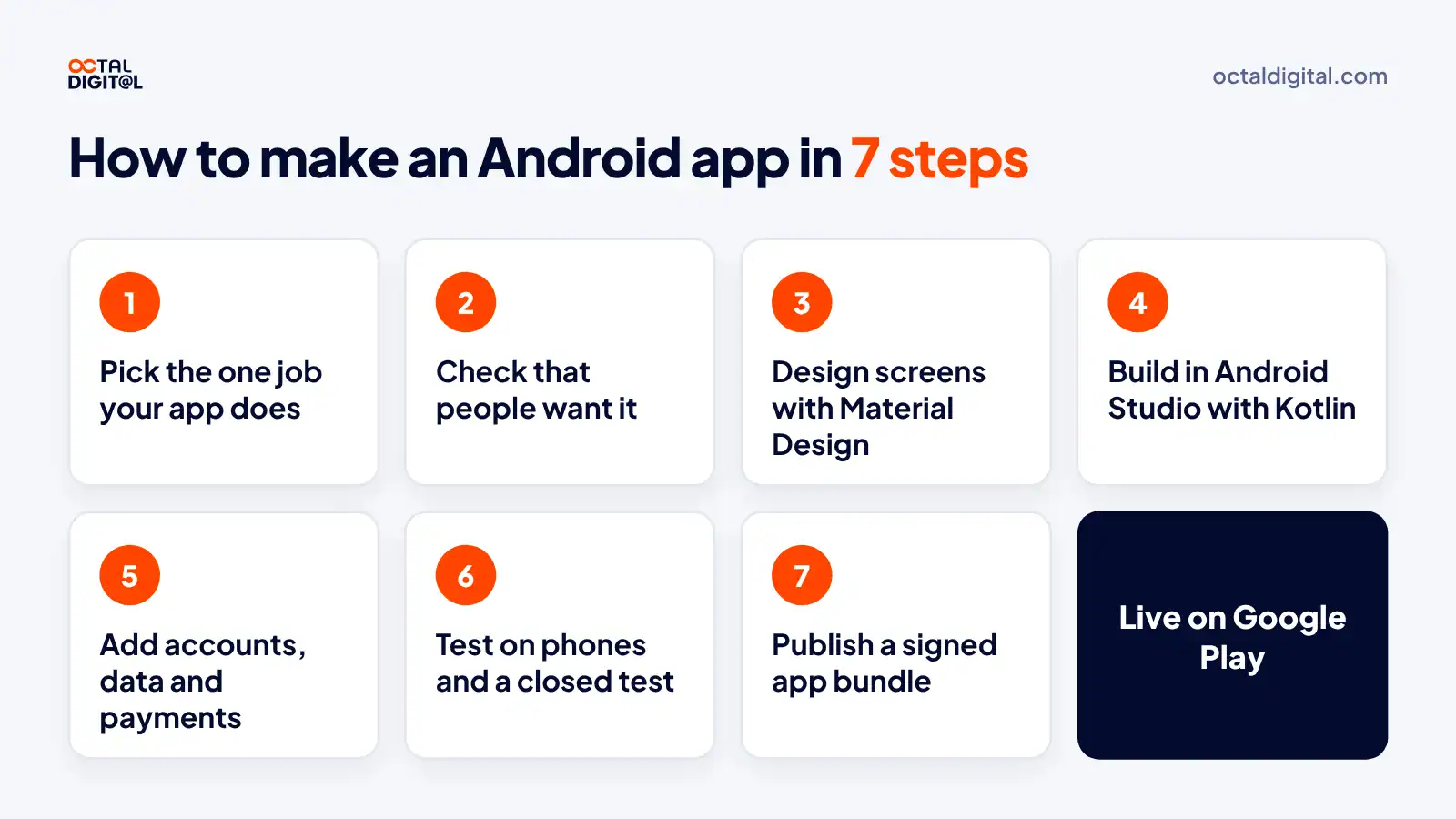
So let’s say you agree with our line of thinking and you’re ready to build the next app in your niche, how would you go about it?
Step 1: Pick the One Job Your App Does
Now that Google Play is well over a decade old, it wouldn’t make much sense to create a mobile app exactly like a top app and try to beat it. If you have nothing to set yourself apart by, there’s no reason for buyers or staff to use your app.
But when apps like these get big and bloated, it usually creates room for smaller, more focused apps. A big app adds features above everything else, which means its users have to scroll past anything that isn’t central to their current task.
One good example of that would be in the “book a time slot” niche.
Step 2: Check That People Want It
This somewhat ties into your niche, but when you’re considering building an app, you must have some proof that people want it.
People always ask us to sign NDAs and protect their ideas, which we do, but that’s not a reason to skip talking to users. The execution counts way more than the idea.
User doubt is a huge roadblock to launching a new app, and something that quickly gets in the way of downloads. Without the interest and trust of your users, you’ll have a tough time getting the app off the ground.
Users learned early on from copycat apps to be extra skeptical of an app that is ad heavy and seems to over-promise what it gives them. To succeed and put users’ minds at ease, aim for the sweet spot of being stronger than what’s currently on Google Play while also being clear and upfront about your features and pricing.
Step 3: Design Your Android App’s Screens With Material Design
You don’t need a perfect user interface, but it helps, a whole lot. Tiny buttons, crowded menus, and certain hard-to-read colors or fonts may get you uninstalled by some users, while other users might be more forgiving. It all depends on your target audience (and how badly they need the app).
Design is more than a look: it’s a habit, and it can be tricky. Unless you’re working as part of a bigger team, you’ll be sketching, testing, and fixing screens alone every day, with just Google’s Material Design guidelines to show you what a normal Android screen looks like. You’ll also need to make your layout work on phones, foldables and tablets of (sometimes wildly) different sizes.
Step 4: Code and Build Your Android App in Android Studio
There’s more than a single way to build the screens of an Android app; in fact, there are two main ways. You can write them in Jetpack Compose, such as a new Kotlin project or a single Compose screen, or you can stick with the older XML layouts and wire them up directly in your activity code.
Google recommends the first option for new apps, but neither is wrong for every project, it simply depends on your app and your team. There are strong and weak examples in both styles, so above all, start a project in Android Studio with the Empty Activity template and ask for feedback from people who have built the kind of app you’re considering.
Your First App in Android Studio
Making your first app from scratch is exciting but can also feel overwhelming. Here’s what happens when you develop an Android app in Android Studio.
- Open Android Studio and click New Project
- Pick Empty Activity to get a starter Compose screen
- Name the app and set its package name
- Run it on the Android Emulator, then on your own phone over USB
- Add features one screen at a time
Step 5: Add Accounts, Data and Payments
Adding accounts, data, payments, booking and push notifications can take anywhere from a few weeks to several months, depending on how you handle it. You’ll likely need a backend like Firebase when you begin the process. Once you add sign-in, most business apps require you to keep user data in the cloud, perhaps for a few screens, or perhaps for every screen in the app. Apps with the most features take the most time, so unless you’ve got some ready-made services, expect to spend a big part of your build on this step during your first version.
Payments aren’t free: you’ll need at least some room in your price. The upside is that Google Play Billing handles the checkout compared to building your own. Outside the US, Google requires it for digital goods sold inside the app, and it takes a service fee on those sales.
Step 6: Test on the Emulator, Real Phones and a Closed Test
This is the final step before you publish a full Android app, and there are three parts to it: the emulator test, the real phone test, and the closed test. The emulator test involves tapping through every screen of the app and checking in Android Studio what you’re running. There are plenty of screens. Most owners consider this portion the easiest. Fortunately, you’ll have the whole app in front of you while testing, and Logcat helps to show you each error.
Next is the real phone test. You’ll have to try a small phone, a large one (moving the app one size up), a tablet (testing from a wider layout), and sometimes, a foldable. For each device, you get crash reports to fix the app and layout. Firebase Test Lab (until its 2027 shutdown) can run the app on more devices for you (and catch more crashes).
The closed test is the longest portion. As long as you’re keeping at least 12 testers opted in, giving them new builds and checking their feedback for 14 days, you’ll be set.
Step 7: Publish a Signed App Bundle in Play Console
Just like a website launch, you’ve got to get production access before you can get a complete public release. New personal accounts require you to finish a closed test before Google accepts you. To do this, you’ll have to upload a signed Android App Bundle in Play Console on your app’s release page. While not too difficult, you will need to fill in your store listing (icon, screenshots and description) and your Data safety form in order to pass, plus add a link to your privacy policy.
Can You Make an Android App for Free?
Yes, all you need to start building an Android app is a computer and Android Studio, and those tools are free. Now, Google Play has a $25 fee and very strict testing rules for new developers, and not being aware of these rules could cost you weeks.
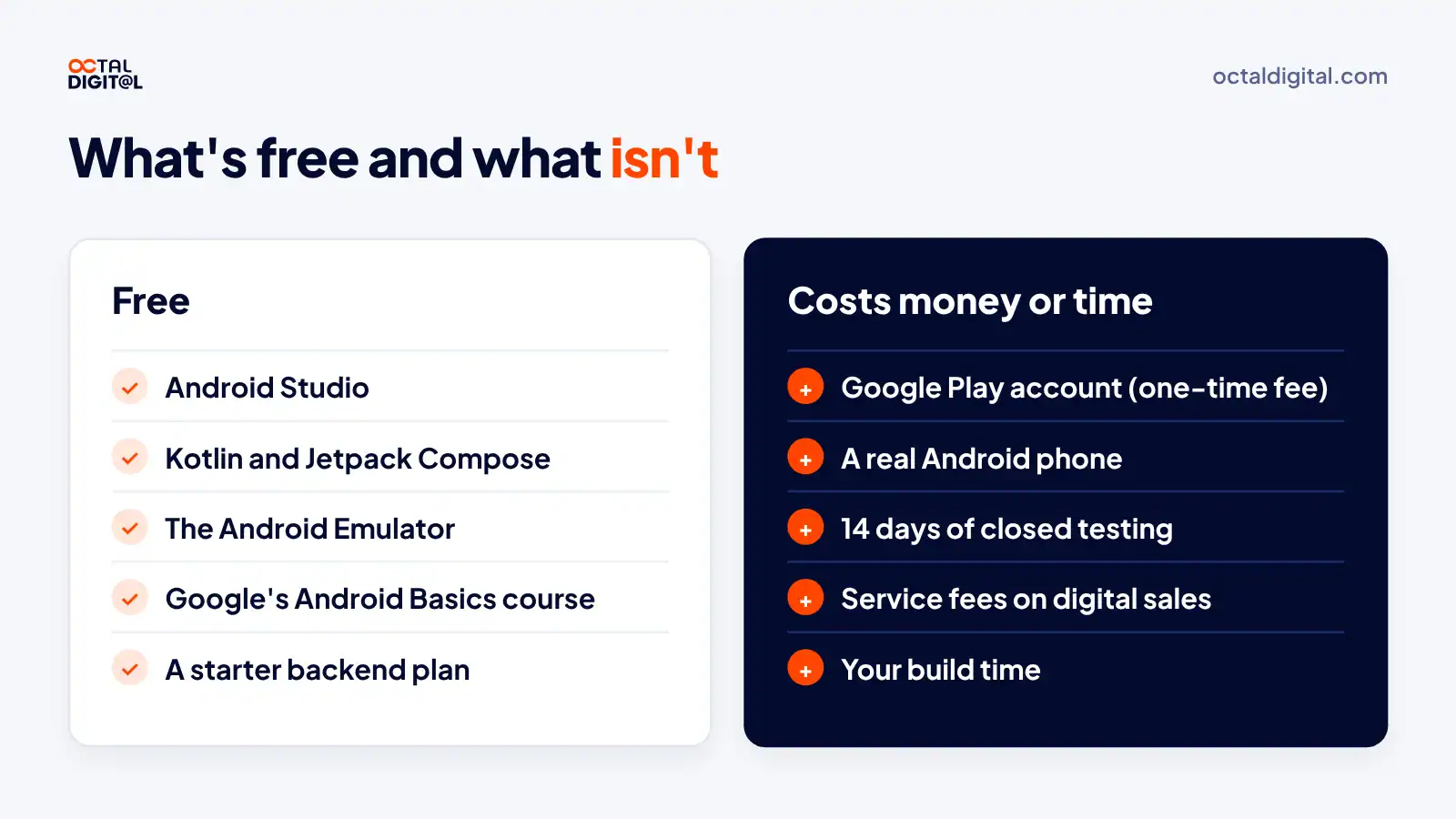
We used to joke that all you need in order to make an Android app is a laptop and a free afternoon. But the “free” part only goes so far. Increasingly, developers and their apps must meet paid requirements in order to publish on Google Play.
In the early days, there were few costs and no testing rules (or, rather, there were rules, but few people read them all!) Now, Google is starting to impose additional requirements, from closed tests with 12 testers to developer verification and target API rules.
The free parts of making an Android app are pretty simple:
- Android Studio, for Windows, Mac and Linux
- Kotlin and Jetpack Compose
- The Android Emulator
- Google’s free Android Basics with Compose course
- MIT App Inventor, a free block-based builder
What counts as “free” varies depending on what you build, but most business apps require a backend, and Firebase has a free plan to start. Payments are typically a little more costly, requiring Google Play’s service fee on each digital sale.
You’ll also need some paid items:
- A Google Play developer account ($25, paid once)
- A real Android phone for testing
- Your time for the 14-day closed test
You’ll also need to pass Google’s identity check, which reviews your name and contact details. In most cases, you’ll also need to get your app tested. Sometimes, friends and family will be your testers during your closed test. In other cases, you may need to ask customers or staff to join and fill out a short feedback form.
Can You Make an Android App on Your Phone?
But that’s just on a computer. If you only have a phone, you’ll need to jump through some additional hoops. Android Studio doesn’t run on a phone, so you’ll need a builder that works in the browser (you can find no-code and AI builders that run in Chrome on Android). You can also test your app on that same phone, install the build, open it, then send feedback from the testing page in Play Store.
Can You Turn a Website Into an Android App?
Don’t forget: a website in a wrapper is the bare minimum to call it an Android app. What the app builders won’t tell you is that in order to avoid a rejection, you’ll also need features beyond the website. Google Play can reject apps that offer little more than a website under its limited functionality rule.
And when you’re ready to take the plunge, check out a progressive web app to see if you need the store at all!
If you’re having trouble meeting the requirements, don’t worry, there are other ways to get on phones! Try a progressive web app (PWA), which installs from Chrome on Android with no store review. PWAs typically have looser rules and lower costs, and they’re a great way to test your idea first.
Can ChatGPT or AI Make an Android App for You?
If you have seen any of the demos or videos on AI app builders, you know that ChatGPT and Gemini, as coding helpers, can write a huge share of a simple app in minutes. While this is great for speed, it leaves the hard parts still undone. This is a problem when it comes to launching a real business app.
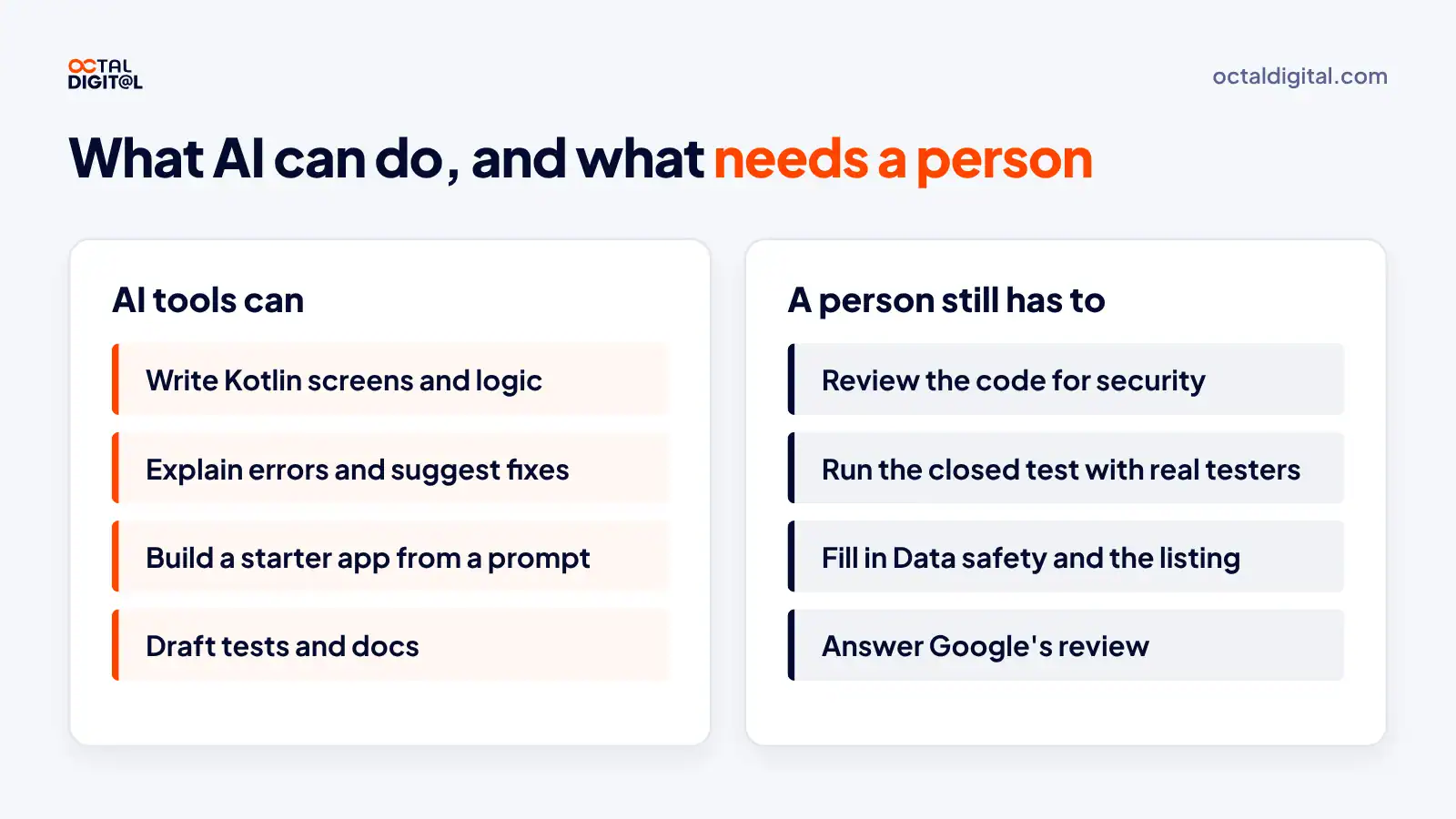
A second problem is that Google Play will want to see a real closed test. Since you are a new personal account, aka someone without a track record, you need 12 testers opted in for 14 days before the app goes live.
Third, AI tools like Google AI Studio can hand you a first version of an app, but they can’t run your closed test with real people or answer Google’s review for you. It is not easy and there are no one-click solutions.
Find a Developer Who Will Work With You
Most owners find it best to work with a developer. When you work with a developer, you can ask someone direct questions. That developer, or project manager, wants to ship your app. They are going to work hard to check the AI code so that it gets approved.
How Much Does It Cost to Make an Android App?
But really, it all breaks down to this question: What does it cost to make an Android app?
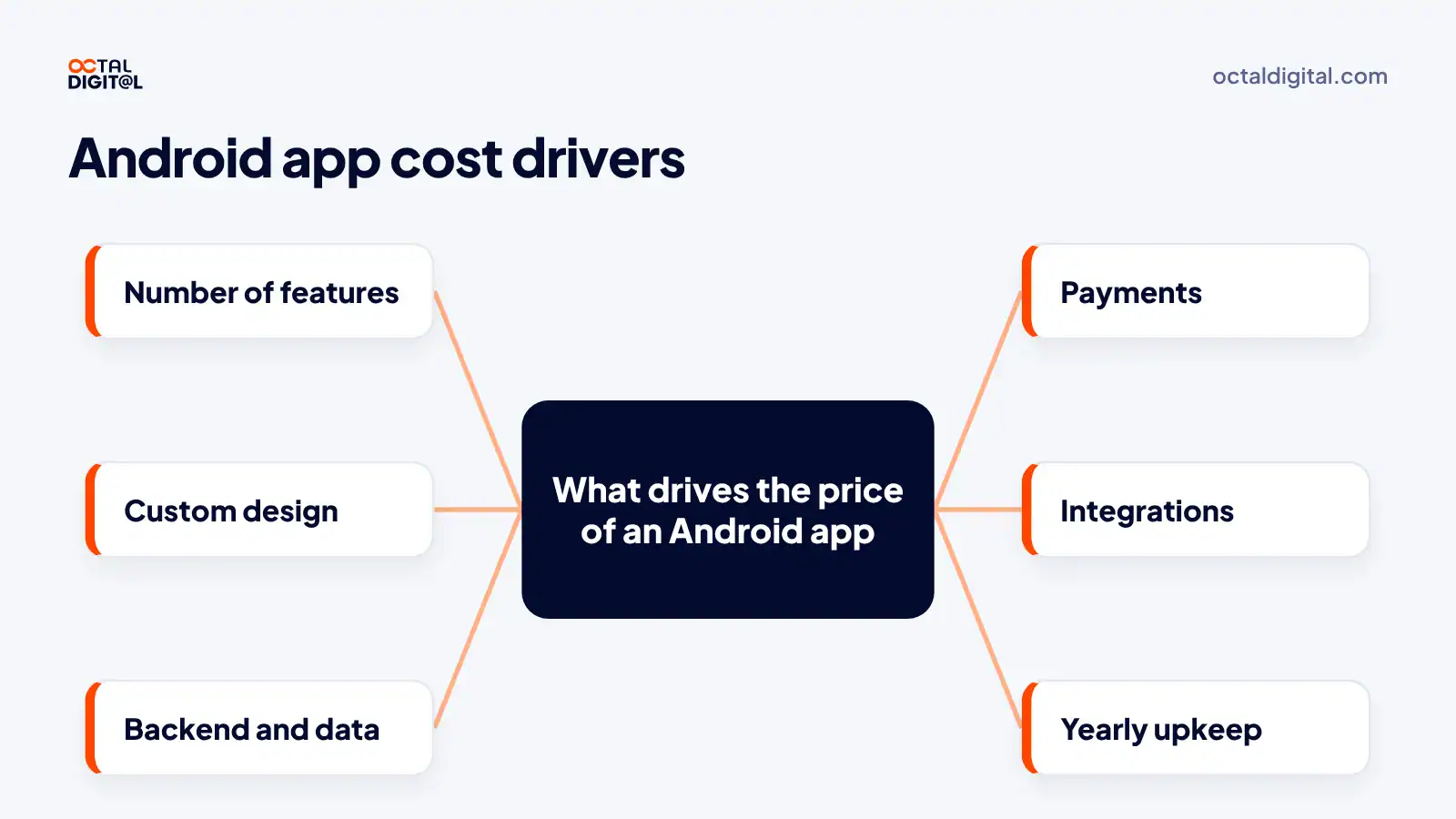
This cost comprises more than the $25 Google Play fee. It has to account for things like design, screens, a backend, payments, testing, hosting, updates, the target API work and more. It is difficult to price a lot of these items due to the unique features of each app though, and Clutch puts most app projects between $10,000 and $49,999.
What Google Charges
Google charges a $25 fee once but earns from your app to a far greater degree if you sell inside it. It takes a service fee on paid apps and digital sales at rates that vary by region and product, and let’s not forget that billing fee your finance team is pretending to not see (or is it the subscription rate? Check Google’s service fees page before you set prices!)
What a Team Charges
So after a bit of planning, we put together a price guide that allows for the real inputs of your app. This includes the cost of design and other factors in the build.
Below are some examples of typical builds we see for business owners. You may be surprised to see the differences in cost. Our team bills $25 to $50 an hour, in line with the $25 to $49 Clutch lists for US firms, and our apps start from $15,000. Obviously these numbers vary depending on features and design, and you can see costs rise rapidly with more integrations or rushed timelines. Feel free to check out our app development cost guide and find out what your costs are.
| Way to build | Typical cost |
|---|---|
| Code it yourself | $25 Google Play fee plus your time |
| No-code or AI builder | A monthly plan, often with a free tier |
| Octal Digital team | From $15,000, at $25 to $50 an hour |
| Upkeep every year | Target API updates, fixes and hosting |
Should You Build for Android or iPhone First?
As an app owner or startup founder, is it wiser (aka more profitable) to build for Android first than it is to build for iPhone first? It depends on your users, and today we break down the facts you should know to launch more in less time.
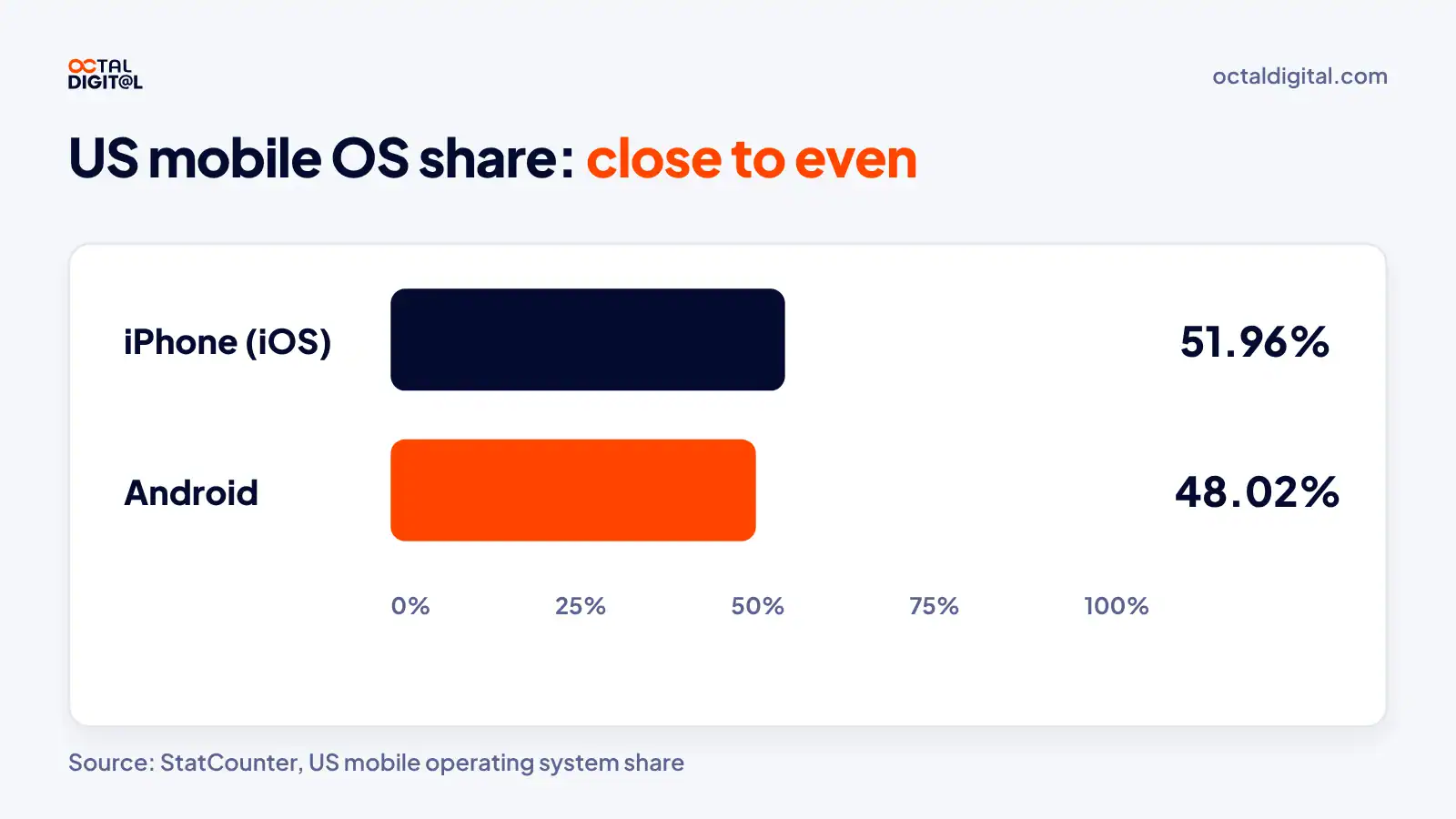
Since StatCounter began tracking phones, iPhone has led the US share every year. Its count for October 2026 is 51.96% iPhone and 48.02% Android.
Even if you built for iPhone only for the whole year, that is about half of US phones left out. But it isn’t until you look at your own users that you can see the choice in a different way.
When to Build for Android First
Google’s current closed test rule for new personal accounts requires 12 testers to opt in for 14 days. Some owners have found that the rule adds two weeks to their first Google Play launch. I still find it surprising that we each have different launch timelines based on which store we pick.
Regardless, at this time the US split is close to even. There are certain kinds of apps when it really only makes sense to build for Android first. Those apps are for field crews and warehouse staff. This is the case when many companies hand out Android devices, which allows you to do one build and reach every worker on your team.
Outside the US, Android’s share can be far higher. There is rarely a strong reason to leave out Android for a global app. Android first is for apps that move you closer to a global audience.
When to Build for iPhone First
This is a key point for many US apps. It isn’t until you do the math that you realize you could be ignoring a real gold mine. Here are the reasons.
When your app is free, the iPhone and Android split matters less. However, when your users pay inside the app, App Store spending tends to run higher than Google Play’s. That is a gap worth checking. Clearly, if you can only launch one app and your users pay in it, you should look at iPhone first.
Or Build Both at Once
Now that your choice isn’t only one store (instead of one store plus a second build later), you need to work out how to reach both users. Your goal is now to fit both apps in one budget. This is where cross-platform tools come in, particularly React Native and Flutter.
With one codebase, there are two factors at play that benefit the owner. First, upkeep is much lighter. You have no separate fixes for iPhone and Android. This is truer still in the first months, after launch. Second, more people can find your app. There are fewer users left out. There are more people searching the App Store, or heading off to Google Play to find an app a friend or coworker named.
This strategy allows you to get both apps in one project, which really cuts your cost per platform. It is common to share most of the code between iPhone and Android. I only wish more owners figured this out before they paid for two builds. I can’t imagine how much money some owners spent on separate apps.
I have shared with you a key choice for app owners. How you use this depends on whether you sell to consumers or staff, the specific phones your users carry, and the budget that is available to you.
When it comes to your app's budget, contact our team early and get a scope, a timeline and a price after a free consultation.
When Should You Hire an Android App Development Company?
You are the app owner and you have every right to build any app you want on your own. Many owners are beginning to realize they have normal schedules, not developer schedules, and they’re simply not going to learn Kotlin, Firebase and Play Console rules for one app anymore.
You’ll still find tools promising one-click apps, or AI builders encouraging you to add more features at once, yet learn from other owners’ mistakes and don’t rely on them alone! Someone eventually has to maintain the code, so the app will need a team.
Focus on your budget, getting the first version out quickly (a small app with a clear job), and if something feels difficult to you, trust your gut and hire help.
Questions to Ask Before You Hire
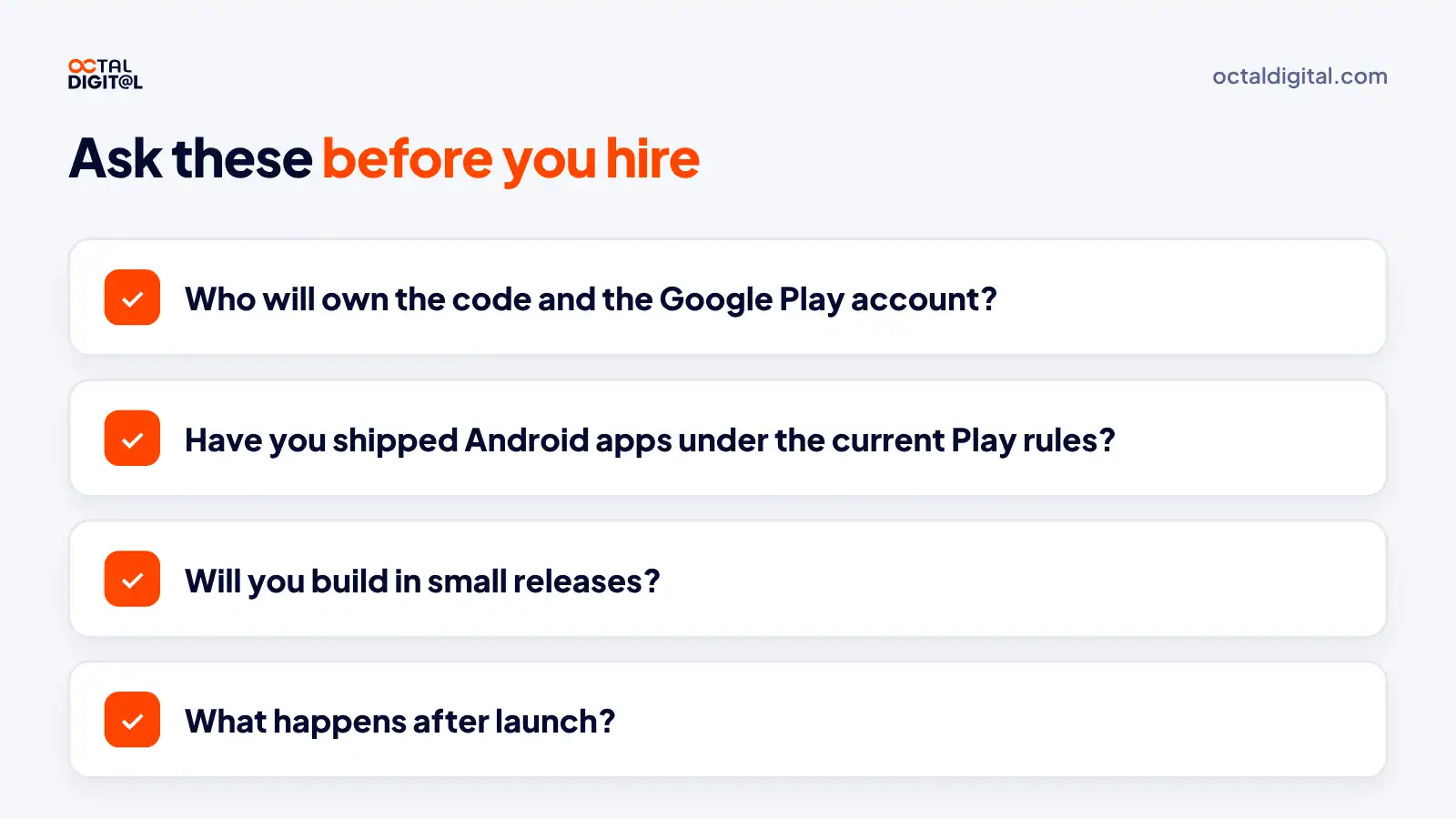
1. Who will own the code and the Google Play account?
On the one hand, it’s great when an agency handles the Play Console setup for you. The problem starts when they publish the app under their own account and forget to move it to yours.
Be careful if you hear a lot of vague answers about ownership, it’s probably trouble and you should simply keep looking.
2. Have you shipped Android apps under the 2026 Play rules?
Most good Android teams can answer this right away, and there’s a good reason why. Rules like the 12-tester closed test and target API 36 shape the whole timeline. Ask them how they handle the closed test, Data safety and target API updates.
Just avoid vague answers! You’ll know it’s a weak answer because it sounds like a sales pitch on a call.
3. Will you build in small releases?
I personally don’t like huge builds or even large two-phase builds. I like to get features one by one and test releases one at a time. It can be hard to manage and even launch large, multi-feature builds and watch out when you have payments!
4. What happens after launch?
In the beginning, many owners would accept quotes that left out upkeep (target API updates every year!). They learned fast and the hard way that most apps need updates after launch.
Just let agencies know you won’t sign without an upkeep plan; some will push back but that’s not your problem!
How Octal Digital Builds Android Apps
Looking to skip some of the most common mistakes in Android app projects? Octal Digital has built apps for clients since 2014, with a US-based team in Houston, Dallas and Los Angeles, and we build Android apps in Kotlin, React Native or Flutter to help you steer clear of the same mistakes.
Best of all, we sign an NDA on request and publish the app under your own Google Play account, so you’ll be on track to launch sooner, and be way less stressed!
Looking for an Android app and don't want to build it yourself? Book a free consultation with Octal Digital.
- A written scope and cost range
- Fixed price or hourly, your choice
- 5.0 rating from 250+ client reviews
Frequently Asked Questions
So, is making an Android app worth it? There are many reasons why it can or cannot be worth it, depending on your business. See what other interested owners are wondering about Android apps below.
Can I make an Android app for free?
Yes, Google allows you to build and test an Android app for free. Just remember to pay the $25 Play Console fee once when you’re ready to publish on Google Play.
Can a beginner create an Android app?
Yes, but you must consider the skills you need when deciding if building it yourself is worth it. Fortunately, they aren’t too heavy, so most people with a computer and some free time can learn the basics.
How do Android apps make money?
The best way to make sure you earn the most from an Android app is to do the following:
- Sell subscriptions or in-app purchases (usually for premium features)
- Charge a price for the download
- Show ads in the free version, so you earn from every user
- Offer fast, friendly support
- Cut features that cost too much and won’t help you grow
How long does it take to make an Android app?
Fortunately, there’s no single timeline for every app. However, you must be comfortable planning for long periods: a simple app takes about one to three months, a medium app four to seven months, and a complex app seven months or more. It’s not a fixed schedule, but it can sometimes run long.
Can ChatGPT build me an Android app?
If you only need a demo and you haven’t hired a developer, ChatGPT can write a lot of the Kotlin code. However, if you plan to launch it, you should have a developer review the code, and you’ll still run the closed test and the Play review yourself.
Should I use Kotlin or Java for Android?
Kotlin is one of the most important choices for new Android apps, so Google’s newest tools favor it. The key is starting new screens in Kotlin and keeping any older Java code, since Java and Kotlin can run side by side in the same app.
What is the difference between an APK and an AAB?
If you upload an APK for a new app, Google Play won’t take it, because new apps must use an Android App Bundle (AAB). Google then builds the right APK for each phone from your bundle.
Have a project in mind? Get a free consultation.
Tell us what you want to build. We reply with next steps, a rough timeline and a cost range.
(800) 995-3369
Matthew Jones supports Octal Digital as a Digital Strategist and trusted technology advisor, helping guide clients through scalable solutions, emerging tools, and smart development strategies that align with business goals and growth.